 POWERBLOW



Posing@Will for Blender Add-on
Overview
Posing@Will is designed to streamline character posing with intuitive mouse controls.
Works with any FK rig. No setup required.
Rotate bones and adjust bone roll using only your mouse.
Did your keyboard run away? No worries—this has you covered.
Showcase
Every pose shown in this video was created using this addon and another addon from POWERBLOW.
Installation
- Go to Edit -> Preferences -> Add-ons.
- Click Install… and select the ZIP file.
- Enable the add-on.
Key Features
- Easily rotate bones and adjust bone roll using intuitive mouse controls.
- Works with any FK rig.
- Break free from traditional R-key and axis-based rotation workflows for faster, more intuitive posing.
How to Use
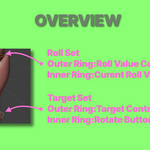
This add-on uses two sets of rings:
- Target Set (movable)
initially placed at the bone tail, but can be repositioned freely.- Outer ring: defines the rotation direction (Target Ring)
- Inner ring: applies the rotation(Rotate Button)
- Roll Set (fixed at the bone head)
Does not rotate bone.- Outer ring: sets the roll value(Roll Set Ring)
- Inner ring: resets the roll value to the current bone roll(Roll Reset Button)
- Select the target armature.
- Switch to POSE mode.
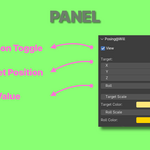
- In the Sidebar, open the Posing@Will tab and enable the View checkbox.
- In the 3D View, Select the bone you want to rotate.
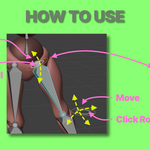
- Move the Target Ring (Target outer ring) to define the rotation direction.
- Click the Rotate Button (Target inner ring) to apply the rotation.
- Adjust the roll using the Roll Set Ring (Roll outer ring) while monitoring the value in the panel.
- Click the Rotate Button (Target inner ring) to apply the roll.
- To match the panel value to the current bone roll, click the Roll Reset Button(Roll inner ring).
- Note: Roll changes are not applied until you click the Rotate Button(Target inner ring).
- You can also manually enter target and roll values in the panel.
- When not using the add-on, disable the View checkbox.
System Requirements
- Supported Blender versions: 4.2 / 4.5 / 5.0 / 5.1 / 5.2 (Older versions not guaranteed.)
- OS: Windows 10 / 11 (64bit)
- CPU: x86_64(Intel / AMD)
- ARM64 Windows (e.g. Snapdragon)
- macOS (Intel and Apple Silicon M1/M2/M3)
- Linux
License
This add-on is licensed under the MIT License.
Full license text is included in LICENSE.txt in the add-on ZIP.
Support
- Next LTS version support planned — Support for the next Long-Term Support (LTS) version is planned.
- Currently supports listed Blender versions — Updates and bug fixes provided as needed.
- Support link — https://powerblow.freshdesk.com/
This add-on is provided "as is". The author is not responsible for any damage, data loss, or unexpected behavior caused by its use. Use at your own risk.