Printprep
 Anvil Interactive Solutions


PrintPrep Documentation (v1.0.37)
Overview
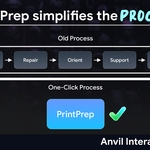
PrintPrep is a Blender add-on designed to streamline 3D model preparation for 3D printing. It automates critical tasks such as mesh repair, model orientation, support generation, and printability analysis, ensuring your models are print-ready for platforms like SuperHive.
Note: As of version 1.0.37, the STL export functionality has been removed due to compatibility issues with Blender 4.4. Users are advised to export STL files manually via File > Export > STL (.stl) after preparation.
Compatibility
Blender 3.0 and above (tested up to Blender 4.4)
Supported Platforms: Windows, macOS, Linux
Installation
Download the PrintPrep_v1.0.37.zip file from SuperHive.
In Blender, go to Edit > Preferences > Add-ons.
Click Install, select the ZIP file, and click Install Add-on.
Enable the add-on by checking the box next to "PrintPrep".
Features
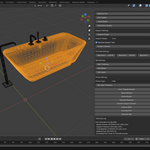
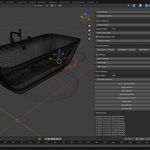
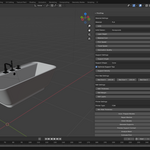
PrintPrep provides the following tools in the View3D > Sidebar > PrintPrep panel:
1. Auto-Prepare Models
Function: Batch processes selected models with mesh repair, orientation, and support generation.
Usage: Select your mesh(es), click Auto-Prepare Models, and monitor progress in the Technical Log.
2. Repair Meshes
Function: Fixes non-manifold edges, fills holes, recalculates normals, and optionally decimates the mesh.
Settings:
Decimation Quality (0.0 to 1.0): Controls mesh simplification (0 for low quality, 1 for original).
Usage: Select a mesh, adjust settings, and click Repair Meshes.
3. Orient Models
Function: Aligns models to the print bed and scales them to fit.
Settings:
Bed Size X/Y/Z: Define your printer’s build volume (default: 200mm x 200mm x 200mm).
Usage: Select a mesh, set bed size, and click Orient Models.
4. Generate Supports
Function: Creates support structures for overhangs based on angle threshold.
Settings:
Support Angle (0° to 90°): Angle threshold for support generation (default: 30°).
Support Shape: Choose between Tree, Cylinder, or Cone (default: Cone).
Branching Levels (Tree only): Number of branching levels (0 to 3, default: 1).
Optimize Tips: Reduces contact area for easier removal (default: True).
Support Density: Multiplier for support thickness (0.1 to 2.0, default: 1.0).
Usage: Adjust settings, select a mesh, and click Generate Supports.
5. Preview Support Contact
Function: Visualizes support contact points with colored spheres (green for optimized tips, red otherwise).
Usage: After generating supports, click Preview Support Contact.
6. Analyze Mesh
Function: Checks for printability issues like thin walls and overhangs.
Settings:
Min Wall Thickness (0.1mm to 5.0mm): Minimum thickness for walls (default: 0.8mm).
Usage: Select a mesh, adjust settings, and click Analyze Mesh.
7. Estimate Print
Function: Estimates print time and material usage based on model and support volumes.
Settings:
Material: Choose PLA, ABS, or Resin (default: PLA).
Infill (0% to 100%): Infill percentage (default: 20%).
Infill Pattern: Grid, Honeycomb, or Gyroid (default: Honeycomb).
Layer Height (0.05mm to 0.4mm): Layer height for printing (default: 0.2mm).
Material Cost: Cost per cubic unit (default: $0.01).
Print Speed (10mm/s to 200mm/s): Printing speed (default: 50mm/s).
Travel Speed (50mm/s to 300mm/s): Non-printing movement speed (default: 150mm/s).
Usage: Select a mesh, adjust settings, and click Estimate Print.
8. Generate Raft
Function: Adds a raft or brim to improve bed adhesion.
Settings:
Raft Thickness (0.1mm to 1.0mm): Thickness per layer (default: 0.3mm).
Raft Margin (1.0mm to 20.0mm): Margin around the model (default: 5.0mm).
Raft Layers (1 to 5): Number of layers (default: 2).
Usage: Select a mesh, adjust settings, and click Generate Raft.
Technical Log
All operations log their results in the Technical Log section of the PrintPrep panel.
Example: "Repaired Cube: Polygons reduced from 12 to 8" or "Analysis for Cube: No printability issues detected."
Troubleshooting
No Mesh Selected: Ensure you have a mesh object selected before running operators.
Performance Issues: For large models, reduce Decimation Quality or process in smaller batches.
Support Generation Slow: Lower Branching Levels or increase chunk size in the script if needed.
Changelog
v1.0.37 (2025-05-27): Removed STL export due to Blender 4.4 compatibility issues.
v1.0.36 (2025-05-26): Attempted fix for STL export (later removed).
v1.0.35 (2025-05-25): Initial version with STL export functionality.
Support
For issues or questions, contact the developer via SuperHive’s messaging system or email (to be provided upon purchase).
License
PrintPrep is licensed under the GNU General Public License (GPL) v3.0. See the license file in the add-on package for details.
s
$20
Have questions about this product?
Login to message
| Sales | 10+ |
| Published | over 1 year ago |
| Blender Version | 4.0 - 5.0 |
| Extension Type | N/A |
| Render Engine Used | Cycles, Eevee |
| License | GPL |
Discover more products like this
3d printing Blender Add-on mesh repair raft generation model orientation printability analysis support generation