Prisma RenderPass
 Darwin Nisttahuz








The most likely cause is that the compositor was not fully set up before rendering. Make sure you run Split (or Join, depending on your workflow) and select a root directory before hitting render. If you opened a saved project, check that the root directory shown in the "Root directory info" section is correct — if it's empty, run "Change Output Directory" to repoint it.
Yes, because PRISMA is non-destructive, your Create Output Node per Pass button setup is preserved in its own node group. Running Create Multi-Layer EXR creates a separate node group for the multilayer EXR output alongside it, nothing is overwritten. You can render both setups from the same compositor tree.
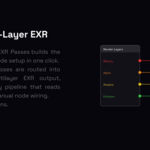
Create Multi-Layer EXR builds a compositor node setup that routes all your enabled render passes into a single multilayer EXR File Output node. The resulting file contains every pass as a named layer inside one EXR, the standard format used across professional VFX pipelines.
Yes. They serve different stages of the same workflow. Use Create Output Node per Pass to render your passes into individual organized files, then use Create Multi-Layer EXR to set up a separate compositor output that combines them into a multilayer EXR for delivery. Both setups live in the same PRISMA panel and can coexist in the same compositor tree.
Yes. The PRISMA panel is available in Properties → Render from any workspace. The Render Image and Render Animation buttons also work from anywhere, if the compositor hasn't been set up yet, PRISMA builds it automatically before rendering, using whichever workflow (Create Output Node per Pass or Create Multi-Layer EXR) you last configured.
PRISMA defaults to OpenEXR Multilayer but you can change the format from the Node Format section in the panel. Any format Blender's File Output node supports PNG, EXR, JPEG, TIFF, etc. Works with PRISMA. The format set on the top node is automatically synced to all other pass nodes.
When using Create Multi-Layer EXR, the output is always a multilayer EXR, this is the standard format for combining multiple passes into a single file compatible with Nuke, DaVinci Resolve, and other compositing pipelines.
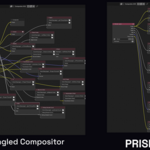
No. If PRISMA detects that your compositor already has a Render Layers node and File Output nodes, it creates a separate Compositor Node Group and works inside that, your existing setup is left completely untouched.
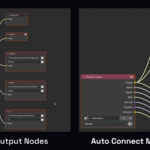
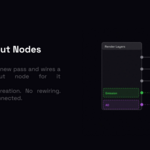
Create Output Node per Pass creates one dedicated File Output node per enabled render pass-named, wired, and folder-organized automatically. Use it when you want each pass saved to its own file for compositing flexibility.
Create Multi-Layer EXR builds the compositor node setup that combines all your passes into a single multilayer EXR output. Use it when your pipeline, client, or compositing software (Nuke, DaVinci Resolve, Fusion) expects one multilayer file instead of separate pass files.
Both operators are in the same PRISMA panel and each takes one click.
PRISMA supports Blender 2.93 through 5.x. It automatically detects your version and adapts — the legacy compositor (2.93–4.x) and the new node-group-based compositor introduced in Blender 5.0 are both fully supported with no extra setup required.
 Included
Includes 12 months of
- Support from Darwin Nisttahuz
- Product updates
Extend this product’s Support Period +12 months: 100% of product price
Have questions before purchasing?
Login to message
| Published | 3 months ago |
| Blender Version | 2.93 - 5.2 |
| Extension Type | N/A |
| Render Engine Used | Blender-Internal, Cycles, Eevee |
| License | GPL |
