 Mrs Eliza



Requirements and installation
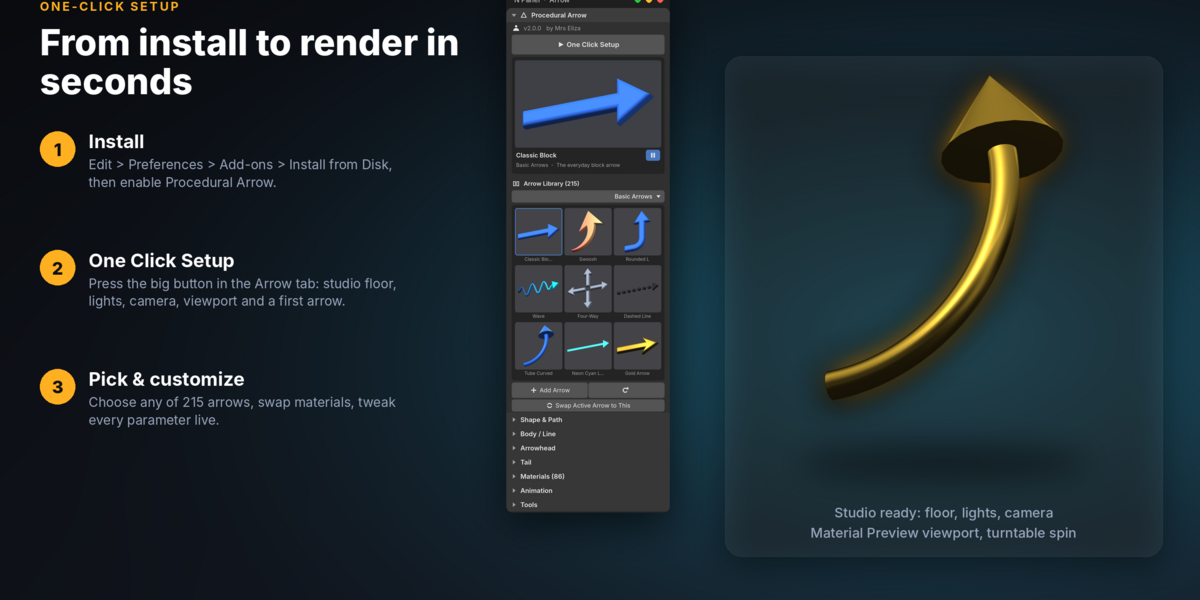
The add-on needs Blender 3.6 or newer. It uses only Blender's own Python and the numpy library that ships with it, so nothing else has to be installed.
- Download
procedural_arrow_v2.0.0.zipand leave it zipped. - In Blender open Edit > Preferences > Add-ons > Install from Disk. In Blender 4.2 and newer, use the dropdown arrow at the top right of the Add-ons tab, then Install from Disk.
- Select the zip and tick Procedural Arrow to enable it.
- In the 3D Viewport press N and open the Arrow tab. The add-on is also under Add > Mesh > Procedural Arrow.
Expand the add-on's entry in Preferences to change the preview speed and size and to choose what One Click Setup creates.
Have questions about this product?
Login to message
| Published | about 9 hours ago |
| Blender Version | 3.6 - 5.3 |
| Extension Type | N/A |
| Render Engine Used | Cycles, Eevee |
| License | GPL |