Procedural Cooked Rice
 Simon Eberl


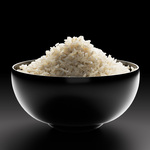
Documentation
Setup:
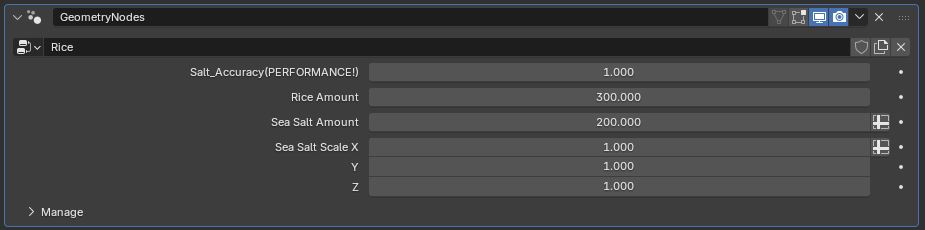
Salt Accuracy: Determines the resolution of the mesh, the salt is being spawned on. The higher the resolution, the more accurate it will spawn.
A value of 1 means low detail and 0 would mean high detail.
Rice Amount: Determines the amount of rice that is spawned. For the standard scene that is provided, 300 is a reasonable number to fill the bowl. However keep in mind that this number is relative. The bigger your mesh volume is, the more rice will be spawned.
Sea Salt Amount: Determines the amount of salt that is spawned on your rice. Keep in mind, that the more rice you spawn, more salt gets spawned as well!
Sea Salt Scale: This lets you adjust the size of the salt grains.
Meshes:
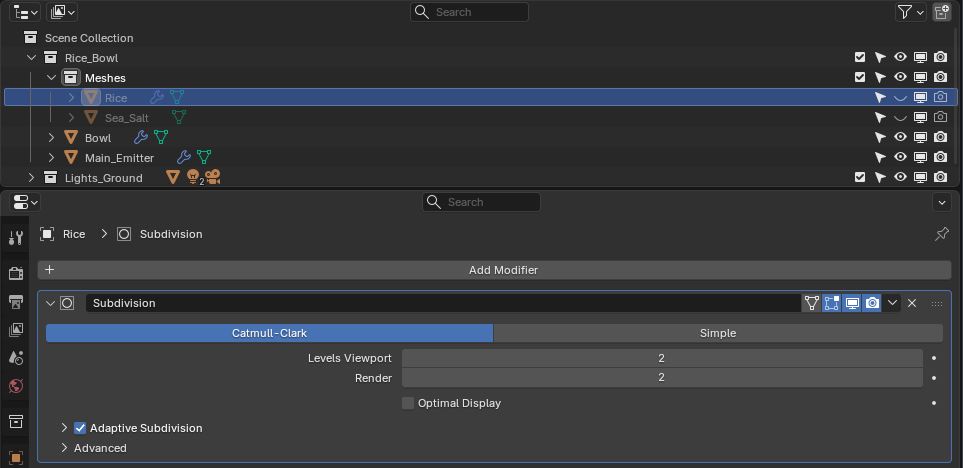
You can find Rice and Salt meshes in this "Meshes" collection. If you want to spawn alot of rice in a big volume, id suggest you set the subdivision surface to 1.
Tips/Workflow:
Please keep in mind that this setup is made for high res close up renders, it will create very heavy scenes. When building a scene I suggest you keep the rice amount low and slowly work your way up with the value until you have your desired result. Make sure to create the mesh you spawn the rice in first and then start playing with the numbers. Changing the volume of the mesh, drastically changes the amount of rice that is spawned.
To create the spawn mesh, just select the "Main_Emitter" in edit mode, delete the existing mesh and add your own!
The quality of your renders will highly depend on lighting. The rice grain shader uses subsurface scattering, so make sure you are getting enough fill lighting (or just use an HDRI) to prevent any weird looking dark spots. I can also recommend to check your bounce settings, a lack of volume bounces will lead to bad results!
Have questions about this product?
Login to message
| Dev Fund Contributor | |
| Published | 3 months ago |
| Blender Version | 4.5 - 5.1 |
| Render Engine Used | Cycles |
| License | Royalty Free |
Discover more products like this
3D food visualization 3D Food Model 3D food assets Asian Rice food 3dfood 3d-food-asset procedural 3d food blender rice