 Skava
Skava


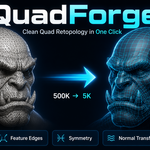
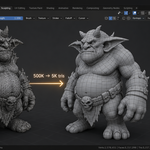
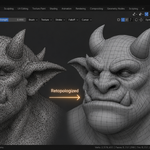
QuadForge — Documentation
v1.1.1 · Blender 3.2 + · Windows / macOS / Linux
1. Install
- Download
quad_forge_v1_1_1.zip, install via Add-ons preferences. - Press
Nin the 3D Viewport → QuadForge tab.
2. Quick start
- Select the source high-poly sculpt / scan.
- Pick a resolution preset — Low (~500), Medium (~2,000), High (~5,000), Ultra (~10,000 quads) — or Custom for any value from 100 to 100,000.
- (Optional) set Symmetry, Feature detection, Auto UV, Transfer Normals in the panel.
- Click Retopologize. A new quad object appears with the
_retoposuffix, selected and active. Use Quick Retopo for a faster pass without feature detection and optimization.
3. The pipeline
- Voxel remesh — produces a clean manifold approximation; voxel size is estimated automatically from your target quad count.
- QuadriFlow quad solve — remeshes to near-100% quad topology at the target face count. If QuadriFlow rejects the mesh, QuadForge automatically falls back to tris-to-quads conversion + un-subdivide decimation.
- Shrinkwrap — projects the quad mesh back onto the source for accurate silhouette.
- Relax + project — configurable optimization passes (0–20) smooth the topology and re-project it onto the source.
- Symmetrize — if a symmetry axis is set, the result is bisected and mirrored as the final geometry step, so the output is exactly symmetric.
4. Feature edge preservation
QuadForge detects sharp edges on the source (angle between adjacent face normals exceeds the configured threshold, default 30°), or uses edges you marked sharp. Those features are re-applied as edge creases on the result so subdivision / smoothing doesn't soften them.
5. Normal transfer
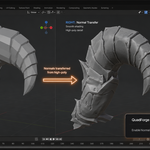
Bakes high-poly custom normals onto the retopo via a Data Transfer modifier (nearest-polygon interpolation). The retopo carries the visual detail of the source while having a fraction of the polys. A normal quality score (0.0–1.0) in the Results panel tells you how closely the shading matches.
6. Auto-UV
Runs Smart UV Project on the retopo result with reasonable defaults, creating a QuadForge_UV layer. Turn off to keep the mesh UV-less and unwrap manually.
7. Results panel
After each run the Results panel shows source vs. result vertex counts, quad count, quad percentage, vertex reduction ratio, and the normal quality score. The operator report also states "Reduced N → M faces" and warns if the source was already lower-poly than the chosen target.
8. Edge crease API compatibility
Blender 4.0 moved edge creases from bm.edges.layers.crease to the crease_edge float attribute. QuadForge probes both APIs at runtime, so creases work on 3.x, 4.x, and 5.x.
9. Troubleshooting
"Voxel remeshing produced an empty mesh" — the source has no closed volume (flat plane, open shell, wire edges). Add thickness with a Solidify modifier and retry.
"Sharp edges are still smoothed" — set Feature detection to Auto and lower the angle threshold, or mark the edges sharp and use From Sharp Edges mode.
"Result has more faces than the source" — your source is already lower-poly than the chosen preset; pick a lower resolution or a smaller custom target.
Slow on very dense meshes — the voxel remesh step is memory-intensive above ~5M faces. Try Quick Retopo first, or reduce Optimize Passes to 2–3.
10. Limitations
- Quad flow is automatic; hand-placed edge-loops for animation rigs may still need manual work.
- Best on closed manifold sources. Hair cards, very thin sheets, and open meshes may need pre-processing (Solidify, close holes, weld doubles).
11. Changelog
v1.1.1 — Optimize Topology no longer fails with an internal Blender error when it is pressed on a mesh that is not a retopology result. The source lookup used to land on the object itself, and projecting a mesh onto itself is something Blender refuses with an unreadable message about ShrinkwrapModifier.target. It now says what to do instead: run Retopologize first, then optimize the object it creates. Nothing changed for the normal path. Two panels also asked for an icon named BRUSH_SMOOTH, which no longer exists in Blender 5.x — a bad icon name aborts the whole panel, so the Results and Tools sections came up empty. Every icon name is now checked against Blender's own list. Retopology now says when it had to fall back. QuadriFlow needs a closed, manifold surface; on a sculpt with open edges it declines, the fallback solver runs instead, and the result is about half quads rather than near 100% — measured: 100% on a clean sphere, 50% on a mesh with 168 non-manifold edges. The result used to arrive silently; it now names the number of non-manifold edges and what to do about them.
v1.1.0 — QuadriFlow quad solver (near-100% quads, was 35–50%); exact symmetry enforcement as the final pipeline step; Optimize Passes setting now honored; clear errors for meshes with no faces / no closed volume; loose-vertex cleanup; "Reduced N → M faces" reporting; KD-tree feature-crease projection and cached panel statistics for dense sources; removed the non-functional Cloud API preference — the addon is 100% local.
v1.0.0 — initial release.
12. Support & License
Through marketplace messaging. GPL-3.0.
Have questions about this product?
Login to message
| Sales | 20+ |
| Published | about 2 months ago |
| Blender Version | 3.2 - 5.2 |
| Extension Type | N/A |
| Render Engine Used | Cycles, Eevee |
| License | GPL |
Discover more products like this
game-mesh poly count retopology clean-topology character art quad mesh mesh optimization topology edge-loops ai-retopo Sculpt 3D Scan