 Anvil Interactive Solutions


⚠️ Quadify Seam is a module for Quadify Ultra and requires Quadify Ultra v1.4.0 or later to function. It cannot be used as a standalone add-on. Purchase Quadify Ultra separately before installing this module.
Quadify Seam is a UV unwrapping module built exclusively for Quadify Ultra. It plugs directly into Ultra's semantic analysis pipeline and uses what Ultra already knows about your mesh to make every UV decision — which seam strategy to use, where to cut, how tight the threshold should be, and how to pack the result for your target engine.
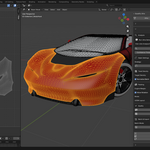
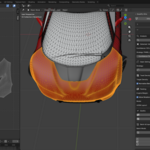
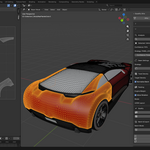
Most UV tools treat every mesh the same. Quadify Seam doesn't. A vehicle body panel gets seams along its panel boundaries. A character mesh gets cuts at anatomical break points — wrists, ankles, neck. A hard surface gets seams along sharp edges and material boundaries. An environment asset gets silhouette-based cuts that minimize visible stretching from camera. The strategy is chosen automatically based on Ultra's semantic classification, with no manual setup required.
When the automatic result isn't clean enough, Auto Optimize takes over. It runs up to 75 iterations across five seam strategies, stepping the angle threshold down in 5-degree increments each pass and scoring the result against a 0.25 stretch target. If angle-based strategies can't reach the target — on highly complex meshes like multi-panel body parts or full character torsos — it falls back to Blender's Smart UV Project and scores that result too. Whatever produces the lowest stretch score wins. The winning strategy and angle threshold are saved to a local cache file keyed by semantic mesh type, so the next time you unwrap a Vehicle Body Panel, the optimizer starts from the known best position and converges immediately rather than re-running from scratch.
The quality feedback system tells you exactly what happened. After every unwrap you get a stretch score, island count, and texel density reading directly in the panel. Open the UV Editor and click Show Distortion Heatmap to see a colour-coded stretch overlay — blue for clean areas, red for faces that need attention. If the stretch is above threshold the panel tells you exactly where to add manual seams and what to do next. The density checker applies a checker grid texture to the mesh so you can spot texel density inconsistencies at a glance before you bake.
Texel density is handled automatically. Set a target — Game Low at 512 px/m, Game Standard at 1024, Film at 2048, or a custom value — and Seam normalises every island to match. In batch mode, all selected objects are brought to the same density so your texture budgets stay consistent across an entire asset. Engine margin presets handle the padding differences between UE5, Unity, and Godot so your islands never bleed at runtime.
UDIM workflows are fully supported. Assign tiles by material or pack multiple objects into a 2×2 or 4×4 UDIM grid automatically. Export a CSV quality report at any time for the full breakdown — object name, stretch score, island count, seam count, texel density, target density, and pass/fail status for every mesh in the batch.
Quadify Seam is fully integrated with Quadify Ultra's Agent Mode via MCP. Every operation — analyse, unwrap, pack, optimize, report — is exposed as an agent tool that the AI can call directly. You can say "unwrap this for UE5 at game standard density" or "optimize all selected objects and export the report" and the agent handles it end to end without you touching the panel.