Quadify Seam — Semantic Uv Unwrapping (Requires Quadify Ultra)
 Anvil Interactive Solutions


Overview
Quadify Seam is a UV unwrapping module for Quadify Ultra. It reads Ultra's semantic mesh analysis and automatically selects the right seam strategy for your mesh type, then iteratively optimizes the result until the UV quality meets a defined stretch threshold.
⚠️ Quadify Seam requires Quadify Ultra v1.4.0 or later. It cannot be used as a standalone addon.
Requirements
- Quadify Ultra v1.4.0 or later
- Blender 4.2 — 5.x
Installation
- In Blender, open the N-Panel and go to Quadify Ultra
- Click the Modules tab
- Click Manage, then Install Module
- Select the quadify_seam.zip file
- Restart Blender
Basic Workflow
- Select your mesh object
- Run Semantic Analysis in the Ultra tab
- Go to Modules → Quadify Seam
- Click Analyse Mesh — confirms the detected type and strategy
- Click Auto Optimize for the best result, or Unwrap & Pack for a single pass
Seam Strategies
Auto — reads Ultra's semantic result and picks the best strategy automatically
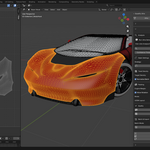
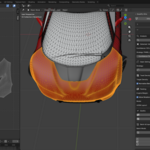
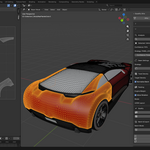
Panel Edge — for vehicle body panels. Seams along boundary edges, material splits, and sharp breaks above 30°
Sharp Edge — for hard surface, CAD, and mechanical meshes. Seams along unsmooth edges and material boundaries
Anatomical — for characters and organic meshes. Angle-based seams plus zone cuts at wrists, ankles, and neck
Silhouette — for environment and archviz assets. Seams along silhouette edges to minimize visible stretch
Angle — classic angle-based seam marking at a configurable threshold. Used as fallback
Auto Optimize
Runs up to 75 iterations across 5 strategies. Each pass steps the angle threshold down by 5° and scores the stretch result. If no strategy reaches the 0.25 target, it falls back to Blender's Smart UV Project. The winning strategy and angle are saved to a local cache file and reused on future unwraps of the same mesh type.
If the target cannot be reached, Auto Optimize reports BEST EFFORT and the Quality panel shows guidance for adding manual seams on high-stretch areas.
Texel Density Presets
Game Low — 512 px/m — mobile, VR, background assets Game Standard — 1024 px/m — PC and console hero assets (default) Film — 2048 px/m — cinematic and archviz Custom — any value in px/m
Engine Margin Presets
UE5 — 4px at 2K Unity — 2px at 2K Godot — 2px at 2K Custom — manual px value
Batch Mode
Off — active object only Independent — each selected object unwrapped separately Shared Atlas — all selected objects packed into one 0-1 UV space
Enable Normalise Batch to equalise texel density across all objects in the batch.
UDIM
2x2 and 4x4 UDIM grids supported. In batch mode each object gets its own tile. On a single object each material slot gets its own tile.
Quality
Stretch Score — weighted average stretch across all UV islands. Below 0.25 passes. Above 0.25 shows a warning with manual seam guidance.
Show Distortion Heatmap — enables the stretch colour overlay in the UV Editor. Blue = low stretch. Red = high stretch.
Show Density Checker — applies a UV grid checker to the mesh for visual density verification.
Export CSV Report — writes stretch score, island count, texel density, and pass/fail to quadify_seam_report.csv in the blend file directory.
Agent Mode
Quadify Seam exposes all operations to Quadify Ultra's Agent Mode via MCP.
seam_analyse — detect mesh type and select strategy seam_unwrap — mark seams, unwrap, normalise density, pack seam_pack — repack islands without changing seams seam_optimize — run iterative optimizer seam_report — validate quality and return metrics
Example prompts: "Unwrap this mesh for UE5 at game standard density" "Optimize all selected objects and export the report" "Repack with Unity margins and no rotation"
Stretch Score Guide
0.00 – 0.10 — Excellent 0.10 – 0.25 — Good, passes threshold 0.25 – 0.50 — Moderate, add manual seams on red areas 0.50+ — High, consider splitting the mesh before unwrapping
Troubleshooting
Analysis shows Unknown / 0% — run Ultra's Semantic Analysis on the mesh first, then click Analyse Mesh
High stretch after Auto Optimize — mesh spans too many surface types for full automation. Split into sub-objects or add manual seams on red heatmap areas then click Repack Only
Very high island count — non-manifold geometry. Run Mesh > Clean Up > Merge by Distance in Edit Mode then re-unwrap
Heatmap not showing — enable Overlays in the UV Editor header
Module not appearing — ensure Ultra v1.4.0+ is installed and restart Blender. Delete any old uv folder from quadify_ultra/modules/
Support
Email: [email protected] Site: quadify3d.com
Have questions about this product?
Login to message
| Blender Extension Compatible | Yes |
| Published | 4 months ago |
| Blender Version | 5.0 - 5.1 |
| Extension Type | Add-on |
| Render Engine Used | Cycles, Eevee |
| License | Mit |
Discover more products like this
blender addon Semantic quadify blender uv packing texel density udim Quadify Ultra ai Tags UV unwrap seam