 Sidigon


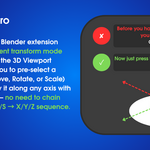
Quick Axis Pro is a Blender extension that adds a persistent transform mode selector directly in the 3D Viewport header, allowing you to pre-select a transform type (Move, Rotate, or Scale) and instantly apply it along any axis with a single keypress — no need to chain the traditional G/R/S → X/Y/Z sequence.
Header Buttons
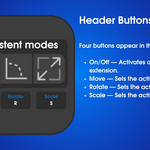
Four buttons appear in the 3D Viewport header:
- On/Off — Activates or deactivates the extension. When turned on, it restores the last active transform mode and enables all shortcuts. When turned off, Blender's default behavior is fully restored. Can also be toggled with Shift+T.
- Move — Sets the active mode to Move (equivalent to G in Blender).
- Rotate — Sets the active mode to Rotate (equivalent to R).
- Scale — Sets the active mode to Scale (equivalent to S).
Only one of the three transform buttons can be active at a time, and at least one must always remain selected while the extension is on.
Keyboard Shortcuts
While the On/Off button is active:
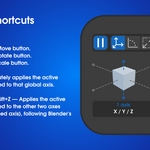
- G — Activates the Move button.
- R — Activates the Rotate button.
- S — Activates the Scale button.
- X / Y / Z — Immediately applies the active transform constrained to that global axis.
- Shift+X / Shift+Y / Shift+Z — Applies the active transform constrained to the other two axes (excluding the pressed axis), following Blender's own convention.
The axis keys (X, Y, Z, Shift+X/Y/Z) are always active while the extension is on. The G/R/S shortcuts can be individually disabled from the preferences if you prefer to switch modes only via the header buttons.
Preferences (Edit → Preferences → Add-ons → Quick Axis Pro)
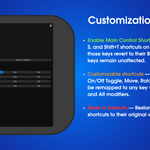
- Enable Main Control Shortcuts — Toggles the G, R, S, and Shift+T shortcuts on or off. When disabled, those keys revert to their Blender defaults. Axis keys remain unaffected.
- Customizable shortcuts — The key bindings for On/Off Toggle, Move, Rotate, and Scale can each be remapped to any key with optional Shift, Ctrl, and Alt modifiers.
- Reset to Defaults — Restores all Main Control shortcuts to their original values (Shift+T, G, R, S).