 Sidigon


How to install?
Step 1: Download the zip file "Quick Axis Pro 1.0.zip"
Step 2: Open Blender 4.2 or higher
Step 3: Go to Edit > Preferences > Get Extensions > v Extension Settings > Install From Disc...
Step 4: Select "Quick Axis Pro 1.0.zip" And click Install from Disc button
Enjoy
How to use Quick Axis Pro?
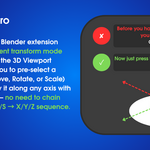
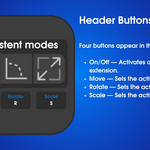
Use Shift+T to enable or disable, or click the Stop/Play button in the header
Select a mode (Move/Rotate/Scale)
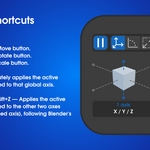
- G — Activates the Move button.
- R — Activates the Rotate button.
- S — Activates the Scale button.
Select the axis you want to move
- X / Y / Z — Immediately applies the active transform constrained to that global axis.
- Shift+X / Shift+Y / Shift+Z — Applies the active transform constrained to the other two axes (excluding the pressed axis), following Blender's own convention.
The axis keys (X, Y, Z, Shift+X/Y/Z) are always active while the extension is on. The G/R/S shortcuts can be individually disabled from the preferences if you prefer to switch modes only via the header buttons.
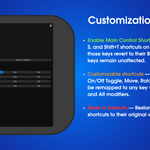
Preferences (Edit → Preferences → Add-ons → Quick Axis Pro)
- Enable Main Control Shortcuts — Toggles the G, R, S, and Shift+T shortcuts on or off. When disabled, those keys revert to their Blender defaults. Axis keys remain unaffected.
- Customizable shortcuts — The key bindings for On/Off Toggle, Move, Rotate, and Scale can each be remapped to any key with optional Shift, Ctrl, and Alt modifiers.
- Reset to Defaults — Restores all Main Control shortcuts to their original values (Shift+T, G, R, S).
Have questions about this product?
Login to message
| Blender Extension Compatible | Yes |
| Published | 7 months ago |
| Blender Version | 4.2 - 5.1 |
| Extension Type | Add-on |
| Render Engine Used | Arnold, Blender-Internal, Blender-Game-Engine, Cycles, Eevee, Freestyle, Luxrender, Mental-Ray, Octane, Vray, Yafaray |
| License | GPL |