 To The Grid Studio


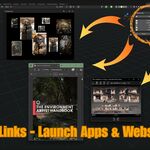
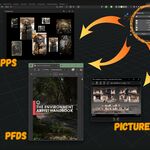
QUICK LINKS - LAUNCH APPS & WEBSITES FROM BLENDER
STOP HUNTING. START CREATING.
You need to check Substance Painter. Where is it? Start Menu... scroll... scroll... there. Now you need your reference pack. File Explorer... Documents... Projects... References... found it. Now ArtStation to upload progress. Browser... bookmark... click.
Five minutes wasted hunting for tools you use every single day.
Quick Links ends this.
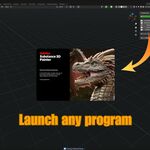
One click launches Substance Painter. One click opens your reference folder. One click jumps to ArtStation. Everything you need, always visible in your Blender sidebar.
WHAT IT DOES
Create custom buttons for any program, website, or file you use. Click the button, it opens instantly. That's it.
No Start Menu hunting. No folder navigation. No bookmark digging. Your entire workflow - programs, URLs, files, folders - organized in one clean panel.
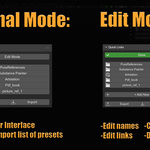
Clean view mode shows only your buttons. Edit mode reveals management controls. It's as simple or powerful as you need.
PERFECT FOR
- Game Artists - Quick access to Unity, Unreal, Substance, reference packs
- Character Artists - Launch ZBrush, Marmoset, anatomy references, ArtStation
- Environment Artists - Open Photoshop, material libraries, concept art folders
- Freelancers - Jump to client folders, project management, invoice templates
- Anyone with a workflow - Stop interrupting your creative flow
KEY FEATURES
✓ Launch anything - Programs, websites, files, folders - if you can open it, you can link it ✓ Clean interface - View mode hides controls, Edit mode reveals management ✓ One-click access - No menus, no searching, just click and it opens ✓ Unlimited links - Add as many shortcuts as your workflow needs ✓ Reorderable - Move links up/down to match your usage patterns ✓ Smart detection - Automatically recognizes URLs vs file paths ✓ Persistent - Your links stay between Blender sessions ✓ Export/Import - Share setups with your team or between machines ✓ Universal compatibility - Works with any program, any website, any file type
REAL WORKFLOW EXAMPLES
3D Generalist Setup:
- Substance Painter (program)
- Marmoset Toolbag (program)
- PureRef (program)
- Personal ArtStation (website)
- Reference Pinterest board (website)
- Current project folder (folder)
Game Developer Workflow:
- Unity Editor (program)
- Visual Studio Code (program)
- GitHub repository (website)
- Asset pipeline document (PDF)
- Team Discord (website)
- Build output folder (folder)
Freelance Production:
- Client Google Drive (website)
- Invoice template (Excel file)
- Project management tool (website)
- Portfolio site (website)
- Time tracking app (website)
- Contract folder (folder)
Click. Open. Work. Repeat.
HOW IT WORKS
View Mode (Default): Clean panel showing only your link buttons. Click any button to instantly launch that program, open that website, or access that file. Export/Import always visible for easy setup sharing.
Edit Mode: Click "Edit Mode" to reveal management controls. Add new links, edit existing ones, reorder with arrow buttons, or delete what you don't need. Click "Done" to return to clean view.
Adding a Link: Click "+ Add New" in Edit mode. Enter a name (what you want to see on the button) and the path/URL. The addon automatically detects if it's a website or file path. Click OK. Done.
Examples:
- Website: https://artstation.com/yourname
- Program: C:\Program Files\Adobe\Photoshop\Photoshop.exe
- File: D:\Projects\References\anatomy_study.pdf
- Folder: C:\Users\YourName\Documents\BlenderProjects
USE CASES YOU DIDN'T THINK OF
Reference Management: Link directly to specific reference image folders, Pinterest boards, or online galleries. No more "where did I save that reference?"
Client Work: Dedicated buttons for each client's Google Drive, Trello board, or communication channel. Switch contexts with one click.
Learning Resources: Quick access to tutorial playlists, documentation sites, or your personal notes. Keep learning resources at hand.
Asset Libraries: Direct links to your texture libraries, HDRIs, or model repositories. Find assets faster.
Version Control: One-click access to GitHub/GitLab repositories, commit history, or project wikis.
WHY THIS MATTERS
Every time you break concentration to hunt for a program or file, you lose flow. That search through the Start Menu, that navigation through folders - it adds up.
Quick Links keeps your tools where you can see them. Always. One click away. Never breaking your creative momentum.
It's not just about saving time. It's about staying focused.
BEYOND THE BASICS
Team Collaboration: Export your Quick Links setup as JSON. Share it with your team. Everyone uses the same organized workflow. Onboard new artists instantly.
Machine Sync: Work on multiple computers? Export from one, import on another. Your workflow travels with you.
Project-Specific: Create different JSON files for different projects. Switch contexts by importing the relevant setup.
Backup Your Setup: Export regularly. Never lose your carefully organized workflow if you reinstall Blender or upgrade machines.
WHAT IT DOESN'T DO (AND THAT'S OK)
Quick Links launches programs and opens files. It doesn't switch between already-running programs (that's what Alt+Tab is for).
Think of it as your organized launcher, not a window manager. For programs that aren't open yet, it's instant. For programs already running, you'll still use Alt+Tab to switch to them.
We're honest about what it does because we respect your time.
THE PHILOSOPHY
Every artist has their toolkit. The programs they use daily. The websites they visit constantly. The files they reference repeatedly.
Quick Links puts that toolkit in reach. Always visible. Always organized. Always one click away.
No gimmicks. No overselling. Just a simple tool that solves a real problem.
If you open the same five programs every day, stop finding them five times a day. Put them in Quick Links once. Click them forever.
Simple problem. Simple solution. Powerful result.
Add your tools. Click your buttons. Get back to creating.