Quick Links - Launch Apps & Websites From Blender
 To The Grid Studio


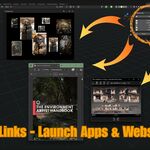
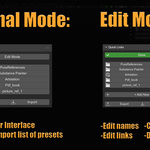
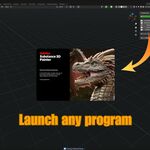
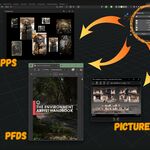
INSTALLATION
Method 1 (Recommended):
- Download quick_links.zip
- Open Blender
- Go to Edit > Preferences > Add-ons
- Click "Install" button at the top
- Select quick_links.zip
- Enable the checkbox next to "Quick Links"
- The panel appears in 3D Viewport sidebar (press N if hidden)
Method 2 (Manual):
- Extract quick_links.zip
- Copy the quick_links folder to your Blender addons directory:
- Windows: %APPDATA%\Blender Foundation\Blender\4.5\scripts\addons\
- Mac: ~/Library/Application Support/Blender/4.5/scripts/addons/
- Linux: ~/.config/blender/4.5/scripts/addons/
- Restart Blender
- Go to Edit > Preferences > Add-ons
- Search for "Quick Links" and enable it
TECHNICAL SPECIFICATIONS
Blender Version: 4.5 or newer Platform: Windows, Mac, Linux (cross-platform compatible) Category: Interface Location: 3D Viewport > Sidebar > Quick Links tab File Size: ~55KB License: GPL v3 (free software, open source)
USAGE GUIDE
Finding the Panel: Open Blender's 3D Viewport. Press N to toggle the sidebar. Look for the "Quick Links" tab.
First Time Setup:
- Click "Edit Mode" button at the top
- Click "+ Add New"
- Enter a name for your link (e.g., "Substance Painter")
- Enter the path or URL:
- For programs: Full path to .exe file
- For websites: Complete URL including https://
- For files: Full path to the file
- For folders: Full path to the folder
- Click OK
- Repeat for all your tools
- Click "Done" to exit Edit Mode
Daily Use: Simply click any button to launch that program, open that website, or access that file. Toggle Edit Mode when you need to add, modify, or remove links.
Export/Import: Click "Export" to save your links as a JSON file. Use "Import" to load a saved configuration. Perfect for backing up your setup or sharing with team members.
FINDING FILE PATHS
Windows:
- Locate the program/file in File Explorer
- Right-click and select "Copy as path"
- Paste into Quick Links (remove quotes if present)
Mac:
- Locate the file in Finder
- Right-click > Get Info
- Copy the path shown
- Paste into Quick Links
Linux:
- Right-click the file in your file manager
- Select Properties or similar
- Copy the full path
- Paste into Quick Links
TROUBLESHOOTING
Panel doesn't appear:
- Press N to toggle sidebar visibility
- Check that addon is enabled in Preferences > Add-ons
- Search "Quick Links" in add-ons list
Link doesn't open:
- Verify the path/URL is correct (no typos)
- For programs, use the full path to the .exe file
- For URLs, include https:// at the beginning
- For files, make sure the file still exists at that location
Program opens multiple instances:
- This is normal behavior for launchers
- Quick Links launches programs, it doesn't switch between windows
- Use Alt+Tab (Windows) or Cmd+Tab (Mac) to switch to already-running programs
Want to reset everything:
- Delete all links in Edit Mode
- Or disable and re-enable the addon in Preferences
SUPPORT & UPDATES
Questions or Issues: Email: [email protected] Please include:
- Blender version
- Operating system
- Description of the issue
- Screenshot if relevant
Updates: This addon is actively maintained. Updates will be posted to your Blender Market account automatically. Check your library periodically for new versions.
Source Code: Available on request. GPL v3 license means you're free to modify and redistribute the code under the same license terms.
KNOWN LIMITATIONS
- Quick Links launches programs and opens files - it does not switch between already-running programs
- Each click opens/launches - clicking a link for an already-running program may open a second instance (behavior depends on the program)
- Links are stored in Blender preferences - they persist between sessions but are tied to your Blender installation
- File paths are absolute - if you move files, you'll need to update the links
TIPS & BEST PRACTICES
Organization:
- Put most-used links at the top
- Use descriptive names that make sense to you
- Export your setup regularly as backup
Team Workflows:
- Create a team JSON file with shared resources
- Everyone imports the same setup for consistency
- Update and re-share when adding new tools
Project Management:
- Create project-specific JSON files
- Import the relevant setup when switching projects
- Keep a "default" setup for general work
Backup Strategy:
- Export your links monthly
- Save the JSON file to cloud storage
- Include it in your Blender config backups
GPL LICENSE INFORMATION
Quick Links is free software licensed under GPL v3. This means:
You are free to:
- Use the addon for any purpose (personal or commercial)
- Study and modify the source code
- Share copies with others
- Distribute modified versions
Under these conditions:
- Modified versions must also be GPL v3
- You must make source code available
- You cannot restrict others' freedoms with the software
The "free" in "free software" refers to freedom, not price. You paid for convenient access and support, not for the software license itself.
For full license text, see the LICENSE file included with the addon or visit: https://www.gnu.org/licenses/gpl-3.0.txt
Have questions about this product?
Login to message
| Published | 10 months ago |
| Blender Version | 3.0 - 5.0 |
| Extension Type | N/A |
| Render Engine Used | Cycles |
| License | GPL |
Discover more products like this
Blender quick access file browser Blender shortcuts blender utility addon 3DProductivity Addon Management launcher 3DWorkflow tool