Animated Water - Ocean FX
 Mamba CG


Quick OceanFX is a Blender add-on designed to help artists create realistic water surfaces quickly and reliably.
It focuses on clean workflows, visual presets, and predictable results for oceans, architectural water, and small water surfaces.
Supported use cases:
-
Cinematic oceans and seas
-
Architectural visualization (pools, fountains, exterior water)
-
Interior water (baths, calm water surfaces)
-
Environment art and game scenes
Compatible with Blender 4.x. and Blender 5.x, Cycles, and Eevee.
Installation
-
Download the Quick OceanFX add-on file.
-
Open Blender.
-
Go to Edit → Preferences → Add-ons.
-
Click Install, select the add-on file, and confirm.
-
Enable Quick OceanFX in the add-ons list.
The panel will appear in:
3D Viewport → Sidebar → Quick OceanFX
Interface Overview
The Quick OceanFX panel is divided into clear sections:
-
Ocean Setup
-
Ocean Shape
-
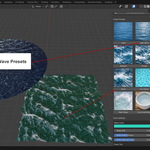
Wave Presets
-
Floating Objects
All controls are designed to be minimal and easy to understand.
Step 1 – Add an Ocean Surface
-
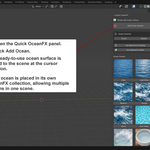
Open the Quick OceanFX panel.
-
Click Add Ocean.
-
A ready-to-use ocean surface is added to the scene at the cursor position.
Each ocean is placed in its own OceanFX collection, allowing multiple oceans in one scene.
Step 2 – Select Active Ocean
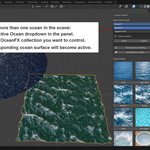
If you have more than one ocean in the scene:
-
Use the Active Ocean dropdown in the panel.
-
Select the OceanFX collection you want to control.
-
The corresponding ocean surface will become active.
Step 3 – Choose Ocean Shape
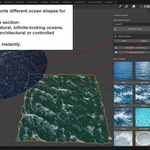
Quick OceanFX supports different ocean shapes for different use cases.
-
In the Ocean Shape section:
-
Choose Circle for natural, infinite-looking oceans.
-
Choose Square for architectural or controlled scenes.
-
-
The shape updates instantly.
Step 4 – Apply Wave Presets
Wave presets are the core of Quick OceanFX.
-
Open the Wave Presets section.
-
Choose a preset by visual preview, not numbers.
-
Presets are grouped by scale:
-
Large scale (oceans, seas)
-
Small scale (pools, baths, fountains, still water)
-
Each preset is tuned for:
-
Correct scale
-
Stable animation
-
Clean reflections
Step 5 – Animate or Render
Quick OceanFX works for both still images and animation.
-
No additional setup is required.
-
Presets are optimized to avoid flickering.
-
Use standard Blender render settings in Cycles or Eevee.
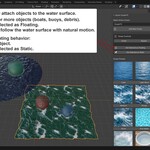
Step 6 – Make Objects Float
You can easily attach objects to the water surface.
-
Select one or more objects (boats, buoys, debris).
-
Click Set Selected as Floating.
-
Objects will follow the water surface with natural motion.
To remove floating behavior:
-
Select the object.
-
Click Set Selected as Static.
Step 7 – Architectural Water Workflow
For pools, baths, and fountains:
-
Add an ocean surface.
-
Select a small water preset (Pool Water, Bath Water, Still Water).
-
Adjust scale and placement to match the scene.
-
Use clean lighting and reflections for best results.
These presets are designed for close-up and interior shots.
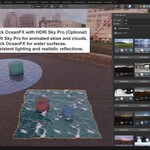
Step 8 – Using Quick OceanFX with HDRI Sky Pro (Optional)
Quick OceanFX works especially well with HDRI Sky Pro.
Combined workflow:
-
Use HDRI Sky Pro for animated skies and clouds.
-
Use Quick OceanFX for water surfaces.
-
Get consistent lighting and realistic reflections.
This setup is ideal for:
-
Cinematic environments
-
Exterior architectural scenes
-
Ocean and coastal shots
Best Practices
-
Choose presets by visual result, not by value.
-
Use large-scale presets only for wide shots.
-
Use small-scale presets for interiors and architecture.
-
Keep water simple – realism comes from scale and lighting.
Performance Notes
-
Optimized for modern Blender versions.
-
Suitable for both preview and final renders.
-
Works well on macOS and Windows.
Support
If you encounter issues or have feature requests:
-
Check the product page on Superhive.
-
Follow updates for new presets and improvements.
Have questions about this product?
Login to message