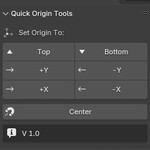
Quick Origin Tools
 3DAssetsKit



🛠️ Installation Guide
- Open Blender.
- Go to Edit > Preferences > Add-ons.
- Click Install... in the top-right corner.
- Navigate to your downloaded addon
.zipfile and select it. - After installation, enable the addon by checking the box next to its name.
- Close the Preferences window.
📌 Access the Addon
After installation, go to the 3D Viewport, press N to open the side panel, and look for the “Quick Origin Tools” tab.
$1.50
Have questions about this product?
Login to message
| Sales | 10+ |
| Published | over 1 year ago |
| Blender Version | 4.0 - 4.5 |
| Extension Type | N/A |
| Render Engine Used | Cycles, Eevee |
| License | Mit |

Discover more products like this
3d tools origin tools tool Modeling tools batch origin addon Blender Workflow python addon quick origin custom origin n-panel addon