 Playful Pixel


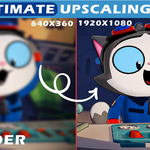


🖼️ Real-ESRGAN Image Upscaler for Blender
Can't render in high resolution? Tired of spending hours rendering animations only to get blurry results? You need this lightweight, fast, and affordable addon.
Real-ESRGAN Image Upscaler integrates powerful AI super-resolution models directly into Blender. It enhances both single images and full sequences—perfect for animation, rendering, and post-production. No more external tools. No more compromises.you can also improve texture quality.
A short film created in Blender with 5,711 frames at 360p was upscaled to 1920×1080 in just 5 minutes, showcasing Resmax’s incredible speed and efficiency.
Model used: realesr-animevideov3-x4
Model used: realesrgan-x4plus-anime
Model used: realesrgan-x4plus-anime
Model used: realesrgan-x4plus
⚙️ Supported Models
- realesr-animevideov3-x2 / x3 / x4 – Optimized for anime-style visuals
- realesrgan-x4plus – General-purpose upscaling with natural detail enhancement
- realesrgan-x4plus-anime – Tailored for anime and stylized content
🚀 Key Features
- Upscale images and sequences directly within Blender
- Multiple Real-ESRGAN models for flexible resolution and style control
- Streamlined workflow—no external tools required
- Ideal for artists, animators, and content creators seeking sharper results
🧰 Requirements
- Blender 3.0+
- Windows operating system (currently supported only on Windows)
Bring cinematic quality to your visuals with just a few clicks—no more blurry frames or low-res textures.
🧠 Performance & Workflow
Upscaling operations are handled in a separate thread, ensuring Blender remains responsive throughout the process. You can continue working on your scene, editing, or rendering while the AI enhancement runs in the background—no interruptions, no bottlenecks.
