 Mars0hod


Scene Variator v1.7 — Quick Start Guide
Scene Variator is a Blender add-on designed to create controlled scene variations, preview the results, select the best versions, and batch render them.
INSTALLATION
- Open Blender.
- Go to Edit → Preferences → Add-ons.
- Install the supplied Scene Variator ZIP package.
- Enable Scene Variator.
- Open the 3D Viewport Sidebar (N).
- Select the Scene Variator tab.
QUICK & ADVANCED MODES
QUICK provides fast access to the most important tools for rapid scene variation.
ADVANCED provides extended controls for more detailed workflows.
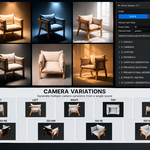
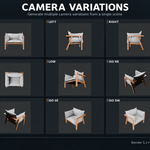
CAMERA VARIATIONS
Generate 12 ready-to-use camera positions around the selected subject, including Front, Back, Left, Right, 45°, 135°, Top, Low and four isometric views.
LIGHTING VARIATIONS
Generate 10 studio lighting setups including Soft Studio, Two Softboxes, Three Point, Top Light, Rim Light, Front Soft, Dramatic Side, High Key, Low Key and Backlight.
Auto Power by Subject Size automatically adapts lighting power to the scale of the selected subject.
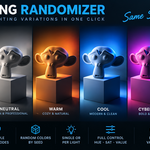
COLOR LIGHTING & LIGHTING RANDOMIZER
Create colored lighting variations and automatically generate randomized light colors for different moods and visual styles.
MATERIAL VARIATIONS
Generate material alternatives with controls for color variation, roughness and the number of variants.
VARIATION GENERATION
Combine cameras, lighting, materials and other enabled variation sources into multiple scene configurations.
Use Random Seed for controlled and reproducible randomization.
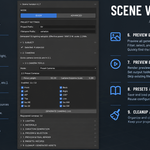
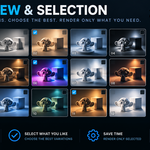
PREVIEW & SELECTION
Generate fast previews before committing to final renders. Compare the generated variations and select only the results you want to keep.
Generate → Preview → Select → Render
FINAL RENDER
Render selected variations or all enabled variations automatically. Configure the output folder, filename, image format and resolution directly from Scene Variator.
PRESETS / RECIPES
Save useful configurations and reuse them in future Blender projects.
COMPATIBILITY
Blender 5.2+
Cycles & Eevee
One Scene. Many Possibilities.
Have questions about this product?
Login to message
| Blender Extension Compatible | Yes |
| Published | about 2 months ago |
| Blender Version | 5.2 |
| Extension Type | Add-on |
| Render Engine Used | Cycles, Eevee |
| License | GPL |
Discover more products like this
material randomizer randomization Workflow Scene Management productivity Lighting presets automation batch render rendering procedural camera presets scene variation