 Salman Naseem


The problem
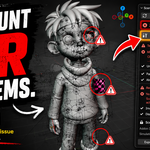
You finish a scene, hit render, and something's wrong. A texture shows up as pink and black checkers. The render goes to a folder that doesn't exist. You send the file to a client and they open it to a blank camera view, because the collection with your hero asset is quietly excluded from render.
None of these are modeling or lighting mistakes. They're housekeeping mistakes; the kind that hide in plain sight until the moment you can't afford them, right before a deadline, mid-render-farm-job, or after the file has already left your machine.
SceneCheck exists to catch that class of problem before it costs you a render or a client relationship.
What SceneCheck does
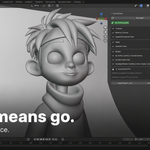
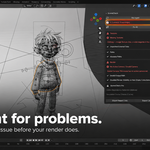
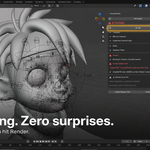
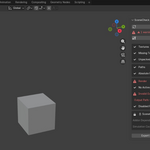
SceneCheck adds a SceneCheck tab to the 3D Viewport sidebar (press N). Click Run SceneCheck and it scans the current scene against a fixed checklist, then lists every issue it finds, grouped by category, with a clear pass or fail icon on each row. Where a fix can be applied safely and manually, you get a Fix button next to that item, and a Fix All button to clear everything fixable in one pass.
It is a checker, not a cleaner. SceneCheck never deletes data, purges unused blocks, or "optimizes" your file. It only reports problems and applies the specific, narrow fixes described below. If you're looking for a scene-cleanup or file-size-reduction tool, SceneCheck isn't that, and won't pretend to be.
The 6 checks (included)
- Missing Textures — flags any image whose source file can't be found on disk, including UDIM tile sets checked as one logical image, not tile by tile. It also catches Image Texture nodes with no image assigned at all, the case that renders as solid magenta in the viewport but never shows up in a normal "find missing files" scan because there's no missing file, there's no file at all. Each flagged row links back to the object using that material.
-
Unpacked External Data — flags images that load fine on your machine but aren't packed into the
.blend, the single most common cause of "it worked when I sent it." Fix packs only the specific images that check flagged, one at a time, so a single genuinely broken image elsewhere in the scene can't stop the rest from packing. -
Absolute Paths — flags absolute (non-relative) paths on images, linked libraries, sounds, and movie clips, the paths that point to
C:\Users\yourname\...and quietly break the moment the file moves to another drive or another computer. Fix relativizes them once the file has been saved (relative paths need a save location to be relative to). - No Active Camera / Invalid Camera — flags a scene with no camera assigned, or a camera that's hidden from render. Nothing kills a "quick preview render for the client" faster than an empty frame.
- Invalid Output Path — flags a render output folder that doesn't exist or isn't writable, and warns (without erroring) when the output path is absolute and points outside your project folder, the case most likely to break when the file changes machines.
- Disabled Render Visibility on Non-Empty Collections — flags any collection that holds mesh objects but is excluded from render, the classic accidental "I hid it to work faster and forgot to turn it back on" mistake.
The 2 Pro checks
Enable SceneCheck Pro in preferences to unlock two more checks. With Pro off, they appear as locked, grayed-out placeholder rows and don't run in the background at all, so they cost you nothing in scan time.
- Addon Dependency Detection — scans every node tree in the file (materials, worlds, the compositor, standalone node groups, which covers Geometry Nodes group trees too) for node types that come from a non-built-in addon, and names the specific addon the recipient needs installed to see the file correctly. This is inherently best-effort: it can only resolve what the current Blender session can see, so run it while the addon is still installed and enabled, before you send the file.
- Simulation Cache Checks — scans every Cloth, Soft Body, Fluid (Liquid and Gas/Smoke checked separately), Dynamic Paint, Particle (hair dynamics and emitters), and Rigid Body World simulation for a baked cache, and names the specific simulation that's missing one. A render farm or a client machine that doesn't get your cache either re-simulates from scratch (different result) or fails outright.
Why this beats checking by hand
Doing this manually means: opening File > External Data > Report Missing Files, eyeballing the viewport for magenta or checkerboard patches, scrolling the Outliner collection by collection to see what's hidden from render, checking the Output Properties path, and hoping you remember to do all of it every time, under deadline pressure, at 1am, on the file you're least familiar with because a client sent it to you an hour ago.
SceneCheck turns that checklist into one button and one panel. It catches things a manual pass regularly misses, like an Image Texture node with nothing assigned to it (no missing file to report, so File > External Data won't catch it, but it still renders wrong), or an absolute path that happens to work today because you haven't moved the file yet.
Report exports and auto-run on save
Click Export Report (.txt) or Export (.json) to write a report next to your saved .blend, useful as a paper trail before you hand a file to a client, a lead, or a render farm queue. The .json format is built for scripts and pipeline tools to consume directly.
Turn on Run SceneCheck Automatically on Save in preferences and SceneCheck scans the file right before every save, popping up a non-blocking warning if unresolved errors remain. It never blocks the save itself; it just makes sure you can't save your way past a broken camera or a missing texture without at least seeing it.
Built for real production scenes
Scenes with 2000+ images scan in chunks across timer ticks instead of freezing the UI in one long loop. Linked-library images and linked addon-dependent nodes are flagged but never auto-fixed; they're marked "linked, edit in source file," because SceneCheck won't reach into a library you don't own and change it.
Who this is for
Freelance Blender artists delivering final files to clients. Small studios handing scenes between artists or off to a render farm. Riggers and modelers preparing an asset before it goes downstream. Anyone who has ever re-rendered a shot because of a mistake that had nothing to do with the actual art.
Requirements
Blender 4.2 LTS or newer, tested through 5.x. Fully offline: SceneCheck reads scene file paths and writes report files next to your .blend, and requests no network permissions at all.
Key Features (with benefits)
- One-click full scan — Run SceneCheck once instead of manually checking six different menus and panels every time you finish a scene.
- Missing texture detection, including unassigned nodes — Catches the solid-magenta case (no image bound at all), not just images with a broken file path, so you stop finding out about it in the render instead of the panel.
- UDIM-aware texture checking — Checked as one logical image per UDIM set, so you're not chasing 20 false positives for one texture with 20 tiles.
- One-click Pack All (targeted) — Packs only the specific unpacked images that were actually flagged, individually, so one broken texture elsewhere can't stop every other image from packing.
- One-click relative path fix — Relativizes absolute paths across images, libraries, sounds, and movie clips in a single click, once the file is saved.
- Camera and output validation — Flags a missing or render-disabled camera and an output folder that doesn't exist or isn't writable, before you waste a render cycle finding out.
- Hidden-geometry detection — Flags collections with real mesh content that are accidentally excluded from render, the mistake that's invisible until the client asks where half the scene went.
- Addon dependency report (Pro) — Tells you by name which addons a recipient needs installed, instead of them finding out when nodes show up broken.
- Simulation cache check (Pro) — Confirms every Cloth, Soft Body, Fluid, Dynamic Paint, Particle, and Rigid Body simulation has a baked cache before it leaves your machine.
- Exportable reports (.txt / .json) — A written record of exactly what was checked and what was found, next to the file, readable by a person or a pipeline script.
- Auto-run on save — Warns you about unresolved errors right before you save, without ever blocking the save itself.
- Fully offline — No network permissions requested. Nothing about your scene leaves your machine.
- Non-destructive by design — SceneCheck reports and fixes narrowly defined issues. It never deletes data or "optimizes" your file behind your back.
Workflow Benefits
Before SceneCheck: finish the scene, eyeball the viewport, manually check the output path, remember to check for hidden collections, hit render, find out something's still wrong, fix it, render again.
With SceneCheck: finish the scene, click Run SceneCheck, read one panel, click Fix All, click Run Again to confirm everything's actually green, render once.
- Fewer wasted render cycles. Camera, output path, and visibility problems get caught before the render starts, not after it finishes.
- Fewer "it worked on my machine" messages. Absolute paths and unpacked textures, the two most common causes of a file breaking after it's sent, get flagged and fixed before the file leaves.
- Less time spent re-checking your own work. One panel replaces a mental checklist you'd otherwise have to remember and run manually, every single time.
- A safety net before every save, if you turn on auto-run, catching mistakes the moment they happen instead of discovering them days later.
- A paper trail, via the exportable report, when a client or a lead asks "did you check the file before sending it."
Use Cases
-
Freelancer sending a final file to a client. Run SceneCheck, fix everything flagged, export a
.txtreport, send both. No more "the textures are missing on my end" emails. - Studio handoff between artists. A rigger finishes a character and hands it to an animator. SceneCheck confirms textures are packed and paths are relative before the file moves to another machine or another drive.
- Prepping a scene for a render farm. Missing camera, invalid output path, and (with Pro) unbaked simulation caches are exactly the failures that waste a farm job. Catch them locally first.
- Opening a file that depends on an addon you don't have. With Pro's Addon Dependency Detection, the sender can tell you by name which addon to install, instead of you guessing from broken pink nodes.
-
Cleaning up before archiving a project. Pack every texture and relativize every path so the archived
.blendstill opens correctly a year from now, on a different computer. - Teaching or onboarding. Give a junior artist a fast, concrete checklist of the mistakes that actually break deliveries, instead of a written list they have to remember to run through by hand.
