 Hugu's Works



🔥 PHASE 2 LAUNCH SALE!
To celebrate our successful launch and initial milestones, we are offering a Phase 2 Special Price: Only $14.9!
(This is a limited-time offer for the next 100 copies only — Secure your copy now before the price increases!)
🌟 FEATURED ON INSPIRATIONTUTS!
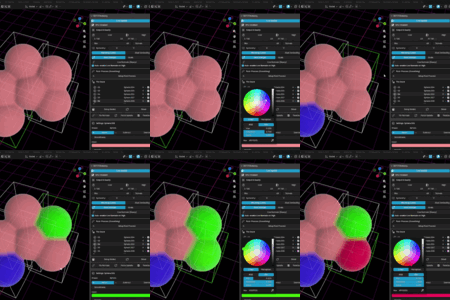
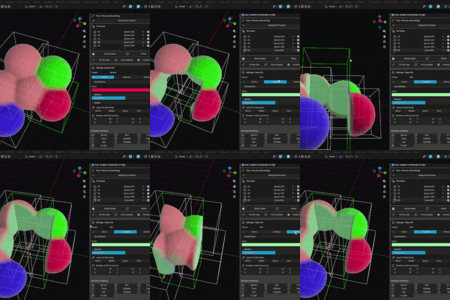
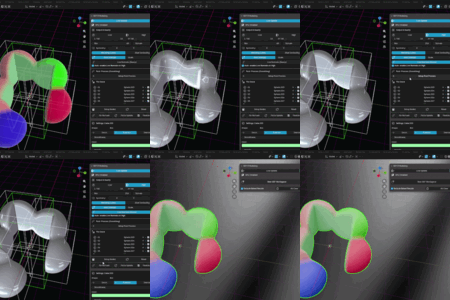
SDF.R was highlighted in InspirationTuts' latest Blender Addons video! Watch it in action showing smooth real-time GPU-based SDF modeling.
🖥️ Platform Support — Windows, macOS & Linux
SDF.R ships for Windows, macOS (Apple Silicon) and Linux (x86-64). All three are built from the same source, by the same automated pipeline, in every release. They are not side projects and they are not afterthoughts.
I want to be straightforward about one thing: I develop on Windows, and I do not own a Mac or a Linux machine. I cannot sit down and reproduce a problem on those platforms myself. What I can do is read a crash report and fix what it points to — and that works. The macOS crash fixed in V16.1.2 was found entirely from one user's crash log, and the cause turned out to be my own code, not their environment.
So these platforms improve exactly as fast as people tell me things.
Please download the file matching your OS:
-
Windows: the standard package (e.g.,
SDF_R_16_2_2.zip) -
macOS:
SDF_R_16_2_2_Darwin.zip— built for Apple Silicon (arm64), does not run on Intel Macs -
Linux:
SDF_R_16_2_2_Linux.zip— built for x86-64
If something breaks, the fastest route to a fix is to launch Blender from Terminal (on macOS, /Applications/Blender.app/Contents/MacOS/Blender), reproduce the problem, and send me what the Terminal printed — plus blender.crash.txt from your temporary folder (open $TMPDIR). That file carries the add-on's own line numbers, and it is exactly what solved the V16.1.2 crash.
Code signing: the macOS build is not notarized, so Gatekeeper blocks it on first use. Open System Settings → Privacy & Security and click Open Anyway.
🚀 Future Roadmap
To further elevate your modeling workflow, we are excited to share our vision for the next major milestones in Rust-GPU-SDF:
- Description: Real-time cross-section clipping at any angle/plane, and the ability to define custom 2D profiles (N-gon, star, and hand-drawn outlines) to sweep, subtract, or intersect with 3D SDF shapes.
- Key Benefit: Enables precise, CAD-like section cuts and intuitive modeling of complex internal structures with zero lag.
- Description: Math Field now includes Gyroid, Schwarz P, and Schwarz D (Diamond) as selectable formulas. Additional field formulas are planned after broad GPU driver testing, with future candidates including more TPMS surfaces, Voronoi patterns, and procedural 3D noise textures.
- Key Benefit: Unlocks advanced procedural lattices, organic detail painting, and high-frequency surface detailing directly generated on the GPU.
- Delivered in V16.1.0: Curve Sync turns any native Blender Curve into a solid, blendable SDF pipe with its own radius, boolean operation, and material — Bezier, Poly, NURBS, and closed curves all supported.
- Still to come: Sweeping an arbitrary 2D profile (rather than a round cross-section) along the guide path, which ties into the Arbitrary Cross-sections work above.
- Key Benefit: Pipes, cables, handles, and organic swept frames can now be drawn by hand and generated on the GPU in real time.
🚨 CRITICAL SYSTEM REQUIREMENTS
- Supported OS: Windows (64-bit), macOS (Apple Silicon) and Linux (x86-64). All three are built from the same source in every release — see Platform Support above for how macOS and Linux issues get fixed, and what I need from you to do it.
- GPU Requirements: Dedicated Graphics Cards (NVIDIA / AMD) supporting DirectX 12 or Vulkan are highly recommended.
- Integrated GPUs: Intel Iris Xe and other integrated GPUs are supported with auto-VRAM memory scaling, but editing speeds may be reduced at extremely high resolutions.
- Blender Version: 3.6 LTS, 4.x, or 5.x.
- First-Time Startup Note: On the very first launch, the engine will perform a "Warming-up" process to compile shaders. This initial compilation usually takes about 15 to 45 seconds depending on your GPU. If the status does not update after a few minutes, please check your Blender System Console for detailed logs or update your GPU drivers.
SDF.R
Pioneering the Next Generation of Blender Modeling
SDF.R is a groundbreaking engine designed to bring the power of Signed Distance Fields (SDF) to Blender with unprecedented speed. As the first-ever add-on in its class to integrate a custom Rust-GPU backend, SDF.R sets a new standard for performance and topological quality.
💎 Dual Topology Engine: Marching Cubes (MC) & Dual Contouring (DC)
SDF.R features two production-ready mesh generation engines. Marching Cubes (MC) remains the default choice, combining stability with high performance for organic, sculpt-like workflows.
As of V15.9.9.1, GPU-accelerated Dual Contouring (DC) has been fully stabilized and is no longer considered experimental. By utilizing a custom SVD-based QEF (Quadratic Error Function) solver, DC preserves sharp corners and creases (such as box edges) that tend to be smoothed out in conventional SDF environments — reliably, at any resolution.
V15.9.9.2 adds a dedicated compute-logic optimization pass: Boolean (CSG) scenes now generate significantly faster thanks to restored per-block spatial culling, Dual Contouring is faster via a lighter normal evaluation, and additional shader-compiler crash triggers on certain NVIDIA drivers have been removed.
V15.9.9.3 focuses on large-scale meshing. Marching Cubes now supports a much more robust GPU Chunked MC path with high-resolution fallback, ghost-cell evaluation, seam weld controls, and visible mesh-health diagnostics. Experimental chunked DC groundwork is also included for testing, but seam-free large-scale DC remains a future backend task.
V15.9.9.4 targets real-time viewport responsiveness. The Ghost Preview now caches its GPU primitive buffer, so simply orbiting/panning the camera no longer rebuilds it every frame; raymarching step count is automatically reduced while you navigate or transform and restored to full quality the moment you stop; and with the result mesh hidden, transform updates skip the entire per-primitive scan and mesh request. The result is markedly smoother interaction in scenes with many primitives.
V16.0.4 introduces the first major V16 modeling feature: a production-ready Gyroid Field primitive. Gyroid structures can now be generated directly inside SDF.R, clipped by Box/Sphere/Cylinder masks, blended into previous primitives, and shaped with Phase plus per-axis frequency controls. CPU mesh generation, GPU/WGSL generation, and the real-time viewport preview share the same Gyroid definition, so the preview and final baked mesh stay aligned.
V16.0.5 generalizes Gyroid Field into a single Math Field primitive with a Formula selector, adding Schwarz P and Schwarz D (Diamond) as new selectable TPMS surfaces alongside Gyroid. All existing presets, mask shapes, boundary modes, phase, and per-axis frequency controls now work identically across every formula, and CPU mesh generation, GPU/WGSL generation, and the real-time viewport preview stay fully in sync for all three.
V16.0.6 focuses on finishing workflow quality. Shared material controls make it easier to unify a piece by applying one base color, Metallic, or Roughness value across the full SDF stack. Snapshot Mesh creates a static mesh copy while preserving the live SDF workspace for further iteration.
V16.0.7 adds a layer-style boolean workflow through Layer Boundary collection dividers. This lets decorative Math Field layers use local Subtract or Intersect operations without cutting every earlier primitive in the stack, opening a more controllable way to build pattern-over-form designs.
V16.1.0 brings native Blender Curves into the SDF stack. With Curve Sync you can draw a path using Blender's own curve tools and have it generate a solid, blendable SDF pipe that supports Union, Subtract, and Intersect just like any other primitive — either by moving the curve into the SDF Collection, or by pointing a lightweight Curve Ref proxy at a curve that lives anywhere else in your scene. A new numeric Bezier primitive and a whole-material Transmission control round out the release.
V16.2.0 reworks Layer Boundary. Switching it on used to give you a group that fused into one shape and then blended softly into the rest of the model — the opposite of a boundary — because the strength of that merge was read from whichever primitive came first in the group. The divider now carries its own Layer Blend, defaulting to a hard seam, and the group it governs is the rows above it, matching group layout and parenting. Files that use Layer Boundary may look different.
V16.2.1 lets a scene hold several SDF trees, each with its own parts, settings and result mesh — so a model's parts come out as separate objects rather than one fused solid. Tree Reference lets one tree carve or join another, which is how two parts are made to fit. Mirror Blend rounds off the crease that per-primitive Mirror has always left down the middle, matching what two real shapes joined with a smooth union would give you. Defaults leave existing files unchanged.
V16.2.2 fixes the ghost preview for Mirror Blend. On V16.2.1 the preview moved the opposite way to the mesh as you raised it, and emptied out at high values, which read as a broken feature. Meshing never used the preview's code, so every mesh and every saved file was already correct. The preview now follows the mesh, and the panel warns when Blend goes past twice the Offset, where the whole shape swells rather than just the seam. V16.1.3 fixes Global Symmetry: with Symmetry X/Y/Z enabled the Ghost Preview showed the mirrored result correctly, but mesh generation returned an empty or half-missing mesh. V16.1.2 is a bug-fix release: a crash on macOS, traced to SDF.R forcing a scene re-evaluation from a timer, is fixed. V16.1.1 targeted viewport responsiveness. The Ghost Preview now renders at a reduced resolution while you navigate or transform, and returns to full resolution the moment you stop. Because this reduces pixel count rather than scene complexity, it stays effective no matter how many primitives are in play. Mesh generation is untouched.
✨ What's New in V16.2.2
- 🪞 The Mirror Blend preview moves with the mesh: on V16.2.1, raising Mirror Blend made the shape in the ghost preview thinner while the generated mesh got thicker, and past a point the shape vanished from the preview altogether. If you tried the feature and concluded it was broken, that was the preview.
Your meshes were never affected. Meshing runs on a separate path, so every mesh you generated on V16.2.1 was already correct, and so is every file you saved. The preview now swells in the same direction and by close to the same amount as the mesh — on a single mirror axis it tracks to within about 0.01 across the whole range, and the seam itself is exact. It no longer creases, either. - ⚠️ A warning when Blend goes past twice the Offset: beyond that point the whole shape swells, not just the seam. That is not a defect — it is what joining two halves smoothly does once the blend radius reaches across the gap between them. The panel now says so when your settings cross the line. If you want a rounder seam without a heavier shape, raise Offset rather than Blend.
- Nothing else changes. At Mirror Blend 0 the preview takes exactly the path it always did, so if you have never used the feature there is nothing visible in this update. The meshing engine is untouched, so there is no shader cache rebuild and no slow first start.
✨ What's New in V16.2.1
- 🌳 One Add-on, Separate Objects: a scene can now hold as many SDF trees as you like. Each tree has its own parts collection, its own settings and its own result mesh, so a model's parts are separate objects from the moment they are built — eyes apart from a head, a lid apart from a jar, a print split into pieces that each take their own material. Nothing to cut up afterwards.
The panel opens with a Tree row: pick the tree from the dropdown, press + to add one, or just click a part in the viewport to jump to its tree. Finalize applies to the active tree only, so baking one leaves the others live. - ⚡ Splitting a Model Makes It Faster: each request carries fewer primitives and sparse block detection has less to search. A 216-sphere model at resolution 128 took 5053 ms as one tree, 1904 ms across four, and 1215 ms across eight. There is no cap on tree count, because nothing costs more simply for having them.
- 🔗 Tree Reference: one tree can read another tree's shape, in Blend or Subtract mode. Subtract is the one for a fit — carve the lid's cavity out of the jar so the two meet exactly, and the cavity follows when you edit the lid. Blend is exact; Subtract is exact whenever the referenced tree is built from Union alone, and the panel tells you when it is not.
- 🪞 Mirror Blend — the mirror seam can finally be rounded: per-primitive Mirror repeats a shape by folding space, so the two halves always met at a hard minimum, and Smoothness has never been able to touch that seam — inside folded space there is only one shape, and nothing to blend it against. On a mirrored sphere the crease was real geometry at up to 84°. Mirror Blend evaluates both sides and joins them properly: 0 creased edges at 8.5°, matching what you get from two real shapes and a smooth union. Works on two axes at once, and defaults to 0 so existing files are untouched.
- 🐛 Fixes: Show Result Mesh now clears the mesh instead of only hiding it; Auto Domain and Use Live Normals re-mesh when toggled; and the panel no longer unlocks while shaders are still compiling (the GPU-ready flag was being saved into your .blend).
✨ What's New in V16.2.0
- 🧱 Layer Boundary Now Produces a Hard Boundary: a layer boundary builds its group on its own and merges the finished shape into the scene once — but that merge was a smooth union whose blend radius came from whichever primitive happened to come first in the group. Inside the group that value does nothing, so it looked inert while you worked and then quietly decided how the whole group met the rest of the model. At the default of 0.2, switching Layer Boundary on gave you a group that melted into the scene as one soft lump.
The divider now carries its own Layer Blend and Profile, defaulting to 0.0 — a hard seam. Primitive Smoothness, and the way a new primitive inherits it, are untouched. - 📐 A Layer Covers the Group Above Its Divider: group layout and stack parenting always acted on the rows above a divider while the layer acted on the rows below it, so one divider's settings applied to two different groups. They now agree, and a layer no longer leaks past the next divider.
- 🎯 One Divider Per Part: keeping eyes, eyelids and a shell from melting into the body is what this feature is for, and it needs a layer for every part — the body included. A single layer on its own does very little: the first layer merges into an empty scene, and a shape left outside every layer still blends into whatever the layers merged into.
- 🐛 Fixes: a divider carrying Radial or Grid threw its layout away entirely when Layer Boundary was switched on; the ghost preview and the mesh now implement the same layer rules; and Move to SDF no longer picks an unpredictable destination in scenes with several SDF outputs, no longer leaves a stale collection link behind, and now says which objects it had to guess a shape for instead of silently making them spheres.
- ⚠️ Existing Files: both Layer Boundary changes alter scenes that use it — the groups shift, and the seams become hard. The new behaviour is what the feature was always meant to do, so the fix is usually to leave it; Layer Blend at 0.2 reproduces the old default if you want the softness back. Files that never used Layer Boundary are unchanged.
✨ What's New in V16.1.3
- 🐛 Global Symmetry Dropped Negative-Side Primitives — Fixed: With Symmetry X / Y / Z enabled in Mesh Settings, the Ghost Preview showed the mirrored result exactly as expected, but generating a mesh dropped any primitive whose centre sat on the negative side of that plane — or quietly shrank one that straddled it. Marching Cubes and Dual Contouring alike.
The preview and the mesh generator are two separate implementations of the same scene, and symmetry was handled correctly only in the first. Two faults compounded: the bounding box the generator searches was clamped to the positive half of each symmetry axis (0 to +max instead of −max to +max), discarding everything on the negative side before meshing began; and the two meshing shaders did not fold primitive centres onto the mirrored side the way the preview shader does, so a primitive placed on the negative side was evaluated at the wrong position entirely. - 🔀 With Booleans, the Same Bug Looked Different: if you used a Subtract or Intersect shape on the negative side of the symmetry plane, the base solid still meshed perfectly and only the cut vanished — the preview showed the cut, the final mesh did not, and nothing errored. Measured with a Subtract sphere cutting a box under Symmetry X: a cut at X = −2 produced exactly the uncut box in V16.1.2, and now produces the correct result, identical to placing it at X = +2.
- 🎯 Were You Affected? Only if a primitive's centre sat on the negative side of an enabled symmetry plane. Shapes on the positive side, or exactly on the plane, meshed correctly — and a matching shape on the positive side could make the result look entirely right, so the problem could stay hidden in exactly the symmetric scenes Symmetry is used for. Per-primitive Mirror in the Layout section was never affected, and meshes generated with Symmetry off are identical to V16.1.2.
Verified on Blender 5.1 by running the old and new engines side by side: a primitive at X = −2.0 with Symmetry X produced an empty mesh before and a correct −3.0 to +3.0 mesh now, under both algorithms. All three axes together produce a complete eight-way symmetric result. - 🖱️ The Stack: Click Anywhere in a Layer Row to Select It: previously only the layer's name selected the object, so clicking elsewhere in the row moved the highlight while the viewport selection stayed where it was. The whole row now works. Selecting objects in the viewport still drives the panel the other way, and a multi-selection made in the viewport is preserved rather than collapsed to one object.
- 🔧 One Loader for All Platforms: The Windows, macOS and Linux builds now load the native engine through the same code path and ship byte-for-byte identical Python. No visible change — but the macOS and Linux builds now run exactly the code tested on Windows, rather than a hand-adjusted variant of it.
✨ What's New in V16.1.2
- 🐛 macOS Crash on Adding a Primitive — Fixed: On some macOS setups Blender crashed the instant a primitive was added, every time. While waiting for the mesh calculation, SDF.R ran a timer that asked Blender for the scene's dependency graph — a request that makes Blender re-evaluate the entire scene if it decides one is due. From a timer that happens at a moment Blender never scheduled, and the evaluator can read past the end of its own object list. The timer no longer forces an evaluation.
The fault was in SDF.R, not in any other add-on. With Factory Settings the crash did not appear, which made it look like a conflict — but a quiet scene simply lets the unsafe call survive. If you hit this and concluded something in your setup was to blame, it was not. - ⏱️ Safety Limit on the Mesh Timer: If the dependency graph stays unavailable, the timer gives up on the queued update after about two seconds instead of polling indefinitely. Normal waiting — while you drag an object, or while the engine is still calculating — is unaffected.
- ✅ Mesh Output Unchanged: V16.1.2 changes neither mesh generation nor the preview. The geometry SDF.R produces is identical to V16.1.1, and no shader cache clearing is required.
✨ What's New in V16.1.1
- ⚡ Smoother Viewport Navigation: The Ghost Preview now renders at a reduced resolution while the camera is moving or an object is being transformed, then snaps back to full resolution the instant you stop. Because this scales down pixel count rather than shape complexity, it helps regardless of how heavy the scene is — exactly the case that used to degrade worst. Shading normals also switch to a cheaper estimate during motion.
- 🧩 Blender 5.2 Support for Post-Process: On Blender 5.2 the Post-Process (Smoothing) section came up empty, because 5.2 changed how Geometry Nodes modifier inputs are stored. SDF.R now reads them either way, so a single build works on both Blender 5.1 and 5.2. This affected every earlier version of SDF.R on 5.2 as well — it is not something V16.1.1 introduced.
- 🖥️ Correct Preview with Split Viewports: With two or more 3D Viewports open, the Ghost Preview could fail to appear once the camera came to rest, and stayed locked in its reduced-quality state. Motion is now detected per viewport rather than through a single shared value, and the reduced-resolution buffers are reused per size instead of being rebuilt every frame.
- 🛡️ Mesh Data Safety Check: Vertex indices coming back from the engine are now range-checked before being handed to Blender. Out-of-range data is rejected with a message in the system console instead of being written into the mesh, where it could corrupt memory and crash Blender later. Valid data is unaffected.
- ✅ Mesh Output Unchanged: V16.1.1 only affects how the preview is drawn. The geometry SDF.R generates is identical to V16.1.0, and updating from V16.1.0 does not require clearing the shader cache.
- 🌀 Curve Sync — Native Blender Curves as SDF Geometry (V16.1.0): Draw a path with Blender's own Curve tools and SDF.R turns it into a solid, blendable SDF pipe. Curves behave like any other stack item, so they support Union, Subtract, and Intersect and blend smoothly with neighbouring shapes. Add as many as you like — each with its own Pipe Radius, Operation, Smoothness, Color, Metallic, and Roughness. Bezier, Poly, NURBS, and closed (cyclic) curves are all supported.
- 🔗 Curve Ref — Reference a Curve Without Moving It: Point a lightweight proxy at any curve in your scene and leave the original object exactly where it is, still available for animation or Geometry Nodes. Because the settings live on the proxy, you can even aim several proxies at the same curve and give each a different radius, colour, or boolean operation. A one-click Edit button jumps straight into the target curve's Edit Mode.
- 📐 Bezier Curve Primitive: A new self-contained 3D quadratic Bezier primitive with independent Start and End radius, for tapered horns, claws, tentacles, and swept accents defined entirely by numeric control points — and fully compatible with the Layout and Deform stacks.
- 💎 Transmission & IOR: Give the generated SDF material glass-like light transmission, with a paired IOR control. Applied to the SDF material as a whole alongside the existing shared Metallic and Roughness controls.
- ⚡ Curve Sync Stays Fast: Curve Sync draws a slim coloured guide line in the viewport instead of a fully raymarched pipe, so adding many curves does not slow the Ghost Preview down. The generated mesh is always exact — press Force Update or enable Show Result Mesh to see the finished shape. Guide thickness is adjustable.
- 🔧 Instancing Accuracy Fix: Fixed geometry that could go missing when Radial or Spiral layouts were combined with Individual/Step Rotation, and when the Radial Axis was set to X or Y. This affects any elongated or asymmetric primitive, not just the new curve shapes.
- Layer Boundary Workflow (updated in V16.2.0): Collection dividers can now isolate a portion of The Stack as a local layer. Subtract and Intersect operations inside that layer affect the layer result instead of cutting all previous shapes, making Math Field and decorative pattern workflows much easier to art-direct.
- Snapshot Mesh: Create a static mesh copy of the current SDF result while keeping the original live SDF workspace fully editable. Perfect for comparing variations, testing materials, or preserving design milestones.
- Global Finishing Controls: Apply one shared color to all primitives with Apply Color All, or unify Metallic and Roughness with Apply Material All. These controls are designed for final look development and overall piece consistency.
- Auto Match Scale for Math Field: One click matches Math Field Axis X/Y/Z values to the object's scale so procedural field density remains visually consistent after non-uniform scaling.
- 🧮 Math Field Formula Selector: Gyroid Field is now Math Field, a single primitive with a Formula dropdown. Choose between Gyroid, Schwarz P, and Schwarz D (Diamond) — the same Scale, Thickness, Bias, Extent, and presets apply to all three.
- 🌀 New TPMS Surfaces — Schwarz P & Schwarz D: Two additional triply periodic minimal surfaces join Gyroid, each with a distinct cell topology, giving you more options for lattice structures, porous forms, and technical-organic surface detail.
- 🎛️ Mask, Boundary, Phase, and Axis Controls: Math Field can be clipped by Box, Sphere, or Cylinder masks; boundary behavior can be set to Fade, Open, or Box Clip; Phase shifts the pattern without moving the mask; and Axis X/Y/Z controls reshape the cell frequency independently per direction — all shared across every formula.
- 🔗 Field Blend Workflow: The Use Previous as Mask workflow makes it easy to fill a previous primitive with Math Field structure. Add a Box or Sphere, add a Math Field, then use the mask helper to create an intersected volume without manual setup.
- ✅ Preview and Mesh Consistency: Every Math Field formula is implemented across the CPU mesh path, GPU/WGSL mesh path, and Blender viewport Ghost Preview, keeping interactive previews and baked output in sync.
- 🎮 Smoother Real-Time Viewport (V15.9.9.4): Interaction stays fluid even as primitive counts grow. The Ghost Preview caches its GPU buffer so camera orbit/pan/zoom no longer rebuilds it every frame, raymarching quality adapts automatically during navigation and transforms (then snaps back to full quality when you stop), and with the result mesh hidden, transform updates skip the full per-primitive scan entirely. Fully backward compatible — no workflow changes.
- 🧱 Large-Scale Meshing & GPU Chunked MC (V15.9.9.3): High-density Marching Cubes is now much more resilient thanks to GPU chunked extraction, partial-mesh protection, ghost-cell evaluation, seam weld controls, and detailed mesh-health diagnostics. Experimental GPU Chunked DC is included as a seam-test backend, while stable large-scale fallback prioritizes GPU Chunked MC.
- ⚡ Compute-Logic Optimization Pass (V15.9.9.2): Boolean-heavy models generate much faster (per-block spatial culling is no longer globally disabled by a single subtract/intersect), Dual Contouring is faster with virtually no quality loss, and a Spiral-layout mesh-loss bug plus another NVIDIA shader-compiler crash trigger were fixed. See the full release notes below.
- 🧩 Dual Contouring Stability Overhaul (V15.9.9.1): Fixed a GPU driver crash on enabling DC, resolved non-deterministic vertex loss at high resolutions, and replaced the QEF solver with an industry-standard SVD-equivalent method for cleaner curved surfaces. See the full release notes below.
- ⚡ Local Pipeline Disk Cache & Driver Warm-up: No more mid-sculpt freezes! Compiled shader pipelines are cached locally, cutting subsequent startup times down to just 2-3 seconds.
- 📐 Mathematical scale synchronization: Supports multiplicative scaling. Primitives scaled or stretched in Blender match the real-time viewport preview and final baked mesh 1:1.
- 🎛️ Non-Destructive Deform Stack: Chain Twist, Bend, and Taper in any order. The mesh generation features stretch-distortion correction to prevent geometry tearing under high deformation.
- 🎨 Boolean Subtraction Material Painting: Carved surfaces automatically inherit the Color, Roughness, and Metallic properties of the cutting tool object, enabling interactive multi-material sculpting.
- 🛡️ iGPU Low-VRAM Safeguard: The engine dynamically checks your hardware boundaries (such as
max_storage_buffer_binding_size) on startup and adjusts block sizes to prevent GPU-related crashes.
🚀 Key Features
- ⚡️ World's First Rust-GPU Engine: Breaking new ground in Blender development. SDF.R utilizes a dedicated Rust backend for unparalleled calculation speeds.
- 🎮 Real-time GPU Previews: Instant, interactive feedback via Blender's GPU module. What you see is what you get.
- 🌀 Math Field Modeling: Build lattice-like porous structures using a native Math Field primitive (Gyroid, Schwarz P, Schwarz D) with masks, boundaries, phase shifting, per-axis frequency control, and one-click mask blending.
- Layer-Aware Composition: Use Layer Boundary collection dividers to keep pattern cuts and intersections scoped to their own group, then merge that group into the model at a seam you control.
- Finishing-Friendly Material Controls: Quickly unify Color, Metallic, and Roughness across the whole stack, while still keeping per-primitive material control when needed.
- Snapshot Mesh Iteration: Output a static mesh copy at any moment without destroying the live procedural setup, making it easier to compare what-if variations.
- 🧩 Advanced Topology Options: Choose between stable Marching Cubes (MC) for organic sculpting, or Dual Contouring (DC) for sharp mechanical features.
- 🌊 Seamless Dynamic Fusion: Effortlessly blend organic curves or sharp mechanical joins with adjustable smoothing.
- 📊 Advanced Layout Stacking: Create complex patterns with Mirror, Radial, Spiral, Grid, and Jitter modifiers in one unified stack.
🛠️ Optimized Workflow


Release History & Release Notes
SDF.R V16.2.2 Release Notes — The Mirror Blend preview moves with the mesh
Released 2026-09-12
V16.2.1 added Mirror Blend, which rounds off the hard crease Layout Mirror leaves down the middle of a mirrored shape. The final mesh has been correct since that release; the ghost preview was not. Raising Mirror Blend made the shape in the preview thinner rather than thicker, and past roughly twice the sum of Offset and the shape's own size it vanished from the preview altogether. The likely way to meet this was to raise Mirror Blend looking for a rounder seam, watch the preview shrink or empty out, and conclude the feature was broken. Meshing never used the preview's code, so every mesh generated on V16.2.1 was already correct, and so is every file saved with it. The preview now follows the mesh in the same direction and by close to the same amount — within about 0.01 on a single mirror axis across the whole Blend range, with the seam itself exact — and it no longer creases. The panel also warns when Blend goes past twice the Offset, where the whole shape swells rather than just the seam; raise Offset rather than Blend if you want a rounder seam at the same size. At Mirror Blend 0 the preview takes exactly the path it always did.
Note: the meshing engine is untouched in this release, so there is no shader cache rebuild and the first start after updating is as quick as always.
SDF.R V16.2.1 Release Notes — One Add-on, Separate Objects
Released 2026-09-09
A scene can hold several SDF trees, each with its own parts, settings and result mesh — so a model's parts are separate objects from the start. Tree Reference lets one tree carve or join another, which is how two parts are made to fit. Mirror Blend rounds off the crease that per-primitive Mirror has always left down the middle: 84° down to 8.5°, identical to two real shapes joined with a smooth union. Defaults keep existing files unchanged. Also fixed, and the reason to take this update if you are on V16.2.0: the ghost preview switched off entirely once a tree held more than sixteen parts, counted after layout expansion. Meshing was never affected and no file was damaged, but the live preview stopped drawing. Alongside it: All Clear no longer leaves a hidden result behind or deletes similarly named objects of your own, a saved Dual Contouring error no longer follows a file to a healthy machine, Show Result Mesh now clears the mesh, Auto Domain and Live Normals re-mesh when toggled, and the panel no longer unlocks before the engine is ready.
Note: the GPU shader code changed, so the first start after updating rebuilds the shader cache once. On a discrete GPU that is the usual 15–45 seconds; on integrated graphics it can take several minutes.
SDF.R V16.2.0 Release Notes — Layer Boundary, Reworked
Layer Boundary now does what its name promises. Files that use it may look different; files that never did are unchanged from V16.1.3.
The seam belongs to the divider now- The merge into the scene took its blend radius from the first primitive in the group — a value that does nothing inside the group, so it appeared inert and then decided the outer seam. At the default 0.2, a layer melted into the model.
- The divider now carries Layer Blend (default 0.0, a hard seam) and its own Profile. Primitive Smoothness and its inheritance are unchanged.
- A layer now covers the group above its divider, matching group layout and parenting, and no longer leaks past the next divider.
- A divider carrying Radial, Grid or any other group layout discarded that layout when Layer Boundary was switched on. The two now work together.
- The ghost preview and the mesh generator now implement the same layer rules.
- Move to SDF: uses the active SDF output as its destination rather than the first one it finds, relinks cleanly for objects that belonged to several collections, and reports which objects it had to guess a shape for rather than turning them into spheres in silence.
SDF.R V16.1.3 Release Notes — Global Symmetry Mesh Fix
A single fix, and a significant one. If you never used Global Symmetry, your output is unchanged from V16.1.2.
Symmetry X / Y / Z dropped negative-side shapesEnable Symmetry: X / Y / Z in Mesh Settings and the Ghost Preview does exactly what you expect — the shape appears mirrored across the plane. Then generate a mesh, with either Marching Cubes or Dual Contouring, and a shape placed on the negative side of that plane is missing entirely; one that straddled the plane comes out quietly shrunk. The preview being right is what made this confusing: it looked like the meshing step was refusing to run. It was running — it was simply looking in the wrong place.
It did not fail across the board. Shapes on the positive side, or exactly on the symmetry plane, meshed correctly — and a matching shape on the positive side could make the whole result look right, so the problem could stay hidden in exactly the symmetric scenes Symmetry is used for.
The preview and the mesh generator are two separate implementations of the same scene. The preview raymarches the SDF directly; the generator first works out where in space it needs to look, then samples only that volume on the GPU. Global Symmetry was handled correctly in the first path and incorrectly in the second, in two independent ways.
1. The search volume covered only one side of the plane. The bounding box the generator builds was being clamped to span 0 to +max on a symmetry axis instead of −max to +max. The mirrored half of the model, and any primitive placed on the negative side, sat outside the volume the generator ever looked at, and was discarded before meshing began.
2. Primitive centres were not folded onto the mirrored side. Symmetry works by folding the sampled point onto one side of the plane, and the preview shader folds each primitive's centre to match. The two meshing shaders — the detection pass that finds occupied cells, and the layout evaluation that positions each primitive — did not. A primitive at X = −2 with Symmetry X on was therefore evaluated as if it sat somewhere else entirely.
As soon as a primitive was on the negative side, both faults lined up: the search volume was empty, and so was the output. Both are fixed, in the Windows, macOS and Linux builds alike.
Scope and verification- Global Symmetry only — the X / Y / Z toggles in Mesh Settings. Per-primitive Mirror in the Layout section was never affected.
- Output with Symmetry off is unchanged from V16.1.2.
- Verified on Blender 5.1, running the old and new engines side by side — a primitive at X = −2.0 with Symmetry X produced an empty mesh before and a correct −3.0 to +3.0 mesh now, under Marching Cubes and Dual Contouring alike. All three axes together produce a complete eight-way symmetric mesh.
One internal change, with no visible effect: the Windows, macOS and Linux builds now load the native engine through the same code path and ship byte-for-byte identical Python. Previously each platform's package carried slightly different code that had to be reconciled by hand every release. The macOS and Linux builds now run exactly the code tested on Windows.
shader_cache.bin by hand remains harmless — it simply costs one slower startup. SDF.R V16.1.2 Release Notes — macOS Crash Fix
A bug-fix release. Nothing about mesh generation or the preview changes — the geometry SDF.R produces is identical to V16.1.1.
The macOS crash — found and fixedOne user reported Blender crashing the moment they added a primitive, every time, on macOS with Blender 5.2. The answer is worth stating plainly: the fault was mine, not their setup.
While SDF.R waits for the mesh calculation to finish, it runs a repeating timer. That timer was asking Blender for the scene's dependency graph — and in Blender, that request does not merely hand one over. If Blender decides an update is due, it re-evaluates the entire scene right there. Inside an operator that is the flow Blender expects. From a timer it begins evaluating at a moment Blender never scheduled, and if the scene's composition shifted just beforehand, the evaluator reads past the end of its own object list. The timer no longer forces an evaluation.
With Factory Settings and only SDF.R enabled, the crash never happened — which made it look like a conflict with another add-on and nearly sent the investigation the wrong way. With a quiet scene the forced evaluation happens to survive; other add-ons only widened the window. If you hit this and concluded something in your setup was to blame, it was not.
Also in this release- Safety limit on the mesh timer: if the dependency graph stays unavailable, the timer gives up on the queued update after about two seconds instead of polling indefinitely. Normal waiting — during a drag, or while the engine is calculating — is unaffected.
SDF.R V16.1.1 Release Notes — Viewport Preview Performance
A focused performance update for the real-time Ghost Preview. Nothing about mesh generation changes — the geometry SDF.R produces is identical to V16.1.0. Only how the preview is drawn while you are actively navigating or editing has changed.
Adaptive Preview Resolution- Reduced resolution while moving: The preview renders at 50% linear resolution during camera orbit/pan/zoom (a quarter of the pixels) and 65% during object transforms, then upscales to fill the viewport.
- Instant return to full quality: The moment you stop, the preview is redrawn at full resolution. Still frames are unchanged.
- Scales with any scene: Because this reduces pixel count rather than shape complexity, it remains effective regardless of how many primitives are in the stack.
- 3-tap normals while moving: Surface normals were estimated with a 6-tap central difference, meaning six extra full-scene evaluations per hit pixel. During interaction this now uses a 3-tap forward difference that reuses the already-computed distance, halving that cost. Full quality returns when you stop.
- Camera navigation: Helps fully — the primitive buffer is cached, so this is pure draw cost.
- Dragging an object: Helps the drawing portion only. Moving an object also rebuilds the preview buffer on the Python side, which this release does not change.
- Generated mesh: No change whatsoever.
-
Blender 5.2 support for the Post-Process panel: the Post-Process (Smoothing) section came up empty on 5.2, with
property not founderrors in the console. Blender 5.2 moved Geometry Nodes modifier inputs from custom properties to regular ones; SDF.R now reads them either way, so one build covers 5.1 and 5.2. This affected earlier SDF.R versions on 5.2 too. - Ghost Preview with split viewports: with two or more 3D Viewports open, the preview could fail to appear once the camera came to rest and stayed locked in its reduced-quality state. Motion is now detected per viewport. This dates back to V15.9.9.4; the adaptive resolution above is what made it visible.
- Reduced-resolution buffer reuse: with split viewports of differing sizes the drawing buffer was recreated every frame, cancelling out the speed-up this release is built around. Buffers are now kept per size.
- Mesh data safety check: vertex indices coming back from the engine are range-checked before being handed to Blender. Out-of-range data is rejected with a console message rather than written into the mesh, where it could corrupt memory and crash Blender later. Valid data is unaffected.
-
Collection cleanup: an object belonging to three or more collections could be left linked to some of them after being moved into
SDF_Collection.
SDF.R V16.1.0 Release Notes — Curve Workflow
V16.1.0 opens up a new way to build shapes in SDF.R: instead of composing everything from numeric primitives, you can now draw a path with Blender's own Curve tools and have SDF.R turn it into a solid, blendable SDF pipe. Curves behave like any other stack item, so they blend smoothly with neighbouring shapes and support Union, Subtract, and Intersect.
Curve Sync- Native curves as geometry: Any Blender Curve object can drive an SDF pipe. Add as many as you like, each with its own Pipe Radius, boolean Operation, Smoothness, Color, Metallic, and Roughness.
- Two ways to attach: Move the curve into the SDF Collection to register it directly, or add a Curve Ref proxy that points at a curve living anywhere else in your scene — the original object never moves and is never modified.
- Reuse one curve many ways: Because settings live on the proxy, several Curve Ref proxies can target the same curve with different radii, colours, or boolean operations.
- One-click edit: An Edit button selects the target curve and enters Edit Mode immediately, so reshaping the path never means hunting through the Outliner.
- Curve type support: Bezier (with handles) and Poly are fully sampled using Subdiv Samples; NURBS is evaluated by Blender itself using the curve's own Resolution Preview U; closed (cyclic) curves loop back on themselves correctly.
- Bezier Curve primitive: A self-contained 3D quadratic Bezier defined by numeric control points, with independent Start and End radius for a smooth taper. Follows the object transform and works with the Layout and Deform stacks.
- Transmission & IOR: Glass-like transmission for the generated SDF material, with a paired IOR control. Unlike Color/Metallic/Roughness (which are stored per vertex and can differ per primitive), Transmission applies to the SDF material as a whole.
- Lightweight curve preview: The Ghost Preview draws Curve Sync as a slim coloured guide line rather than a fully raymarched pipe, so adding many curves does not slow the viewport down. The generated mesh remains exact — enable Show Result Mesh or press Force Update to see the finished shape. Guide thickness is adjustable.
- Instancing accuracy: Fixed geometry that could go missing when Radial or Spiral layouts were combined with Individual/Step Rotation. The bounding volume used to skip empty regions during meshing did not account for the extra per-copy rotation, so parts of elongated or asymmetric shapes could be culled away. The same calculation also ignored the Radial Axis setting, causing losses when the axis was X or Y. This affects any elongated or asymmetric primitive, not just the new curve shapes.
- Stack order for Curve Sync: Curve Sync items now respect stack order, so Subtract and Intersect operate on the shapes above them as expected.
- Stability polish: Adding a Curve Ref no longer creates a duplicate group entry; Solo mode stops at the selected item reliably; duplicating a Collection Divider group carries Curve Sync items across correctly; and removing a Curve Ref proxy leaves the referenced curve untouched.
- Extrude and Lathe removed from the Add grid: Their two working cross-sections (rectangle and circle) overlapped almost entirely with the existing Rounded Box, Cylinder and Torus primitives, so the entry was removed rather than shipped half-complete. Arbitrary cross-section profiles remain on the roadmap. Existing objects are unaffected.
%APPDATA%\Blender Foundation\Blender\<your version>\datafiles\rust_gpu_sdf\shader_cache.bin, then restart. The first startup after clearing will take the full warm-up time again. SDF.R V16.0.7 Release Notes - Layer Boundary Workflow
V16.0.7 builds on the V16 Math Field system and adds a more controllable layer-style boolean workflow. It is designed for decorative pattern modeling where you may want an Intersect or Subtract operation to affect only the current layer, not the entire earlier model.
Layer Boundary for Collection Dividers- Scoped boolean composition: A Collection Divider can be marked as a Layer Boundary. The group above it is evaluated on its own and merged into the scene once, so a Subtract or Intersect inside the group reaches only the group.
- Parts that stay separate: Give the body, the eyes and the shell each their own layer boundary and they meet at a hard seam instead of melting together. The divider's Layer Blend sets how soft that seam is, and defaults to none.
- Cleaner Math Field masking: Use a Math Field inside a layer, then use a cylinder, box, or sphere as an Intersect mask without accidentally cutting earlier base forms.
- Layer-style creative control: Build a base shape, close it with a layer boundary, then stack decorative details and close those with a second one. Each layer behaves like a controlled overlay instead of a destructive global operation.
- Improved Collection Divider behavior: Divider rows are kept cleaner and avoid producing duplicate group markers for the same intended grouping operation.
- Snapshot selection behavior: After creating a Snapshot Mesh, the generated snapshot object is selected automatically for easier inspection, moving, material testing, or comparison.
- Appearance-only updates: Apply Color All and Apply Material All are optimized as finishing operations, updating visual attributes without intentionally triggering a full SDF mesh recomputation.
SDF.R V16.0.6 Release Notes - Finishing Workflow
V16.0.6 focuses on making it easier to finish a piece once the main form is working. The goal is not only to generate shapes, but to make them easier to unify, compare, and prepare as presentable mesh objects.
Material and Color Finishing- Apply Color All: Apply one shared base color to every SDF primitive in the stack.
- Apply Material All: Apply shared Metallic and Roughness values across all primitives, useful when the overall object needs a unified material feel.
- Reset material defaults: Resetting the generated shader node setup also returns the shared Metallic and Roughness controls to their defaults.
- Snapshot Mesh: Create a static mesh copy of the current SDF result without finalizing the whole live SDF workspace.
- Smoothness carry-over: Newly added primitives can inherit the previous Smoothness value, helping maintain consistent connection feel across a model.
- Auto Match Scale: Math Field Axis X/Y/Z can be matched to object scale to keep procedural pattern density visually consistent under non-uniform transforms.
🚀 SDF.R V16.0.5 Release Notes — Math Field: Gyroid, Schwarz P & Schwarz D
V16.0.5 restructures the Gyroid Field primitive introduced in V16.0.4 into a general-purpose Math Field primitive, laying the groundwork to keep adding more mathematical field formulas over time. This release adds the first two additional formulas: Schwarz P and Schwarz D (Diamond).
Math Field: One Primitive, Multiple Formulas- Formula selector: The Shape list now has a single "Math Field" entry. A new Formula dropdown lets you switch between Gyroid, Schwarz P, and Schwarz D (Diamond) on the same object at any time.
- Shared controls across every formula: Scale, Thickness, Bias, Extent, presets, Mask Shape, Boundary Mode, Phase, and Axis X/Y/Z all continue to work exactly as before — they now simply apply to whichever formula is selected.
- Two new TPMS surfaces: Schwarz P produces a more cubic, evenly-spaced pore structure, while Schwarz D (Diamond) produces a diagonally-symmetric cell pattern — both are additional triply periodic minimal surfaces alongside the original Gyroid.
- Full pipeline parity: All three formulas are implemented in CPU mesh generation, GPU/WGSL chunked mesh generation, and the real-time viewport Ghost Preview shader, so what you see while modeling always matches the final baked mesh.
🚀 SDF.R V16.0.4 Release Notes — About the V16 Gyroid Field Update
V16.0.4 is the first major V16 feature milestone for SDF.R. Rather than only refining the existing primitive set, this version adds a new procedural field-based modeling direction: Gyroid Field. It is designed for porous structures, lattice-like volumes, organic technical surfaces, internal material patterns, and experimental SDF forms that are difficult to build with standard Boolean primitives alone.
New Primitive: Gyroid Field- Native SDF Gyroid: Gyroid is available as a standard SDF.R primitive from the primitive buttons and the Shape selector. It participates in the same stack, Union/Subtract/Intersect operations, material coloring, preview, and bake workflow as the existing primitives.
- Core controls: Scale, Thickness, Bias, and Extent define the cell density, wall thickness, field offset, and finite working range.
- Practical presets: Fine, Medium, Coarse, Thick, and Shell-style presets provide quick starting points while still allowing manual parameter editing.
- Mask Shape: Gyroid can be clipped by Box, Sphere, or Cylinder masks, allowing it to become a bounded object instead of an infinite periodic field.
- Boundary Mode: Fade, Open, and Box Clip modes control how the field behaves near the boundary, from softened fade-out to open cuts and closed clipped volumes.
- Use Previous as Mask: A one-click helper turns the previous primitive into a mask and intersects the selected Gyroid with it. This makes it fast to create objects such as a Box filled with gyroid structure or a Sphere containing a porous internal pattern.
- Phase: Shifts the Gyroid periodic field without moving the boundary mask, useful for art-directing where openings, ridges, and surface flow appear.
- Axis X / Y / Z: Independently changes Gyroid frequency along each axis, making it possible to stretch or compress the cellular rhythm in a specific direction without changing the object transform.
- CPU / GPU / Viewport alignment: The Gyroid definition is implemented in CPU mesh generation, GPU/WGSL mesh generation, and Blender's real-time Ghost Preview. The goal is that the interactive preview and final baked mesh remain visually consistent.
- Built on the V15 stability foundation: V16.0.4 inherits the viewport responsiveness, mesh diagnostics, GPU chunked MC, and Dual Contouring stabilization work completed in the late V15 series.
🚀 SDF.R V15.9.9.4 Release Notes — Real-Time Viewport Responsiveness
A focused performance update for the interactive viewport. As scenes accumulate more primitives, moving the camera or dragging objects could start to feel sluggish because the real-time Ghost Preview was rebuilt from scratch every single frame. V15.9.9.4 removes that redundant work. No workflow changes and fully backward compatible — existing scenes and parameters behave exactly as before, just more responsive.
Ghost Preview: Cached GPU Buffer- Camera navigation no longer rebuilds the preview: Orbiting, panning, and zooming don't change your primitives, so the GPU primitive buffer is now cached and reused across frames. The expensive per-frame stack scan, matrix decomposition, data packing, and texture upload are skipped entirely while you simply look around.
- Automatic, always-fresh invalidation: The cache is rebuilt only when something that actually affects the shape changes — a transform, a parameter tweak, an undo/redo, or a stack edit — so the preview never goes stale.
- Interactive step reduction: While you navigate the viewport or transform objects, the raymarching step count is temporarily capped to keep interaction fluid — the heavier the scene, the more this helps.
- Full quality on release: The instant you stop moving, the preview automatically redraws one final frame at full quality, so the still image you inspect is always the high-detail version.
- Lighter transforms while sculpting with the mesh hidden: When "Show Result Mesh" is OFF, transform updates now return early — after keeping the stack and parenting in sync — skipping the full per-primitive fingerprint, rebuild, and mesh request. This pairs perfectly with the "Ghost Preview Only" workflow introduced in V15.9.9.
🚀 SDF.R V15.9.9.3 Release Notes — Large-Scale Meshing & GPU Chunked MC
A large-scale meshing stability update focused on high-density Marching Cubes, safer fallback behavior, and clearer mesh diagnostics. This update is especially useful for larger SDF scenes that previously risked missing regions or incomplete meshes at high resolutions.
Marching Cubes: Large-Scale Stability- New GPU Chunked MC backend: Large high-resolution jobs can now be split into GPU chunks instead of relying on one monolithic mesh buffer. This greatly improves tolerance for dense scenes and reduces the chance of capacity-related missing mesh regions.
-
Automatic high-resolution chunking: In
Autobackend mode, high-resolution jobs can start directly with chunked GPU meshing when appropriate. - Ghost-cell evaluation: GPU chunks evaluate a one-cell expanded region and then filter triangles back to the core chunk area, helping reduce boundary artifacts.
-
Chunk seam weld: Added a chunk-only
Seamweld scale to help reduce visible boundaries without globally increasing the standard weld threshold. - Safer chunk sizing: Non-divisible resolutions are handled directly, and safeguards prevent accidental micro-chunk jobs from running for an excessive time.
-
Mesh health reporting: The Output & Quality panel can now show states such as
OK,CAPACITY_LIMITED,EMPTY_RESULT,BLOCK_OR_PRIM_FALLBACK, andSURFACE_UNDER_SAMPLED. - More visible generation details: The UI now reports useful meshing information such as backend, face/vertex count, chunk size, ghost cells, weld scale, filtered triangles, chunk usage, issue count, and fallback reason when available.
- Partial mesh protection: Incomplete or empty results can be prevented from replacing the last valid mesh.
- Fallback chain: Capacity-limited or empty results can fall back to GPU Chunked MC, lower-resolution safe retry, and CPU Chunked MC as needed.
-
Experimental GPU Chunked DC: A
GPU Chunked DC (Seam Test)backend is included for investigation and comparison. - Known limitation: Chunked DC can still show visible seams because each chunk solves DC independently. Changing seam weld values may reduce or shift the seams, but does not fully remove the structural boundary issue.
-
Recommended stable workflow: Use
AutoorGPU Chunked MCfor large high-resolution scenes. Use normal DC where it fits within current limits, and treat chunked DC as an experimental seam-test mode.
🚀 SDF.R V15.9.9.2 Release Notes — Compute-Logic Optimization & Robustness
A focused optimization and stability update. No workflow changes and fully backward compatible — existing scenes and parameters work exactly as before, just faster and more robust.
Performance- Much faster Boolean (CSG) scenes: Previously, a single Subtract/Intersect anywhere in the scene disabled spatial culling globally, forcing every region to evaluate every primitive. Culling is now restored on a per-block basis, so union-heavy models with a few Booleans build dramatically faster.
- Faster Dual Contouring: The hottest part of DC — per-edge normal evaluation — was switched to a lighter 4-tap gradient (~1/3 fewer SDF evaluations) with virtually no visible quality change. Output normals remain full-quality.
- Reduced per-frame overhead: Removed a redundant duplicate field evaluation in the face pass and an unused per-frame buffer clear left over from an earlier internal redesign.
-
Fixed missing geometry on tall Spiral layouts: The Spiral layout's axial pitch was not included in the internal detection bounds, so instances near the ends of a spiral with a large
count × pitchcould disappear. The bounds now account for the full spiral extent. - Fewer missing faces with Deformers + Booleans: Widened the detection safety margin for deformed primitives so that combining the Deform Stack (Bend / Twist / Taper / Elongate) with Boolean operations is less likely to drop faces.
- Removed another NVIDIA shader-compiler crash trigger: The Marching Cubes edge-table lookup used the same problematic pattern already fixed in Dual Contouring (a dynamically-indexed local array literal) that could crash the driver's shader compiler on some NVIDIA setups. It now uses module-level constants.
- More stable DC vertices & GPU/CPU parity: Added Tikhonov (Levenberg–Marquardt style) regularization to the GPU QEF solver to match the CPU solver. Vertex placement is now more stable on flat and cylindrical regions, and GPU and CPU results are consistent.
🚀 SDF.R V15.9.9.1 Release Notes — Dual Contouring Officially Stabilized
This update delivers a major stability overhaul for the Dual Contouring (DC) engine. Previously an experimental feature, DC has been rebuilt from the ground up and is now confirmed stable across low to very high resolutions.
Dual Contouring: Crash Fixes & Quality Overhaul- Fixed a critical GPU driver crash when enabling DC: On certain GPU/driver combinations, switching to Dual Contouring could crash Blender entirely during shader compilation. This has been fully resolved.
- Fixed vertex loss at high resolutions: DC meshes could lose a large portion of their vertices unpredictably as resolution increased. The internal block-lookup system has been redesigned for fully deterministic results, even at very high resolutions (500+).
- New SVD-based QEF Solver: Replaced the direct matrix inversion solver with an industry-standard SVD-equivalent solver (Jacobi eigendecomposition + singular value truncation + mass-point biasing). Curved and organic surfaces (spheres, domes, etc.) now generate cleanly, while sharp mechanical edges remain fully preserved.
- Fixed a shading "weave" artifact on curved surfaces: Corrected a face-winding inconsistency in the mesh generator that caused a diagonal, corduroy-like shading pattern on curved DC surfaces. Added alternating quad triangulation for extra smoothness on organic shapes.
- Fixed inverted face normals (both DC and Marching Cubes): Discovered and fixed a long-standing winding bug where Marching Cubes output was fully inverted (relying on Live Normals to mask it), plus a partial winding issue in Dual Contouring. Both engines now output correctly-facing geometry independent of the Live Normals setting.
-
New Diagnostic Logging: Added a persistent log file (
sdf_debug.log) that records shader compilation diagnostics. If you ever run into GPU-related issues, this log makes it much easier to identify the cause and get you a faster fix.
🚀 SDF.R V15.9.9 Release Notes
New Feature: Ultra-Fast "Ghost Preview Only Mode"
- Massive Performance Boost via Complete Mesh Generation Bypass: The "Mesh Icon" in the UI has been vastly upgraded. It is no longer just a simple visibility toggle—it now acts as the Master Switch for the entire mesh generation process.
- Zero FPS Drop Sculpting Experience: When the Mesh Icon is turned OFF (grayed out), heavy polygonization processes (like Marching Cubes) are completely bypassed. The viewport relies solely on the Raymarching Ghost Shader. You can now tweak shapes, increase resolution, and expand domain sizes with zero calculation overhead!
- One-Click Mesh Restoration: After blazing through your modeling tasks in Preview Mode, simply toggle the Mesh Icon back ON. The mesh calculation triggers instantly in the background, rebuilding your actual wireframes and solid meshes on the fly.
🚀 Rust-GPU-SDF V15.9.8.1 Release Notes (Pilot implementation)
- Full Collection Support in Ghost Preview: Advanced layout expansions using Collections (Empty dividers)—such as Mirror, Radial, and Grid—are now fully supported in the real-time Ghost Preview. This allows users to see fast and perfectly accurate raymarched previews in the viewport before generating the final mesh.
- 1-Click Collection Duplication: Added a dedicated "Duplicate" button for Collection rows in 'The Stack' UI. With a single click, users can duplicate an entire Collection (Empty) along with all its contained SDF primitives. The duplicated group retains all existing layout parameters and is automatically appended to the bottom of the stack.
-
UI/UX Refinements:
- Transformed the Collection name display (e.g.,
== SDF_Group_Empty ==) in the UI list into a clickable operator button, significantly improving the click hit-box and making it effortless to activate Collections. - Replaced the bulky "Break Parent" text label with a clean, toggleable "Chain" icon.
- Optimized the visibility condition for the advanced rotation menu ("Rotation: Indiv & Accum"). The menu now dynamically appears for both primitives and Collections only when "Radial" or "Spiral" layouts are enabled, making the UI much cleaner and more intuitive.
- Transformed the Collection name display (e.g.,
-
🐛 Bug Fixes:
- Fixed Mesh Disappearance Caused by Negative Scaling: Resolved a critical bug in the Rust (WGSL) bounding box (AABB) calculation where negative scale values caused the calculation to break, resulting in missing or cropped meshes. By strictly enforcing absolute value calculations (abs()), the computational engine is now highly robust and safe against extreme layout deformations and scale inversions.
🚀 Release Notes (v15.9.8 / Color-related)
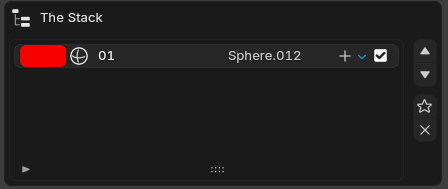
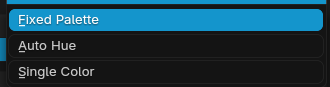

v15.9.8 improves the primitive color workflow with better visibility and user control. The original fixed palette flow is preserved, while adding selectable color assignment modes for different workflows.
What's New:-
Added scene-wide Color Mode:
- Fixed Palette: Keeps the existing sequential built-in palette behavior.
- Auto Hue: Automatically rotates hue for each newly added primitive (with fixed saturation/value).
- Single Color: Uses one shared base color for all newly added primitives.
- Added Auto Hue controls: Saturation, Value, Hue Step (deg) (0–360, default: 120°), and Hue Offset.
- Switched Hue Step to degree-based UI: Replaced normalized step-style tuning with angle-based control for better intuitiveness.
- Improved visibility in The Stack: Added a color chip per stack row, making object-to-color mapping immediately readable from the list.
- UI Placement: Color Mode and related controls are placed in primitive settings below Color and above Metallic/Roughness.
- Compatibility: Default mode remains Fixed Palette, preserving current behavior by default. New rules apply on primitive creation; existing object colors are not auto-recolored.
🚀 Release Notes - Rust-GPU-SDF v15.9.7.4
- Fixed a mismatch between viewport preview (shader) and generated mesh placement when using Grid layout.
- Unified Grid index/clamp behavior in the preview shader to match the mesh-side centered logic.
- Added post-Grid
accum_idxupdates in the preview path so Step Rotation behaves consistently. - Improved visual parity and more natural instancing results, especially with Grid + Step Rotation.
🚀 Release Notes for SDF.R V15.9.7.3 (Global UI Update)
This update focuses on globalizing the add-on interface by standardizing all user-facing labels, property names, operator descriptions, dialog boxes, and warning notifications into English. Internal logic, identifiers, and calculation properties remain completely unchanged, ensuring 100% stability and compatibility with your existing projects.
What's New in V15.9.7.3:-
1. Unified English User Interface (Global UI): All hardcoded Japanese strings in the Blender Sidebar Panel have been translated into clean, industry-standard English terminology:
- Deform Stack Types: ストレッチ $\rightarrow$ Elongate | ベンド $\rightarrow$ Bend | ツイスト $\rightarrow$ Twist | テーパー $\rightarrow$ Taper
- UI Properties & Dynamic Labels: 係数 / 滑らかさ $\rightarrow$ Factor / Smoothness | 大きさ $\rightarrow$ Size | Shell (中空化) $\rightarrow$ Shell (Hollow) | 変形 (スタック) $\rightarrow$ Deform (Stack)
- Preview Quality Presets: 低 (128) $\rightarrow$ Low (128) | 中 (256) $\rightarrow$ Mid (256) | 高 (512) $\rightarrow$ High (512)
-
2. Globalized Dialogs and Warnings:
- Dual Contouring Switching Popup: Standardized the experimental notice, compilation time warning (approx. 65 seconds), and Blender unresponsive warning message into English.
- Operators & Tooltips: All operator labels and descriptions are now fully localized.
- 3. Under the Hood & Documentation: console logs and packaged zip updated to V15.9.7.3.
🚀 Release Notes - Rust-GPU-SDF V15.9.7.2
Bug Fixes:-
Fixed Radial Pattern Alignment and Rotation Direction on Y-Axis (
axis == 1): Resolved a misalignment issue where the real-time viewport preview (GLSL) and the generated mesh (Rust/WGSL) did not match when using the Radial/Spiral pattern on the Y-axis. - Corrected the internal coordinate mapping in the mesh generator. Previously, the generator treated the X-axis as the primary coordinate and the Z-axis as the secondary coordinate. It has now been corrected to use the Z-axis as the primary coordinate and the X-axis as the secondary coordinate, matching the viewport's behavior (counter-clockwise rotation and offset along the Z-axis).
-
Affected Components:
src/common.wgsl,src/lib.rs,src/sdf.rs.
🚀 Release Notes: Rust-GPU-SDF-V15.9.7.1
This update introduces Primitive Edge Profiles, SDF Shelling, customizable Blend Profiles, and improved GPU initialization stability.
Key Features & Enhancements:- Primitive Edge Profiles (Bevel / Rounding): Added edge rounding and chamfering directly to primitives (Box, Cylinder, Rounded Box, Hex Prism, Ngon Prism). Supports Round, Sharp, Soft, Tight, and Chamfer.
-
SDF Shelling (Hollow Modifier): Hollows out shapes using the formula
abs(d) - shell_thickness. Fully synchronized across CPU and GPU. - Custom Blend Profiles: Transition profiles for blending operations (Union, Subtract, Intersect). Supports Round, Sharp, Soft, Tight, and Chamfer.
- GPU Initialization Auto-Recovery: Automatically removes corrupted shader cache files and retries compilation on startup failure.
🚀 SDF.R V15.9.7 Release Notes
New Features:- Added 5 New Primitive Types (Tier 1): Ellipsoid, Rounded Cylinder, Capped Torus, Octahedron, and Cut Sphere. Fully implemented across all pipeline layers.
- Fixed GPU Shape Fallback Issue: Resolved a bug where newly added shapes fell back to the default "Sphere" primitive when generating meshes.
- Fixed Mesh Clipping on Parameter Changes: The local AABB logic and domain expansion algorithm are now synchronized dynamically with shape-specific parameters to prevent mesh clipping.
-
Fixed Blocky/Circular Mesh Holes at High Resolutions: Updated
detect.wgslblock detection shader to correctly evaluate and keep computation blocks for the new shape IDs. - Resolved Mesh Cracking in Smooth Blending: Rewrote bounding radius calculations to use 3D diagonal vector lengths and expanded the safety margin for active block detection to ensure seamless blending.
🚀 Release Notes — V15.9.6.2
V15.9.6.2 focuses on robustness improvements for mesh generation stability in complex CSG workflows.
Improvements:- Strengthened mitigation for band-like mesh dropout observed near shape boundaries during subtraction-heavy modeling.
- Improved Detect Pass block evaluation and added safety fallback to full-primitive evaluation.
- Added a conservative CSG safety mode to reduce topology corruption (unexpected holes/floating artifacts) caused by local-list culling.
- Enhanced Marching Cubes boundary handling by adding local re-evaluation for near-surface cells.
- Enhanced GPU initialization and shader compilation stability.
🚀 SDF.R V15.9.5 Release Notes
Highlights:- Improved stability for integrated GPUs (iGPU) during startup.
- Fixed clipped/cutoff geometry in torus-heavy layout workflows.
- Improved GPU preview reliability for large procedural layouts.
- 1) Torus clipping in layout workflows: Addressed an issue where torus shapes could appear cut off. Bounding boxes are now shape-aware.
- 2) GPU initialization crash on iGPU systems: Added dynamic memory safety guards to prevent memory overflow crashes.
- 3) Viewport preview cutoff: Improved preview-domain handling and step budgeting for large-scale scenes.
In the spirit of free software and the GNU GPL:
May Blender forever remain free under the GPL!
This addon guarantees all users the freedom to learn from, modify, and share this source code — forever.