MorphBridge – Shape Key Transfer for Different Topology | Blender Addon

MeshMind in Rigging


FOR BLENDER 4.2+

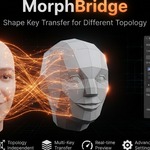
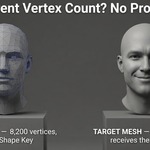
MorphBridge — Transfer Shape Keys Between Meshes With Different Topology

Copy shape key deformations from any mesh to any other mesh in Blender — even when vertex count, vertex order, or topology don't match. No retopo tricks, no manual sculpting, no matching mesh required.

Surface Correspondence Engine Barycentric Interpolation Works on Any Vertex Count

Shape Keys Are Locked to One Mesh. MorphBridge Breaks That Rule.

In stock Blender, shape keys only work if two meshes share the exact same vertex count and vertex order — which means a facial expression sculpted on your high-poly source almost never survives a retopo, an LOD pass, or a swap to a different base mesh. Most artists end up re-sculpting the same expression by hand on every new mesh. MorphBridge solves this with real surface-based shape key transfer — built for character artists, game asset pipelines, and anyone who needs shape key data to survive a topology change.

What MorphBridge Does

🔗 True Different-Topology Transfer
Source and target meshes don't need matching vertex count or order — transfer between a low-poly game mesh and a high-poly sculpt with zero prep.
📐 BVH + Barycentric Projection
Every target vertex is projected onto the closest source triangle and blended from its three nearest points for accurate, smooth deformation.
🎚️ Strength Multiplier (With Invert)
Dial the transferred deformation up, down, or flip it entirely with negative strength values — no need to redo the transfer.
🌊 Optional Laplacian Smoothing
Clean up noisy transfers with adjustable smoothing iterations, right inside the same panel.
🎯 Vertex Group Influence Mask
Isolate the transfer to the face, a limb, or clothing using a target vertex group as a per-vertex influence multiplier.
✅ Match-Rate & Distance Feedback
After every transfer, see your match rate and average distance instantly — know it worked before you even look at the mesh.

How It Works — 5 Steps From Two Meshes to One Matching Expression

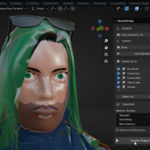
  1. Overlap the meshes. Place Source and Target so their surfaces roughly line up in world space.
  2. Select Source, then Target — or select both and click Use Selected; the active object becomes the Target automatically.
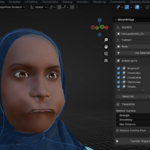
  3. Tick the shape keys you want to transfer from the multi-select list.
  4. Adjust Max Distance, Strength, Smoothing, or an Influence Group if you need finer control.
  5. Click Transfer Shape Keys and get an instant match-rate report.

Built For

Game character artists moving facial expressions from a sculpt to a game-ready LOD mesh.
Rigging TDs who need corrective shapes to survive a topology or retopo pass.
Asset store creators reusing a shape key library across a whole character lineup.
VFX and cinematic artists porting blendshapes between production and proxy meshes.

Frequently Asked Questions

Can I transfer shape keys between meshes with a different vertex count in Blender?
Yes — this is exactly what MorphBridge is built for. Unlike Blender's built-in Surface Deform or Data Transfer tools, MorphBridge uses BVH-based surface projection and barycentric interpolation, so Source and Target never need matching topology.
Does MorphBridge work with modifiers like Subdivision Surface or Mirror?
You can enable "Use Modifiers" to base correspondence on the evaluated mesh, as long as the modifier stack doesn't change the vertex count (Mirror and Armature are fine; Subdivision Surface or Boolean are not, since they alter vertex count).
My match rate is low — what does that mean?
A low match rate usually means the Source and Target aren't aligned closely enough in world space, or Max Distance is set too small. Overlap the meshes more precisely and increase Max Distance, then transfer again.
Can I limit the transfer to just the face or one body part?
Yes — assign a vertex group on the Target and select it as the Influence Group. MorphBridge multiplies the transferred deformation per vertex, so unweighted areas stay untouched.
What Blender versions does MorphBridge support?
MorphBridge is built and tested for Blender 4.2 and newer, including full compatibility with the modern Extensions platform.

Stop Re-Sculpting the Same Expression on Every Mesh

Install MorphBridge, overlap two meshes, and transfer a shape key in under a minute — no matching topology required.

Get MorphBridge for Blender 4.2+

  • Transfer Shape Keys between meshes with different topology in seconds. Surface correspondence + barycentric interpolation for accurate morphs on retopo, LODs, clothing, and more.

    $12.50 $25
$12.50

Have questions about this product?
Login to message

Details
Blender Extension Compatible Yes
Sales 20+
Published about 2 months ago
Blender Version 4.2 - 5.2
Extension Type Add-on
Render Engine Used Cycles, Eevee
License GPL