SightLIne³
 Momentum Creative Technology Inc.


What operating systems are supported?
SightLine³ is currently developed and tested on Windows 11 using Blender 4.4 +.
While Blender itself is cross-platform, official support for SightLine³ is presently limited to Windows 11. Support for additional platforms may be evaluated in future updates.
What Blender versions are supported?
SightLine³ is compatible with Blender 4.4 and newer. Future compatibility will be maintained where possible as Blender evolves.
Is this tool intended for beginners?
SightLine³ is designed for artists who require structural accuracy in their work.
Basic familiarity with Blender’s camera system and 3D navigation is recommended.
How is SightLine³ different from vanishing-line tools?
Traditional tools rely on inferred vanishing point intersections.
SightLine³ defines explicit paired ray constraints along the X, Y, and Z axes. Instead of visually chasing intersections, it constructs measurable axis relationships that mathematically determine camera placement.
It is constraint-driven rather than approximation-driven.
Does SightLine³ require known measurements?
Not exact measurements — but reasonable scale estimates are required.
SightLine³ uses two user-defined values to establish scene scale:
Camera Distance
An approximate distance from the real-world camera position to the selected TwinRay anchor point (for example, 10 meters across a street).
Reference Height
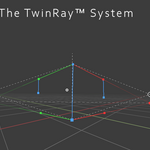
An estimated real-world height represented by the Z-axis constraint — typically the vertical distance between the ZBot (bottom blue anchor) and ZTop (top blue anchor). This might correspond to a building corner (4–6 meters), a doorway (approximately 2.2 meters), or another feature in the image with a reasonable real-world height estimate.
These values do not need to be perfectly measured. They provide proportional scale so the solver can construct a physically plausible camera within meaningful world units.
The structural solve establishes geometric correctness. Post-solve refinement controls allow precise spatial tuning for production workflows.
What is the TwinRay™ anchor?
The TwinRay anchor is a defined geometric reference point in the image that establishes world grounding for the solve.
All axis constraints relate back to this anchor. Choosing a stable, well-defined anchor improves solution reliability.
Visually, the anchor corresponds to the ZBot (bottom blue anchor) location in the viewport.
What if my image contains conflicting perspective cues?
If the image geometry is inconsistent (for example, non-parallel architectural lines), SightLine³ computes the most physically plausible solution permitted by the provided constraints.
It cannot resolve contradictions that do not exist in real-world geometry.
Can I adjust the camera after solving?
Yes.
SightLine³ includes controlled post-solve refinement tools (dolly, zoom offset, lens micro-adjust, roll) that allow production-level adjustments while preserving the underlying geometric relationships.
Why does my solved camera not “look right” at first glance?
Human perception tolerates structural error. SightLine³ does not.
A visually “close” alignment may differ from a geometrically consistent solution. The solver prioritizes mathematical coherence over visual approximation.
Use the refinement controls after solving if production adjustments are needed.
Can SightLine³ fix distorted or warped images?
No.
SightLine³ reconstructs a physically plausible camera based on the geometry present in the image. If the image contains lens distortion or warped verticals, those characteristics will influence the solution.
Lens distortion correction should be performed prior to solving when necessary.
What type of images work best?
Images with:
Clear, straight architectural lines
Strong edge contrast
Well-defined verticals
Minimal lens distortion
Consistent perspective
Highly stylized imagery, curved geometry, or conflicting perspective cues may reduce solve stability.
Is SightLine³ automatic?
No.
SightLine³ is an interactive, constraint-based camera solver. The user defines geometric relationships in the image using the TwinRay™ guides. The solver then computes a mathematically consistent camera from those constraints.
It is precise — not push-button.
Why does the solve sometimes feel “finicky”?
SightLine³ responds directly to guide placement. If the guides allow multiple geometric interpretations, refining them clarifies the solution. This behavior reflects the solver’s commitment to structural accuracy.
$22
Have questions about this product?
Login to message
| Blender Extension Compatible | Yes |
| Sales | 20+ |
| Published | 8 months ago |
| Blender Version | 4.4 - 5.0 |
| Extension Type | Add-on |
| Render Engine Used | Cycles, Eevee |
| License | GPL |
Discover more products like this
camera solving Perspective-matching architectural visualization TwinRay camera matching perspective solver ArchViz camera calibration set extension SightLine3 match photo blender addon