 TAngraFX


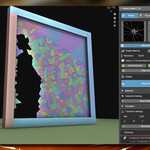



The Dirtmap is on wrong place, what should i do?
In most physics simulation cases, even with rigs, the Apply Transform can introduce many issues. Simply Shatter can suffer from the same problem. The best solution is to avoid applying the Apply Transform before using simply shatter. And let simply Shatter handle it for us.
How to install the simply shatter addon?
Like most add-ons you can install it as an add-on or an extension.
1- go to blender preferences.
2- click on addons
3- install the addon from local storage
4- select the zip file
5- Then, enable the add-on by checking the box next to "Simply Shatter".
Where can I find video tutorials?
You can find a detailed tutorial and showcase on our YouTube channel: [https://www.youtube.com/@TangraFX]. We recommend starting there to see the add-on in action.
I can't afford the product. How do I request a discount or free copy?
We believe this tool should be accessible. Please send us a direct message through the Blender Market or our social media, politely explaining your situation. We are happy to help.
The dirt map isn't showing up in my render. What should I check?
Ensure the "Dirt Map" option is enabled in the Materials panel. Also, check that your render engine (Eevee or Cycles) supports the node setup, and that your viewport shading is set to "Material" or "Rendered".
Can I use my own materials with Simply Shatter?
Absolutely. While we include 6 custom glass materials, the shatter system works with any Blender material. You can apply your own materials to the fractured pieces at any time.
What do the different Collision Types (Static, Dynamic, Sticky, Slippery) do?
Static: Objects don't move. Dynamic: Objects move and collide with physics. Sticky: Fragments stick to surfaces on impact. Slippery: Reduces friction for ice-like or slick interactions.
My simulation is too slow or crashes. How can I fix this?
First, try using the Low Poly fracture method with a lower resolution. In the Physics panel, reduce the simulation quality and step count for the preview. You can also enable the "Real-time preview" to dial in the settings before running a final, high-quality bake.
Can I control where the object shatters from?
Yes, after selecting apply shatter, just click on the point that should center of shatter.
What version of Blender is required for Simply Shatter?
The add-on is designed for Blender 3.0 and above. For the best experience and full feature compatibility, we recommend using the latest stable version of Blender.
Have questions about this product?
Login to message
| Blender Extension Compatible | Yes |
| Sales | 200+ |
| Rating | 18 ratings |
| Dev Fund Contributor | |
| Published | about 1 year ago |
| Blender Version | 3.6 - 5.2 |
| Extension Type | Add-on |
| Render Engine Used | Blender-Internal, Blender-Game-Engine, Cycles, Eevee, Luxrender |
| License | Mit |
Discover more products like this
blender Glass physics simulation VFX fracture shatter Shader b3d Fracture Simulation destruction effects