 Waveus


Smart Auto Focus – Documentation
Automatic Camera Focus in Blender, Done Right
Smart Auto Focus lets you add realistic Depth of Field to your Blender scenes in seconds. Focus your camera automatically, smoothly, and accurately — no empties, no guesswork, no tedious keyframes.
Installation
-
Download the
.zipfile of Smart Auto Focus. -
Open Blender (3.5+).
-
Go to Edit > Preferences > Add-ons > Install.
-
Select the downloaded
.zipand click Install Add-on. -
Enable the addon. A new tab Smart Auto Focus will appear in the 3D View sidebar.
Features
-
One-click autofocus on real surfaces
-
Smooth focus transitions
-
Switch delay to avoid jitter
-
Bake focus keyframes for animations
-
Automatic Depth of Field control
-
Clean and minimal UI
How to Use
-
Select your active camera.
-
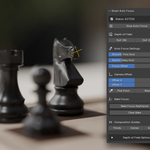
Press Start Auto Focus to activate the Raycast pointer.
-
Move the camera; the focus follows your point of interest automatically.
-
Adjust Smooth Time and Switch Delay to control focus speed and responsiveness.
-
Optional: Press Bake Focus to keyframe the focus for your animation.
-
Stop Auto Focus anytime to regain manual control.
Advanced Tips
-
Use Camera Offset (X/Y) to adjust the Raycast start point in the camera’s FOV.
-
Use the Eyedropper Tool to pick any point in your scene for focus.
-
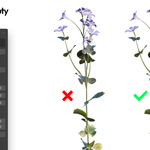
Disable Surface Picking in Object Properties to skip objects you don’t want focused.
-
Adjust Focus Offset to fine-tune distance per object.
-
Combine with Composition Guides for better framing.
Troubleshooting
-
Stop Auto Focus before moving or editing objects to avoid conflicts.
-
Make sure the active camera has Depth of Field enabled.
Compatibility
-
Blender 3.5 and above
-
Works with any camera using Depth of Field
Video Tutorial
A step-by-step video tutorial is included, showing all features and workflow from installation to baking focus for animations.
License
-
Smart Auto Focus is distributed under a permissive license. Lifetime updates included with a one-time purchase.
Have questions about this product?
Login to message
Discover more products like this
autofocus blender blender autofocus how to focus in blender focus blender Render auto focus auto-focus blender autofocus autofocus in blender camera smart-auto-focus blender auto focus