 auphinity.tools



Smart Batch Renamer
Batch rename objects, meshes, materials & collections — with live preview
Smart Batch Renamer
Stop renaming objects one by one. Select. Preview. Apply. Done.
The problem
You know the feeling. You open a .blend file you haven't touched in a week and the outliner greets you with:
| Your Outliner right now |
|---|
Cube.003 |
Cube.007 |
Sphere.012 |
Material.004 |
Cylinder.001 |
Light.002 |
You could spend 20 minutes clicking through each object and typing names by hand. Or you could select them all, open the Rename tab, and fix everything in a single click.
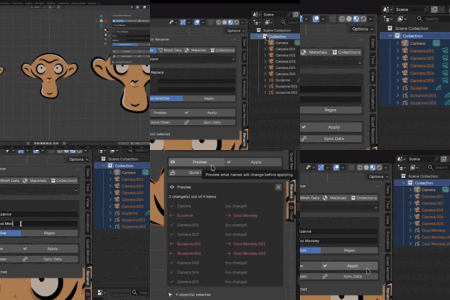
Smart Batch Renamer is a lightweight sidebar panel that lives in your 3D Viewport. Select the objects you want to rename, pick an operation, preview the result, and apply — done. No guessing, no regrets: you always see exactly what will change before anything happens.
Features at a glance
| Operation | What it does | Example |
|---|---|---|
| Find & Replace | Search and replace text in names. Plain text or full regex. Case-sensitive toggle. |
wall_old → wall_new
|
| Prefix / Suffix | Add or remove text at the beginning or end of names. |
Chair → SM_Chair
|
| Clean Names | Strip .001 / .002 / .003 suffixes. Trim whitespace. Spaces to underscores. |
Cube.003 → Cube
|
| Numbering | Rename with sequential pattern. Control base name, start, padding, separator. |
Tree_001, Tree_002, Tree_003
|
| Change Case | Convert to UPPER, lower, Title, or snake_case. |
WallPanel → wall_panel
|
| Sync Data Names | Set mesh data-block names to match their parent object names. | Object Chair → data-block Chair
|
| Quick Clean | One button strips .001 from objects, meshes, and materials at once. | Entire scene cleaned in one click |
Live preview — see before you commit
Every operation supports a live preview. Click Preview and the panel shows a clear before/after list:
| Before | After | |
|---|---|---|
| Cube | — | no change |
| Light | — | no change |
| Camera | — | no change |
Camera.001 |
→ | Camera - 001 |
Camera.002 |
→ | Camera - 002 |
Cube.001 |
→ | Cube - 001 |
Cube.002 |
→ | Cube - 002 |
Cube.003 |
→ | Cube - 003 |
Changed names are highlighted. Unchanged names are dimmed. Your scene stays untouched until you explicitly click Apply. Changed your mind? Just close the preview.
How it works
| Step | Action | Details |
|---|---|---|
| 01 | Select | Pick objects in the viewport |
| 02 | Choose | Pick target (Objects / Mesh Data / Materials / Collections) and operation |
| 03 | Preview | See every name change before it happens |
| 04 | Apply | One click. Supports Ctrl+Z undo. |
After installation the add-on appears as a Rename tab in your 3D Viewport sidebar (press N). The entire tool lives in this one panel — no pop-ups, no separate windows.
Who is this for?
- Environment artists assembling scenes from dozens of kitbash parts who need consistent naming across hundreds of objects.
-
Game developers preparing assets for engine export with strict prefixing rules like
SM_,SK_,MI_. - Freelancers delivering organized .blend files to clients who expect professional naming.
-
Anyone who has ever opened the Outliner, sighed at the wall of
Cube.001names, and wished for a better way.
What you get
| Detail | Value |
|---|---|
| Version | 1.0.0 |
| Compatibility | Blender 4.0 and newer |
| License | GPL-2.0-or-later |
| File |
smart_batch_renamer.zip — install directly in Blender |
| Render engine | No dependency — works with EEVEE, Cycles, Workbench |
| Documentation | Full user guide included (see Documentation tab) |
Tip: After installation, press N in the 3D Viewport to open the sidebar, then click the Rename tab. That's it — you're ready to go.