 peterz


Does Smart Flow Replay record every Blender operation?
No. It focuses primarily on reliable object-processing operations performed in Object Mode. Actions that depend on Edit Mode, Sculpt Mode, node editors, animation editors, or other interactive contexts may not be recorded.
The recording report identifies actions as Captured, Partially Captured, or Not Recorded.
What happens if one object fails during a batch?
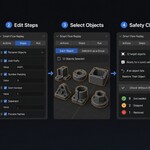
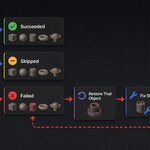
You can choose from three failure-handling modes:
Restore That Object restores the failed object and continues.
Restore Entire Batch stops the run and restores all targets.
Keep Partial Changes preserves changes made before the failure.
Are shared workflow files safe?
Shared .sfrflow files contain serialized workflow data, not Python source code. Imported workflows cannot execute Python, delete objects, or open and save .blend files.
Imported workflows also display a permission summary before their first run. However, users should still inspect all steps and test unfamiliar workflows on duplicate objects.
Can Smart Flow Replay export multiple FBX files?
es. An Export FBX step can generate files for multiple targets. Dynamic placeholders such as {object_name}, {index}, and {workflow_name} can be used to create unique filenames and paths.
Example:
//exports/{object_name}.fbx
Can I create a workflow without recording it?
Yes. You can add steps manually or begin with one of the included Starter Actions.
What modifiers are supported?
Common supported modifiers include Bevel, Mirror, Array, Solidify, Subdivision Surface, Boolean, Decimate, Weld, and Weighted Normal.
Why was one of my workflow steps skipped?
A step may be skipped because:
It is disabled
Its conditions did not match
The target object is incompatible
The required selection count was not met
A conditional skip is expected behavior and is not considered a failure.
Can workflows behave differently for different objects?
es. Individual steps can use conditions based on object type, name patterns, modifiers, materials, custom properties, Blender mode, and selection count.
When a condition does not match, the step is skipped rather than reported as a failure.
 Included
Includes 12 months of
- Support from peterz
- Product updates
Extend this product’s Support Period +12 months: 25% of product price
Have questions before purchasing?
Login to message
| Blender Extension Compatible | Yes |
| Published | 3 months ago |
| Blender Version | 4.2 - 5.2 |
| Extension Type | Add-on |
| Render Engine Used | Cycles, Eevee |
| License | GPL |
Discover more products like this
3d-workflow-automation asset presentation batch-export artist workflow Blender Workflow Automation addons Workflow no-code-automation Batch processing productivity Blender Automation