Smart Spacing – Object Alignment & Distribution Toolkit
 RealDevCode



📘 Documentation
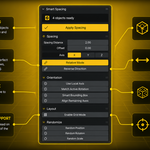
Learn how to use Smart Spacing to arrange, distribute, align, and organize objects faster with precision spacing tools, grid layouts, smart bounding box spacing, and workflow utilities.
📦 Installation
Go to Edit → Preferences → Add-ons → Install and select the Smart Spacing ZIP file.
⚙️ Main Features
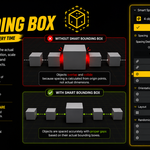
- Smart Bounding Box spacing
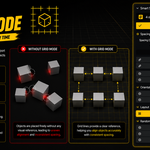
- Grid layout & object organization
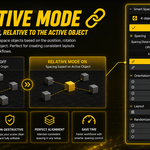
- Relative object spacing workflow
- X, Y, Z axis spacing controls
- Offset and spacing distance controls
- Local axis support
- Match active object rotation
- Reverse distribution direction
- Random position, rotation & scale tools
🎯 Workflow Usage
- Select multiple objects inside Blender
- Open the Smart Spacing panel
- Choose spacing mode and axis
- Adjust spacing distance and offset values
- Enable optional tools like Grid Mode or Smart Bounding Box
- Apply spacing instantly with one click
📐 Smart Spacing Tools
- Smart Bounding Box spacing for accurate object gaps
- Grid Mode for clean layouts and organization
- Relative Mode for active object spacing workflows
- Local Axis support for rotated object spacing
- Randomization tools for natural variation
🛡️ Safe Workflow
- 100% offline workflow
- No tracking or data collection
- No internet access
- Production-safe workflow design
- Works directly inside Blender
💡 Tips
- Use Grid Mode for cleaner layouts
- Enable Smart Bounding Box for accurate spacing
- Use Relative Mode for flexible workflows
- Combine randomization tools for natural scenes
- Use Local Axis mode for rotated objects
Have questions about this product?
Login to message
| Blender Extension Compatible | Yes |
| Dev Fund Contributor | |
| Published | 5 months ago |
| Blender Version | 4.2 - 5.2 |
| Extension Type | Add-on |
| Render Engine Used | Cycles, Eevee |
| License | GPL |
Discover more products like this
distribution spacing procedural Level Design blender addon alignment object tools modeling Workflow grid layout environment art layout