SmartUndo+
 kunemann




Yes — press Cmd/Ctrl+Alt+Y for the pie menu. The first ring shows only the categories that actually have history for whatever is under your cursor, the second one lists that category’s steps around a dial: you are at the top, counter-clockwise walks back in time and Original always sits in the neighbouring slot. Clicking a step moves that track alone, exactly like clicking a row in the panel — just without leaving your cursor.
No — that is what the 1.35.0 through 1.36.0 performance passes were for. Values snapshot only after they settle, animation channels are fingerprinted so only the ones that actually moved get re-read, selection clicks on dense meshes skip the heavy work and saving a large history reuses what it already encoded. A 900-curve rig costs 12 ms a pass instead of 190 and adding more rigs no longer makes it worse. The 1.35.3 pass went after the remaining heavy-rig costs: undo re-sync matches channels by fingerprint, so native undo on a deep history is a couple of lookups instead of a full scan; panel redraws no longer re-read thousands of channel names (labels are cached); the first poll of a big rig is sliced across ticks instead of one long stall; sculpt strokes reuse the previous step’s topology buffers; saving pre-warms in the background, with Windows checkpoints compressed and written in one call. Histories are identical before and after. Sculpt strokes store one whole-mesh snapshot each, so on dense meshes SmartUndo+ asks once before tracking them — Cancel leaves sculpting to Blender’s undo — and the Max Vertices preference skips geometry tracking above that size entirely. History itself lives in RAM, so stepping and jumping stay instant. Posing a rig is cheap too: the pose is fingerprinted in bulk so only the bones that actually moved are re-read — a 339-bone character costs about a quarter of a millisecond a tick. The 1.36.0 pass removed the last big stalls: scene and group checkpoints on a 2000-object scene went from 4.1 s to 0.14 s, dense-mesh undo dropped from hundreds of milliseconds to single digits and panel redraws are about 7× faster.
Open Preferences → Add-ons → SmartUndo+ and tick Performance Log under Diagnostics. Reproduce the slowdown, then press SmartUndo+ Performance Report right below it. That writes smartundo_perf_.json next to your .blend — the full path is printed in the console — with per-span timings plus a machine fingerprint, so a slow scene can be diagnosed from real numbers instead of a description. Profiling stays off unless you ask for it, so it costs nothing in normal use. Send the JSON over “Contact the creator” with a note about what you were doing and I can see exactly which phase is costing the time.
Vertex paint and weight paint are covered automatically — they are part of the same mesh-geometry tracking as edit-mode and sculpt changes. Texture paint is separate and opt-in (whole-image snapshots use more RAM): turn it on from the panel, or accept the one-time notice on your first stroke — and every brush stroke — in the 3D viewport or the Image Editor — becomes its own undoable step in the panel’s history. Checkpoints keep it all too — restoring one brings back weights and unsaved texture paint along with the shape.
Yes — every brush stroke becomes its own step with a sculpt icon in the Geometry group — and Voxel or Quadriflow remeshing lands as a topology step you can step back across. Each step stores a whole-mesh snapshot, so dense meshes show a one-time notice first: OK keeps saving every stroke, Cancel leaves sculpting to Blender’s undo (small meshes track automatically). Dyntopo and Multires strokes live outside the mesh data, so they stay with Blender’s undo while active — and Multires settings stay tracked like any modifier. Each stroke is named after the brush that made it — Sculpt: Blob, Sculpt: Smooth for shift-smoothing — and sculpting files under its own Sculpt category, separate from edit-mode changes.
Simulation and physics caches, particles and grease-pencil strokes are out of scope and it isn’t version control or a scene backup. Dyntopo and Multires strokes live outside the mesh data, so they stay with Blender’s undo while active — turning Dyntopo off still lands the session as one step. Each track is capped too, so the very oldest steps eventually drop off. For anything longer-term, save a Checkpoint.
Yes — and it works per bone. Pose a bone, move on to the next one, then come back: with bones selected, Cmd/Ctrl+Alt+Z walks each selected bone’s own history and leaves the rest of the pose exactly where you put it. Clicking a step in the panel does the same. Bones do not need keyframes for this — pose values are tracked like any other property — and a bone that is keyed steps its F-Curves along with its pose. With no bones selected the whole armature steps back one state, as it always did.
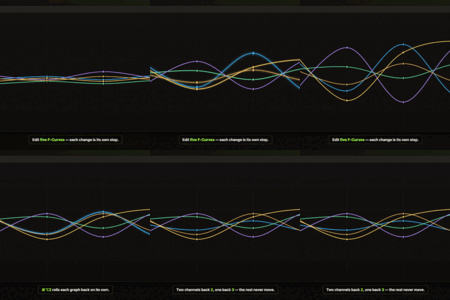
Yes. Editing keyframes in the Graph Editor or Dope Sheet — moving, adding or removing a key, changing a handle, interpolation or easing — is tracked per F-Curve channel, so you can undo just X Location without touching Y Location or a shape-key's animation. Cmd/Ctrl+Alt+Z there steps only the selected channels, across several objects at once and each channel is named exactly as the Graph Editor shows it. Scrubbing the timeline and playback record nothing.
Have questions about this product?
Login to message
| Blender Extension Compatible | Yes |
| Sales | 30+ |
| Rating | 10 ratings |
| Dev Fund Contributor | |
| Published | 5 months ago |
| Blender Version | 5.0 - 5.2 |
| Extension Type | Add-on |
| Render Engine Used | Arnold, Blender-Game-Engine, Cycles, Eevee, Freestyle, Luxrender, Mental-Ray, Octane, Vray, Yafaray |
| License | GPL |
Discover more products like this
non-destructive redo undo history undo addon keymap per-object undo Workflow history timeline checkpoints productivity