 Filip
Filip


The Ultimate Measurement, CAD-like tools and Technical Drawing Toolkit for Blender
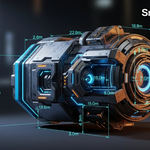
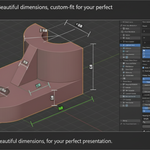
Snap Measure transforms Blender from a powerful modeling suite into a complete solution for technical illustration, architectural visualization, and precision engineering. Move beyond simple measurements and unlock a professional workflow with interactive dimensioning, powerful modeling drivers, and a one-click Technical Renderer that produces stunning, print-ready drawings.
## Measure Anything, Precisely
Create accurate dimensions with a toolset designed for a seamless, intuitive workflow.
Intuitive Snapping: Snap precisely to vertices, edges (including midpoints), faces, and bounding box corners with clear visual feedback. You can even snap new measurements to the virtual points of existing ones.
Comprehensive Measurement Tools: Effortlessly create linear dimensions, angles, 3-point arc radii, and even complex bevel radii directly from your edge selections.
Projected Dimensions: Lock to an axis to measure the projected distance between objects, perfect for creating elevations and plans.
Chain Mode: Draw continuous measurements one after another without restarting the tool, ideal for dimensioning floor plans and complex objects.
## Full Visual Control
Customize every aspect of your annotations to match your project's aesthetic or professional standards.
Complete Customization: Control every visual aspect of your dimensions, including color, line thickness, font, font size, and decimal precision.
Professional Endpoint Styles: Choose from multiple arrow styles, including standard arrows, architectural ticks (T-Shapes), and ISO-compliant filled arrowheads.
Advanced Text Formatting: Go beyond the number. Add custom prefixes and suffixes (e.g., "Approx. 12.5m"), add lines of text above and below your dimension, or completely override the value with your own text.
Dimension Rounding: Automatically round measurement values up or down to your specified interval (e.g., to the nearest 5mm).
## More Than a Ruler: Interactive Modeling
Turn your measurements into active components of your modeling process.
Powerful Driver System: Use any measurement as a driver source. Copy a dimension's value and paste it as a driver onto any property in Blender—from an object's scale to a modifier's value. Create complex parametric relationships with a few clicks.
Vertex Group Scaling: Don't just measure—model. Assign sections of your mesh to a line's Start and End vertex groups, and then simply type in a new value in the UI to scale the mesh to that exact dimension. Perfect for architectural adjustments and hard-surface modeling.
## Professional Drawings & Renders
Generate clear, professional output for presentations, blueprints, and documentation.
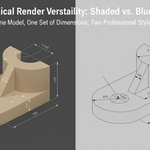
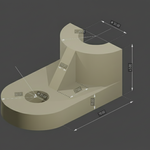
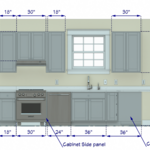
One-Click Technical Renderer: Instantly generate clean, vector-style line drawings of your model. It automatically handles hidden lines (optional), applies a clean white background, and renders all your Snap Measure dimensions for a professional, blueprint-style look.
Section Views: Combine the Technical Renderer with a boolean cutter object to create incredible section views, complete with automatic, customizable cross-hatching.
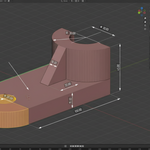
Render Overlay: Composite your colorful, in-viewport measurements over your standard Cycles or Eevee renders for clear, illustrative presentations.
Streamlined Workflow & Organization
Manage even the most complex scenes with powerful organization and workflow features.
Measurement Groups: Organize your dimensions into layers. Name them, group them, and toggle their visibility with a single click.
Presets System: Save and load entire collections of visual and behavioral settings. Create presets for different projects, clients, or drawing styles.
Quick Access Panel: Mark any measurement as a "Favorite" to add its primary control slider to a dedicated panel for fast, easy access to your most important dimensions.
Solo Mode: Instantly hide all other measurements to focus on just one, then toggle back to restore your previous view.
Stop fighting with imprecise workflows. Snap Measure provides the accuracy, control, and professional output you need, seamlessly integrated inside Blender. Download Snap Measure today and take control of your dimensions.
