Stack Anything
 Oculis Studio





Documentation
Stack Anything
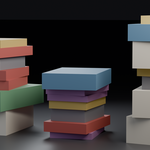
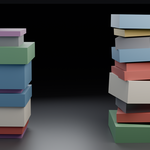
A geometry nodes group that stacks random objects from a collection, using each object's real bounding box so items always sit flush.
v1.0Blender 5.2+
Setup
Installing
There's no add-on to install. Stack Anything is a node group inside a .blend file, so you either point your Asset Browser at it or append it.
1 |
Put the file in an asset library Copy Stack Anything.blend into a folder registered under Preferences ▸ File Paths ▸ Asset Libraries. Or skip this and use File ▸ Append ▸ NodeTree instead. |
2 |
Add it to an object Any object works — an empty mesh (Add ▸ Mesh ▸ Plane, then delete its vertices in Edit Mode) is cleanest, since the original geometry isn't used. Add a Geometry Nodes modifier and choose Stack Anything. |
3 |
Pick your collection Set the Collection field and items appear immediately. The stack grows from the object's origin. |
Reference
Main settings
| Collection | — | One item per direct child of the collection, chosen at random. The collection can be hidden in the viewport and render. |
| Direction | Up (Z) | Which way the stack grows — Up (Z), Along X or Along Y. See below. |
| Count | 12 | Items per stack. Total items = Count × Stacks X × Stacks Y. |
| Gap | 0 m | Space added between items. Negative values overlap them, useful for soft or squashy objects. |
Randomize
All randomness is per item and driven by Seed. Nothing here can break the packing — items stay flush no matter how you set them, with one exception noted under Lean.
| Seed | 0 | Changes which objects are picked and every random value at once. Give each stack in a scene a different seed. |
| Spin | 12° | Random rotation about the stack axis, ± this angle. Rotation happens around each item's own centre, so nothing drifts sideways. |
| Lean | 0° | Random tilt in the two perpendicular directions. Applied after packing distances are worked out, so keep it under about 5° or add Gap to compensate. |
| Shift | 0 m | Random sideways slip, ± this distance. Always applied across the stack, never along it, so it can't open gaps. |
| Scale Min / Max | 1.0 / 1.0 | Uniform size variation per item. The scaled size is what gets packed, so a shrunken item takes correspondingly less room. |
Multiple stacks
One modifier can build a whole grid of independent stacks. Each accumulates its own height, so they all end up different.
| Stacks X / Y | 1 / 1 | How many stacks across each grid axis. Which world axes those are depends on Direction. |
| Spacing X / Y | 0 (auto) | Distance between stacks. Left at 0 it measures your collection's overall footprint and adds 20% clearance. Type a value to override. |
— Auto spacing doesn't know about Spin, so if you rotate items a lot you may want to set spacing manually
Direction
Three ways to run
Up (Z) — a pile
Items pile upward from the object origin. Stacks X spreads along +X, Stacks Y along +Y — a grid on the ground.
Along Y — a shelf row
Items stand up and pack face to face along +Y, each one resting on the floor plane rather than centred on it. Stacks X gives parallel rows along +X; Stacks Y gives levels above, so Spacing Y becomes your shelf pitch.
Along X — the same, rotated
Runs along +X. Stacks X spreads along +Y, Stacks Y stacks levels in +Z.
Starting points
Recipes
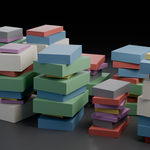
Messy book pile Up (Z) · Spin 14° · Lean 2° · Shift 0.006 · Scale 0.92–1.12 · Gap 0.0015 |
Bookshelf Along Y · Spin 0 · Lean 4° · Stacks Y 3 · Spacing Y = shelf pitch |
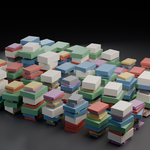
Warehouse floor Up (Z) · Count 6 · Stacks X 8 · Stacks Y 6 · Spin 3° · everything else off |
Machine-perfect Spin, Lean and Shift at 0, Scale 1–1, Gap 0 — dead-straight, seamless packing. |
Under the hood
How it works
Worth reading if you plan to modify it. There's no repeat zone anywhere — everything is fields, evaluated in one pass, which is why it stays fast at high counts.
— Collection Info runs with Separate Children and Reset Children, so each child becomes an instance at the origin and the source objects' own transforms are ignored
— A Bounding Box node gives one box per child; realising that produces exactly 8 vertices per object, where vertex 0 is the minimum corner and vertex 7 the maximum
— Each item picks a random object index, then Sample Index reads those two corners to get its size, centre and base
— Accumulate Field turns those depths into a running total — the distance each item sits along the stack. Its Group ID is the stack number, which is how a grid of stacks accumulates independently
— Every item is anchored by the centre of its bounding-box base, and both rotation stages pivot around that same anchor — which is why rotation never shifts an item off its neighbour
— Output is instances. Add a Realize Instances node after it if you need real geometry
Good to know
Limits and behaviour
Bounding boxes include everything
A stray vertex far from the body inflates that object's box and leaves an apparent gap. Clean up loose geometry in your source objects.
Items pack along their local Z
Whichever way you model an object, its local Z height is the direction it gets packed in. Rotate the mesh in Edit Mode if an object stacks on the wrong face.
Editing the collection reshuffles things
Adding, removing or renaming source objects changes their index order, so a saved seed will produce a different arrangement.
Lean is approximate
Tilt is applied after distances are calculated, so large angles cause clipping. Small values plus a little Gap look best.
If something looks wrong
Troubleshooting
Nothing appears
Check the collection is set and isn't empty, and that Count isn't 0. Empty inputs produce nothing rather than an error.
Neighbouring stacks collide
Auto spacing is based on unrotated bounds. Set Spacing X / Y by hand, or reduce Spin.
The same object keeps repeating
Picks are independent, so repeats are normal in a small collection. Add more variants or change Seed.
Items intersect
Either Gap is negative, or Lean is too high. Set both back to 0 to confirm the packing itself is clean.
Still stuck
Email [email protected] with a scene file and I'll take a look.
Specs
Details
| Blender | 5.2+ |
| Type | Geometry Nodes group |
| Output | Instances |
| Dependencies | None |
| Author | oculis.studios |
Have questions about this product?
Login to message
| Downloads | 9 |
| Dev Fund Contributor | |
| Published | 3 months ago |
| Blender Version | 4.2 - 5.2 |
| License | GPL |