Stylised Antique Floor Lamp
 J'Arrive Art Studio


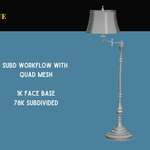


Drag-and-drop using the Asset Browser, or quickly append into any scene.
To access assets from the Asset Browser:
1. Download and extract files from ZIP
2. Save to a location on your computer where you won't need to move the folder (if you do move the folder, you will just need to repeat the steps below)
3. Open a new Blender file in your preferred software version (4.5+), go to Edit > Preferences > File Paths
4. Under 'Asset Libraries' click the '+' and then navigate to the saved folder (you will not see anything inside the folder, this is normal). Set your preferred Import Method (I use 'Append'). Save your preferences.
5. Open the Asset Browser as a split window, drag and drop! Uncheck 'Instance' in the Append Operator menu (bottom left) to use the parented hierarchies in your new scene. You only have to do this once and it'll stay unchecked as you append more collections.
Ryan King has some excellent videos on YouTube about how to add Asset Libraries if you're having any difficulties - https://www.youtube.com/watch?v=2n0DkByD-l0&t=344s
Append method:
1. In the scene you want to bring the asset into, go to File > Append
2. Navigate to the saved folder, then go to 'Collections' and select the asset you want
Textures and Materials
1. The areas of the mesh that use PBR textures (from polyhaven.com) are UV unwrapped. You can switch these for your own textures if you want to change the look.
2. The parts using procedural materials are object-mapped, and don't have UVs prepared.
3. If you're pulling an asset from the browser repeatedly using the Append method, e.g. a stack of books, you'll find the materials are created as a new .00- variant each time. This gets very heavy quite quickly and the viewport may be laggy or crash your renders. Set the material to the original variant each time you drag the asset in from the browser, or use alt-D to duplicate what's already in your viewport to create a new copy (without dragging from the asset browser again).
4. If you are intentionally working with many iterations of the materials you can go the Simplify tab in Render settings and set the Texture Resolution Max for the viewport and render.
----
Please feel free to email me at [email protected] for any questions, support, or custom asset packs.
----
About the Shop
When I was working as an environment artist on an animated short film with the Entertainment Technology Centre at USC, there was a small budget for assets if buying them would speed up the work without sacrificing the look we were going for. For one environment - a detailed tailor shop - I figured I should check what was out there. There were so many characters that fit the stylised realism aesthetic - but I ended up modelling every single prop for that scene.
It got me thinking about character artists, and any else doing set dressing. Modelling and detailing backgrounds is a domain of its own; combined with the task of animating a character or creating a diverse range of environments, would anything ever get finished? Especially for indies, it becomes all-time-consuming.
There are quicker ways now- you can generate 3D models in a few minutes. So why bother with a prop shop? In the controversy of AI generation, whatever your feelings on it, something has become clearer to me - there are a lot of people looking for ways to tell their stories.
I love 3D, and I love Blender - and I think it's a workflow worth championing.
Have questions about this product?
Login to message
| Published | 5 months ago |
| Blender Version | 4.5 - 5.1 |
| Render Engine Used | Cycles, Eevee |
| Misc Data | Uvs-Unwrapped, Textured |
| License | Royalty Free |

Discover more products like this
set dressing 3D background Blender Professionals characteranimation Antique Portfolio Renders lamp pixar stylised 3d-wooden-furniture antique Lighting hero prop