Stylized Anime Hair Collection Pack - 60 High Quality Game Ready Hairstyles for Characters and Avatars
 blenderustad



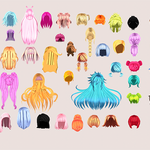
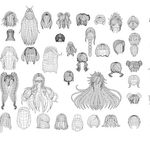
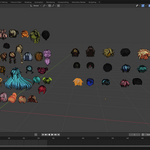
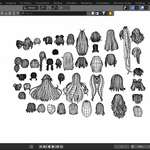
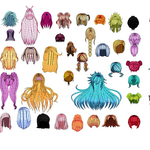
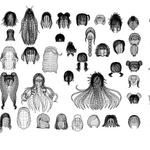
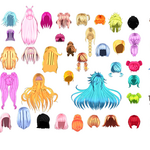
60+ Anime Hairstyles — Female & Male
A collection of 61 stylized anime hairstyle models (46 female + 15 male), delivered as a shared multi-object file in five formats for use across Blender, game engines, and other 3D/DCC software.
Package Contents
Male  Female.blend     Native Blender scene (source file)
Male  Female.fbx       Autodesk FBX
Male  Female.obj       Wavefront OBJ
Male  Female.mtl       Material library for the OBJ
Male  Female.glb       glTF 2.0 (binary, textures embedded)
Male  Female.dae       COLLADA
Texture.zip            All texture maps, packaged separately
Texture/               Same texture maps, unpacked (60 files)
Thumbnail/, 1200X600/, 1920X1080/   Marketing/preview renders (not part of the 3D asset)
What's Inside the 3D Files
-
61 hair mesh objects in one scene:
Male_Hair_01–Male_Hair_15andFemale_Hair_01–Female_Hair_46. - Each object is a standalone, individually selectable mesh — delete or hide any you don't need.
- Combined mesh data: ~215,500 vertices / ~205,200 triangulated faces across all 61 objects (varies per style; poly count is per-object, not per-scene, since only the hairstyles you use will end up in your project).
-
61 materials (one per hairstyle, 1:1 with the mesh objects), matching the
newmtlentries inMale Female.mtl. - No body/head mesh is included — these are hair-only assets meant to be fitted onto your own character.
Textures
- 60 texture maps in
Texture/(also zipped asTexture.zip). - Two naming conventions are used depending on how each hairstyle was authored:
-
<Name>_Base_color.png— albedo/base color map. -
<Name>_2D_View.png— a flat opacity/alpha card texture used for card-based hair strands.
-
- File names correspond to material names, not always to the
Hair_XXobject numbering — match by material name if a texture looks unlinked after import. - Textures are not packed inside the
.fbx,.obj, or.daefiles — keep theTexturefolder alongside those files (or beside your project) so paths resolve. The.glbhas textures embedded and needs nothing extra. The.blendfile has textures packed internally.
Format Notes / Compatibility
| File | Notes |
|---|---|
.blend |
Saved with Blender 4.3, OBJ/FBX/GLB exports generated from Blender 4.5.5 LTS. Textures are packed into the file (File > External Data > Unpack All Into Files if you need loose copies). |
.fbx |
Standard FBX mesh + material export. Compatible with Unity, Unreal Engine, Maya, 3ds Max, Cinema 4D, iClone, and similar. Re-link the Texture folder if materials appear blank on import. |
.obj / .mtl
|
Universal mesh format. Import .obj with .mtl in the same folder so materials auto-link. No animation/rig data (OBJ doesn't support it). |
.glb |
Self-contained glTF 2.0 binary — geometry, materials, and textures in a single file. Best choice for web viewers, VRChat/avatar pipelines, and engines with native glTF import (Unreal 5, Godot, Babylon, Three.js). |
.dae |
COLLADA, Z-up axis. Useful for older pipelines/software that don't support glTF or FBX. |
Importing
-
Blender: open
Male Female.blenddirectly, orFile > Importthe.fbx/.obj/.glb/.daeinto an existing scene. -
Unity / Unreal: drop the
.fbxor.glbinto your project's asset folder; import theTexturefolder alongside it (FBX only) so material slots pick up the maps automatically. -
Other DCC apps (Maya, 3ds Max, C4D, iClone, etc.): use
.fbxfor the widest compatibility, or.dae/.objas fallbacks. - After import, isolate the hairstyle you want (
Male_Hair_XX/Female_Hair_XX) and delete or hide the rest — all 61 live in the same file/scene by design, so you only need to import once.
Fitting to a Character
These are hair-only meshes with no rig or shape keys. To use them on a character:
- Position/scale each hair object to your head mesh manually, or
- Parent the hair object to your character's head bone (skeletal attach), or
- Use a Blender modifier (e.g. Shrinkwrap/Surface Deform) if you need the hair to conform to a custom head shape.
Support
For missing textures, broken material links, or import issues, check that the Texture folder is present next to the model file (required for .fbx, .obj, .dae) before reporting an issue.
$49
Have questions about this product?
Login to message
| Published | 7 months ago |
| Blender Version | 2.6x - 5.1 |
| Render Engine Used | Blender-Internal, Blender-Game-Engine, Cycles, Eevee |
| License | Royalty Free |
