 iralon




Installation:
- Download the surfacechain.zip file.
- In Blender, navigate to
Edit > Preferences > Add-ons - Click Install, and find where you downloaded the zip file. Then hit the
Install Add-onbutton. - In the sidebar panel, (shortcut key N), you will see SFChain, click on it.
How to Use:
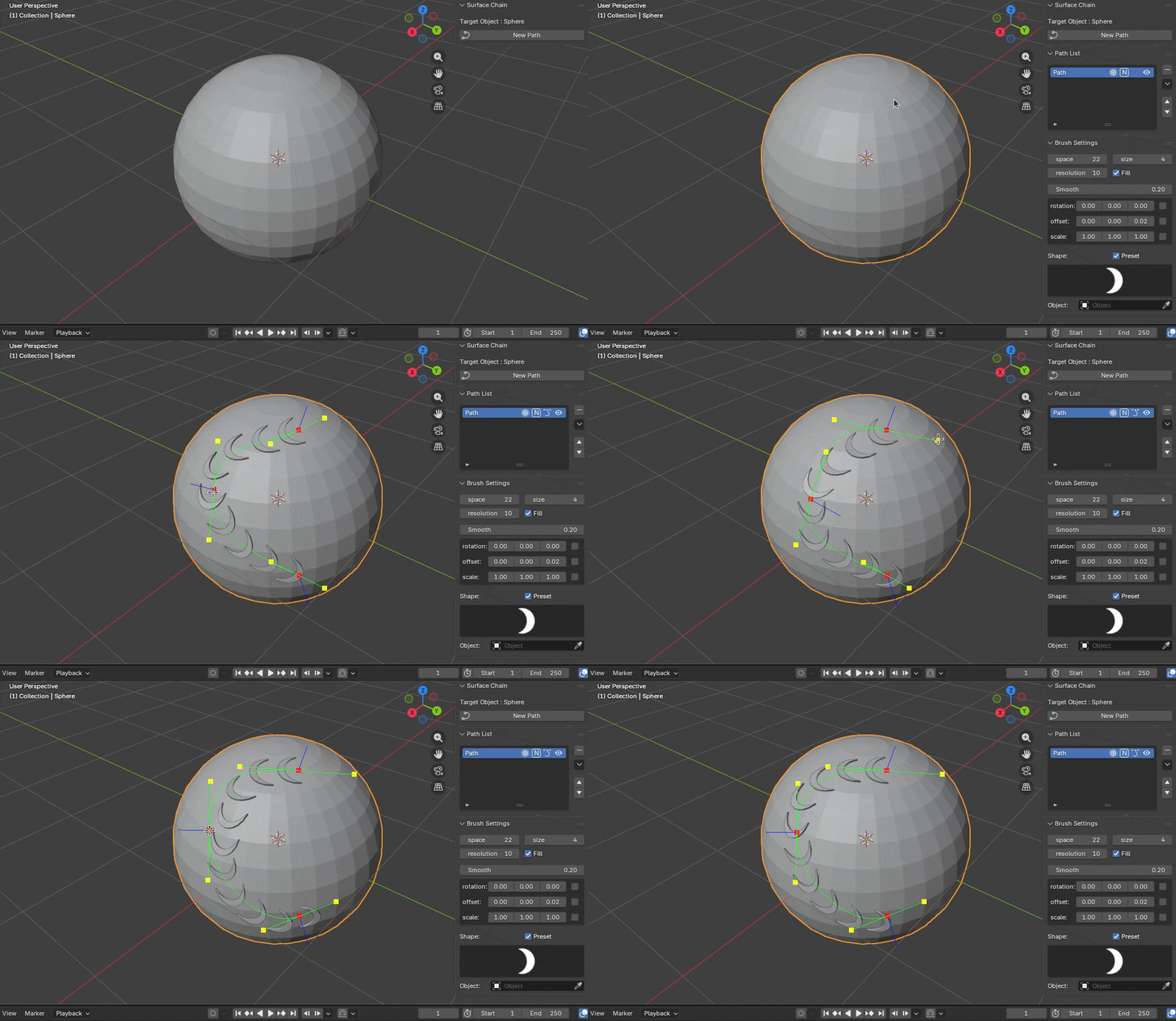
- Click "New Path" button to create a new path.(if the button is not available , please select an object in the scene as the target object first.)
- After creating the path, a new path will appear in the path list. Then, you can click on the surface of the target object with the left mouse button to create the first path point. Click on the surface again to form a chain.
-
To add a path point, just click the left mouse button on the object’s surface. When hovering over a path point, right-click to delete it, or left-click to toggle its type (free or vector). While hovering over a path line, left-click to easily insert a new point.
After creation, you can perform several operations on the path.
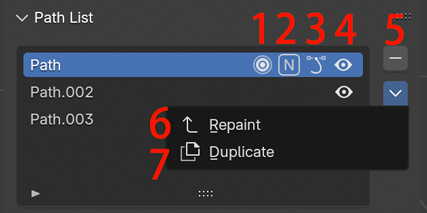
1: Start or end editing the path. Once the path is created, it will automatically be ready for editing. Press 'Enter' or 'Esc' to finish editing. To edit an existing path, simply press the button again.
2: Make the path symmetrical. 'N' means asymmetric, while 'X,' 'Y,' or 'Z' will make the path symmetrical along the corresponding axis.
3: Toggle cycle or not for the path.
4: Make the path visible or not.
5: Delete the selected path.
6: Repaint the selected path..
7: Duplicate the selected path.
Have questions about this product?
Login to message
| Blender Extension Compatible | Yes |
| Sales | 10+ |
| Published | about 1 year ago |
| Blender Version | 4.0 - 5.0 |
| Extension Type | Add-on |
| Render Engine Used | Blender-Internal, Blender-Game-Engine, Cycles, Eevee |
| License | GPL |
Discover more products like this
chain detail pattern bezier jewelry path attachment curve ornamentation align Bezier Curve Link