Sweep Modifier
 Abbos Mirzaev




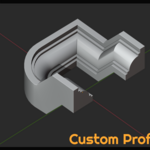


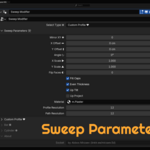

Important Note:
Drag & Drop asset (e.g. a profile) from the Asset Browser directly into a Geometry Nodes modifier input in the Modifier tab will not work directly in Blender's UI. This is a current limitation of how the Asset Browser and Modifier UI interact.
If you need a custom profile, simply drag it from the Asset Browser into the 3D Viewport, then use the eyedropper tool to select it in the modifier.
We may consider supporting this functionality in the future.
🧰 Features
✅ Adds a Sweep Modifier using Geometry Nodes
✅ Appears inside the Modifier panel > Generate section
✅ Includes a Pie Menu for quick access (Ctrl + Shift + Q)
✅ Auto-loads the Geometry Node group from a local .blend file
✅ Clean, non-destructive, and reversible
✅ Supports both Mesh and Curve objects
✅ Uses PROP_PROJECTED modifier icon for visual distinction
📦 Installation
- Download the .zip addon file (e.g., Sweep_Modifier_Addon_v2.zip).
- In Blender, go to Edit > Preferences > Add-ons.
- Click Install…, select the ZIP file, and enable Sweep Modifier.
🧪 How to Use
📌 Method 1: From the Modifiers Panel
- Select a Mesh or Curve object.
- In the Properties Panel, open the Modifiers tab.
- Scroll down to the Generate section.
- Click Sweep Modifier (icon: 🧭).
- The Geometry Nodes modifier is added with the sweep node group preloaded.
📌 Method 2: Using the Pie Menu
- Select a Mesh or Curve in the 3D Viewport.
- Press Ctrl + Shift + Q to open the Sweep Modifier Pie Menu.
- Select “Add Sweep Modifier”.
🔄 Customization
Once the modifier is added:
- Open the Modifier stack.
- You will see a Geometry Nodes modifier labeled “Sweep Modifier”.
- You can expose inputs/outputs in the node group to control:
- Profile shape
- Curve path
- Width, thickness, taper, etc.
For advanced customization, edit the Sweep Modifier node group in the Geometry Nodes Editor.
-
$10
Included Custom Profile, User Custom Profile, Bar & Cicrle Shapes, and other pro settings.
-
$5
Included only Bar & Cicrle Shapes
Have questions about this product?
Login to message