Synthia
 Egret Studios LLC


Synthia - Complete Documentation
Overview
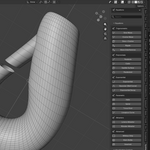
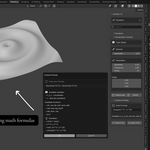
Synthia is a Blender addon that lets you turn math into 3D. You can visualize formulas, algorithms, and shapes instantly, making math easier to understand and more fun to explore.
Installation
- Download
synthia.zip - Open Blender (4.0.0 or later)
- Go to Edit → Preferences → Add-ons
- Click Install and select
synthia.zip - Enable Synthia by checking the checkbox
- Access from N-Panel → Synthia in the 3D Viewport

Quick Start
- Open the N-Panel (press
Nin 3D Viewport) - Navigate to Synthia tab
- Choose a category: Equations, Algorithms, or Geometry
- Click any preset to generate the visualization
- Adjust parameters in Visualization Controls panel
- Animate by keyframing parameters on the timeline.
Main Interface
Category Selector
Switch between three main categories:
- Equations - Mathematical functions and surfaces
- Algorithms - Sorting, pathfinding, fractals, data structures
- Geometry - Theorems, vectors, transformations, topology
Search Bar
Filter presets by name - type to find specific visualizations quickly

Preset Buttons
Click any button to instantly generate that mathematical concept as 3D geometry
Categories & Presets
📊 EQUATIONS (30+ presets)
Basic Functions
-
Sine Wave -
sin(x)wave function -
Cosine Wave -
cos(x)wave function -
Tangent -
tan(x)function with asymptotes -
Parabola -
x²quadratic function -
Exponential -
e^xgrowth curve -
Logarithm -
log(x)function
Advanced Surfaces
- Saddle Surface - Hyperbolic paraboloid
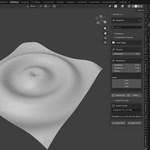
- Ripple - Concentric wave pattern
- Gaussian Bell Curve - Normal distribution
- Paraboloid - 3D parabolic surface
- Hyperboloid - Double-cone surface
- Helicoid - Spiral staircase surface
- Catenoid - Minimal surface (soap film)
- Enneper Surface - Self-intersecting minimal surface
- Möbius Strip - Non-orientable surface with one side
- Klein Bottle - 4D bottle in 3D space
- Seashell - Logarithmic spiral
Parametric Curves
- Helix - 3D spiral
- Spiral - 2D/3D spiral curve
- Torus Knot - Knotted curve on torus
- Lissajous Curve - Harmonic motion patterns
Attractors
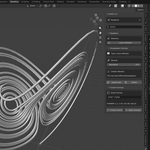
- Lorenz Attractor - Chaotic butterfly pattern
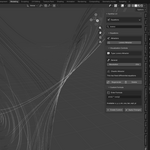
- Rössler Attractor - Chaotic spiral system
🔢 ALGORITHMS (35+ presets)
Sorting Algorithms
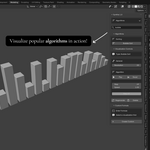
- Bubble Sort - Animated bar sorting
- Quick Sort - Divide-and-conquer sorting
- Merge Sort - Merge-based sorting
- Insertion Sort - Insert elements in order
- Selection Sort - Select minimum repeatedly
- Heap Sort - Binary heap sorting
Controls: Play/Pause/Reset buttons, adjustable speed
Pathfinding
- A Pathfinding* - Heuristic-based search (cone toward target)
- Dijkstra's Algorithm - Uniform cost search (circular wave)
- Breadth-First Search - Level-by-level exploration (circular wave)
- Depth-First Search - Deep exploration (snake pattern)
Visual: Cubes grow/rise as algorithm explores grid
Fractals
- Mandelbrot Set - Iconic fractal boundary
- Julia Set - Related fractal pattern
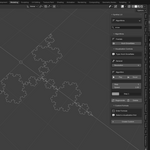
- Koch Snowflake - Recursive snowflake curve
- Sierpinski Triangle - Triangle with holes
- Dragon Curve - Fractal dragon pattern
Data Structures
- Binary Tree - Hierarchical tree with spheres and connections
- Heap Structure - Pyramid layout with heap properties
- Graph Network - Nodes in circle with random edges
Cellular Automata
- Conway's Game of Life - Cells live/die based on neighbors
- Langton's Ant - Single ant creating highway pattern
- Elementary CA - 1D Rule 30 scrolling down
Number Theory
- Prime Spiral (Ulam) - Primes arranged in spiral showing diagonal patterns
- Sieve of Eratosthenes - Prime numbers visualized as grid
- Fibonacci Spiral - Golden ratio spiral curve
Procedural Geometry
- Perlin Noise - Terrain-like surface
- Voronoi Diagram - Nearest-neighbor cells
- Delaunay Triangulation - Connected triangular mesh
📐 GEOMETRY (40+ presets)
Theorems
- Pythagorean Theorem - Visual proof: a² + b² = c² with squares
- Circle Theorems - Inscribed angles and chords
- Triangle Inequality - Valid vs invalid triangle sides
- Thales' Theorem - 90° angle in semicircle
Vectors
- Vector Addition - Parallelogram law
- Vector Subtraction - Difference of vectors
- Dot Product - Projection visualization
- Cross Product - Perpendicular result with plane
- Vector Projection - Component along direction
Transformations
- Matrix Rotation - Before/after rotation
- Matrix Scaling - Stretch/compress transformation
- Matrix Shear - Skew transformation
- Matrix Reflection - Mirror across axis
- Eigenvectors - Vectors that don't change direction
3D Shapes
- Platonic Solids - All 5 perfect polyhedra (tetrahedron, cube, octahedron, dodecahedron, icosahedron)
- Euler Characteristic - V - E + F = 2 proof with labeled cube
- Cube Net - Unfolded cross pattern
Rotation
- Euler Angles - Roll, pitch, yaw rotations demonstrated
Constants
- Golden Ratio - Phi spiral with Fibonacci rectangles
- Pi Visualization - Circumference/diameter ratio
Calculus
- Tangent Line - Derivative as slope on parabola
- Area Under Curve - Integral as Riemann sum rectangles
- Gradient Vector Field - Arrows showing steepest ascent
Topology
- Trefoil Knot - Simplest nontrivial knot
Visualization Controls
When a visualization is selected, the Visualization Controls panel appears:
General
-
Resolution - Mesh detail level (4-256)
- Low (4-16): Fast, blocky
- Medium (32-64): Balanced
- High (128-256): Detailed, slower
Parameters (Equations only)
- Amplitude - Wave height/scale (0.01-10.0)
- Frequency - Wave repetition rate (0.01-10.0)
- Phase - Wave offset (-6.28 to 6.28 radians)
- Scale - XYZ multipliers (0.01-10.0)
Note: Special surfaces (Möbius, Klein, Attractors) have fixed geometry and don't support parameter changes - they display an info message instead.
Algorithm Controls
- Play/Pause - Start/stop animation
- Reset - Return to initial state and regenerate
- Step - Current algorithm step number (read-only)
- Speed - Animation playback speed (0.1-5.0)
- Progress Bar - Visual indicator of completion
Actions
- Regenerate - Rebuild mesh with current parameters
- Delete - Remove visualization from scene
Custom Formulas - The Power Feature
This is Synthia's most powerful feature! Create unlimited mathematical surfaces by writing your own formulas.
Understanding What Custom Formulas Create
Custom formulas in Synthia create mathematical surfaces defined by the equation:
z = f(x, y)
Where:
-
xandyare horizontal coordinates -
zis the height (vertical output) - The formula defines the height at each (x,y) point
What You CAN Create.
✅ Surfaces - Any function of x and y
✅ Terrains - Hills, valleys, mountains
✅ Waves - Ripples, interference patterns
✅ Mathematical Art - Spirals, fractals, patterns
✅ Geometric Shapes - Pyramids, cones, curved surfaces
✅ Organic Forms - Smooth, flowing shapes
What You CANNOT Create!
❌ Closed 3D Solids - Can't make a cube, sphere (requires volume definition)
❌ Implicit Surfaces - Can't use f(x,y,z) = 0 equations
❌ Multiple Disconnected Parts - Single continuous surface only
❌ Self-Intersecting Volumes - Surface-based, not volume-based
Why? Synthia evaluates formulas as z = f(x,y) - a height field over a grid. For each (x,y) position, there's only one z value. This creates surfaces like landscapes, not enclosed volumes.
How to Use Custom Formulas
- Open Custom Formula panel
- Enter formula in the text field
- Click Create Custom to generate new visualization
- Or select existing visualization and click Apply Changes
Note: A dedicated guide containing how to get started with custom formulas is included in the files. (PDF file)
...........................................................................................................
Feel free to reach out on my inbox for more information and support.
- Egret.
Have questions about this product?
Login to message
| Blender Extension Compatible | Yes |
| Sales | 20+ |
| Published | 11 months ago |
| Blender Version | 4.0 - 5.1 |
| Extension Type | Add-on |
| Render Engine Used | Cycles, Eevee |
| License | GPL |

Discover more products like this
mathematical 3d-modelling mathematical-design advanced-procedural mathematical art