Texture Axis Flipper
 CGHawk


# Texture Axis Flipper - README
---
## 📦 Overview
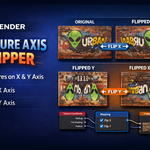
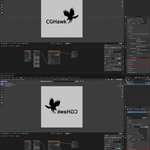
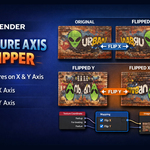
**Texture Axis Flipper** is a Blender add-on that allows you to flip textures along the X and Y axes using a simple checkbox interface in the Material Properties panel. This tool uses Blender's Mapping node to flip textures non-destructively, making it ideal for game assets, archviz materials, decals, and more.
---
## ⚙️ Installation Instructions
1. **Download the Add-on**
* Ensure you have the `texture_axis_flipper.py` file ready.
2. **Install the Add-on**
* Open Blender.
* Go to `Edit → Preferences → Add-ons`.
* Click the **Install...** button.
* Locate and select `texture_axis_flipper.py`.
* Click **Install Add-on**.
3. **Enable the Add-on**
* Find `Texture Axis Flipper` in the Add-ons list.
* Check the box to **enable** it.
4. **Save Preferences** (optional but recommended)
* Click the hamburger menu in Preferences → `Save Preferences`.
5. **Access the Add-on**
* Select an object with a material.
* Go to the **Material Properties** panel.
* Look for the **Texture Axis Flipper** panel.
* Use the checkboxes to flip the X and/or Y axes.
---
## 🔧 Usage Instructions
1. Select the object whose material you want to modify.
2. In the **Material Properties** panel, locate the **Texture Axis Flipper** panel.
3. Check **Flip X Axis** to mirror the texture horizontally.
4. Check **Flip Y Axis** to mirror the texture vertically.
5. You can combine both for a diagonal flip.
**Tip:** The add-on automatically works with the Mapping node setup. If your material doesn't have one, the add-on will create it for you.
---
## ⚠️ Important Notes
* **Texture Mode**: For proper flipping, your Image Texture **must be set to Repeat** instead of Clip or Extend. To check:
1. Select the Image Texture node in the Shader Editor.
2. Under `Image → Extension`, choose **Repeat**.
* The add-on is **non-destructive**; the original texture remains unchanged.
* Compatible with **Blender 3.0+**, Cycles, and Eevee.
---
## 📝 Support
For any issues, questions, or feature requests, please contact the developer or leave a message on the Blender Market product page.
---
## 🎨 Keywords
Blender, Blender Add-on, Texture Flipping, X Axis, Y Axis, Mapping Node, UV Mapping, Material Workflow, Shader Nodes, Non-D
Have questions about this product?
Login to message
| Published | 10 months ago |
| Blender Version | 4.2 - 5.0 |
| Extension Type | N/A |
| Render Engine Used | Cycles, Eevee |
| License | GPL |
Discover more products like this
Flip uvs best blender addons Shader plugin Blender texture plugin Texture rotate plugin Blender 3D plugins Uv plugin uvplugin Flip texture blender plugin Cghawk axis flipper 3D Addons addon 3D animation plugins blender texture addon Axis flipper blender axis flipper Shader addons Rotate uv switch Uv flip addon texture plugin addons uvtools blender pro texture addon blender addons Texture axis flip blender plugins best addons for blender