3d illusions
4 months ago
Thanks Marc, I'm glad you're so happy with the addon and support 👍
This item has an average rating of 5 from 30 ratings by the community.
Purchase this item to leave a review!
The addon speaks for itself, it's superb and works exactly as described. It'll cut your render times by probably 80% or more. But besides the addon, Michael is fantastic support. I've had the pleasure of speaking with him a couple of times and he's always be friendly, supportive and goes above and beyond to assist even when it's nothing to do with the addon. You really couldn't ask for a more capable addon for the purpose and for such excellent customer service. Have no doubts, just buy it ... it's worth 10x the price.
3d illusions
4 months ago
Thanks Marc, I'm glad you're so happy with the addon and support 👍
Turbo Tools safes me Time and Money. Its the best boost for the Buck I have every purchased.
3d illusions
7 months ago
Thanks Holger, I'm pleased to hear you rate it so highly 👍
I was still disheartened when Pidgeon Tools went down the drain and then completely broke in Blender 5, so I wasn't ready to get my whole brain chemistry rewritten by Turbo Tools.
Rendering was always a torture with my GTX 1070, so I was stunned when I tested Turbo on a simple character turnaround (no background), which normally renders 2.5 mins per frame, while Turbo Tools did it in just 27 SECONDS. I had to double-check to make sure I didn't accidentally switch to EEVEE. The difference might not seem much at first glance, but I definitely felt it when it took me to render out the whole animation in 1.5 hours instead of 8. I can't wait to see how it'll perform on a complex scene with volumes and background!
All in all, another addon I can't imagine working without anymore. Turbo Tools is extremely user-friendly. I've never seen an addon before that explained its functions so well by just hovering over each option. I could easily use it without having to leave Blender to look for a user guide online. They do have several tutorials on YouTube, though, and I imagine I could achieve even better results by watching them and gaining a deeper understanding of the addon's nuances. However, I'm already very happy with my purchase! I'll be forever grateful to the Turbo Tools team for making rendering feel like less of a chore, even on an older PC setup.
3d illusions
8 months ago
Thanks for the review Jevlin, I'm really happy to hear that the addon is speeding up your rendering. The 1070 is the card I used when I wrote the addon. It generally speeds up rendering by 3 to 5x on typical scenes, regardless of which GPU is used, and even when CPU rendering. I'm also pleased to hear that the detailed tooltips are doing their job too. Thanks for your purchase 👍
This is a must have in my opinion. It really helps in rendering by letting you crank out clean, detailed Cycles images with way fewer samples while producing results that are usually cleaner and more detailed than what you'd get with high samples + the native denoiser.
I've been using Turbo Tools V4, and I'm in love. It doesn't just speed things up; it genuinely improves quality at the same time and has become essential in my workflow.
Seeing that there's a new version (Turbo Tools X) built specifically for Blender 5+ and since I recently updated to Blender 5, I definitely need to grab Turbo Tools X, it really helps a lot. Give it a chance.
3d illusions
8 months ago
Thanks Pure, it's great to hear that Turbo Tools has become so important in regards to render speed and quality. Thanks for the review.
Works wonderfully, very pleasant support experience as well. Takes some fiddling but has an easy to understand interface and you can diagnose what's slowing your render down fairly quickly with help from the tutorials on the creator's Youtube.
3d illusions
9 months ago
Thanks Merlin, great to hear that the provided video tutorials have got you up and running quickly 👍
the best!
3d illusions
9 months ago
Cheers Titus 👍
I like it very much! Speeding up the renders and denoising is great, also I like the publishing tool. Support is great and fast, the issue I had was not TurboTools fault, but the developer guided me and was very patient with my questions. Highly recommended!
3d illusions
10 months ago
Thanks Venko, glad you're happy with the various features and rendering improvements Turbo Tools X provides 👍
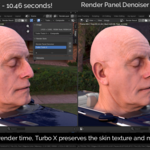
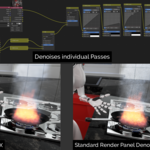
Tech wizard epicness! The denoiser is 10 times better than the standard Blender denoiser, the compositor is awesome, and the temporal stabilizer gives you 5× the rendering horsepower.
3d illusions
10 months ago
Thanks Dragos, I'm really happy to hear the addon is having such a positive impact on your workflow 👍
This is a no brainer. If you have the cash for it, and you're aiming to do dense scenes and/or bigger animations, Turbo Tools X with 5.0 blender is the thing you'll very much want.
I came over from Turbo Tools 4, and that was great. While not perfect, it couldn't be due to working with Blender's ever changing microcosm of development. And as such, I do not have that big of an issue with having to upgrade. More so since 3d illusions has provided a cheap why to upgrade.
For anyone looking to add grease pencil objects to your scene, adding an alpha over node is your magic bullet here. It'll allow you to have the speed of Turbo Tools and The style of an outline or other grease pencil objects in the same in the same pass.
On top of all the other pluses, I'll have to add this note. Those behind 3d illusions are very quick to answer questions and concerns with their tools. I'm here due to having an issue with testing if grease pencil and Turbo Tools plays nice with each other. At first, they don't... but that turns out to be how my scene was loading old mats for the grease pencil objects. The people behind 3d illusions were prompt and very understanding of my issue. Fixed it in less than an hour over all. (I had to give a small scene but they figured out the issue with just that info.) ^^
Aka, TL;DR: if you want a tool to help cycles speed up to almost as fast, and in some cases faster, than Eevee without losing your details, Turbo Tools is for you. ^^
3d illusions
10 months ago
Thanks John, that's great to hear, and I really appreciate you taking the time to review 👍 PS, it's not a team, just me, but I always try and respond to support requests immediately 👍
I just received the new version for free since I bought V4 within the last 3 months, and honestly I couldn't be happier. V4 has been a game changer for me. It's one of those addons that becomes a necessity without you even noticing. I use it constantly, and at this point I wouldn't render without it.
It speeds up my renders to a ridiculous degree. The temporal stabilizer is just incredible. It let's me get way more done than before. It's saved me a ton of time and genuinely improved my workflow.
Huge shoutout to the creator as well, incredibly responsive, helpful and just awesome to deal with. Highly recommend.
3d illusions
10 months ago
Thanks very much Adnoire. I'm really happy to hear how effective you're finding the addon at reducing your render times and removing flicker 👍
Turbo Tools X is built specifically for Blender 5 and beyond. Buy once and it's yours forever. Purchase also includes 12 months access to updates, which can optionally be extended further if you wish.
Included
Includes 12 months of
Extend this product’s Support Period +12 months: 25% of product price
Have questions before purchasing?
Login to message
| Sales | 700+ |
| Rating |
30 ratings
|
| Dev Fund Contributor | |
| Published | 10 months ago |
| Blender Version | 5.0 - 5.2 |
| Extension Type | N/A |
| Render Engine Used | Arnold, Blender-Internal, Blender-Game-Engine, Cycles, Eevee, Freestyle, Luxrender, Mental-Ray, Octane, Vray, Yafaray |
| License | GPL |
automation rendering gpu rendering Denoiser temporal stabilizer performance Cycles Render post-production Workflow render speed compositor