 Shahzaib A.


Ultimate Wheel Kit
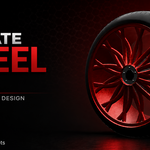
AI-Assisted Procedural Automotive Wheel Designer for Blender
Design custom wheels with AI. Refine every detail in Blender.
Ultimate Wheel Kit is an AI-assisted procedural automotive wheel design system for Blender that combines cloud-powered AI generation with detailed procedural modeling and manual customization.
Describe the wheel you want in natural language, generate a structured wheel-and-tire design, and then continue refining the result directly inside Blender. From realistic automotive fitment to aggressive concept wheels, Ultimate Wheel Kit helps you explore more designs and move from idea to 3D asset faster.
AI-Powered Wheel Design
Turn your design ideas into structured automotive wheel specifications using natural-language prompts.
The AI system interprets your description and converts it into a coherent wheel-and-tire configuration, taking into account wheel dimensions, fitment, spoke design, brake clearance, tire sizing, materials and finishes.
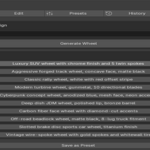
Four AI generation modes
|
Generate Create a new wheel design from your description. |
|
Variation Create a new take on your current wheel design. |
|
Improve Refine your current wheel design. |
|
Random Explore a completely new and distinctive wheel concept when you want inspiration without starting from a specific prompt. |
The AI backend validates and normalizes generated parameters before returning them to Blender, helping keep designs within supported ranges and maintaining relationships between wheel width, tire sizing, brake dimensions, lug count and bolt pattern.
AI That Understands Wheel Design
Ultimate Wheel Kit is designed to generate structured wheel specifications rather than arbitrary text output.
|
The AI system is instructed to consider ▸ Realistic automotive fitment ▸ Bolt pattern and lug-count consistency ▸ Wheel and tire proportions ▸ Brake clearance ▸ Appropriate tire sizing ▸ Manufacturing-oriented design logic ▸ Visual relationships between the requested style and the generated parameters Specific aesthetic requirements are translated into relevant geometry, materials, finishes and tire characteristics. |
Example prompts
|
Describe designs such as ▸ Aggressive forged track wheel with a concave face and matte black finish ▸ Luxury SUV wheel with chrome finish and twin spokes ▸ Deep-dish JDM wheel with a polished lip and bronze barrel ▸ Modern turbine wheel with directional blades ▸ Off-road beadlock-style truck wheel ▸ Cyberpunk concept wheel with an anodized finish ▸ Classic rally wheel with a distinctive color treatment |
Detailed Procedural Wheel Customization
Once a design has been generated, you can continue editing it directly inside Blender.
|
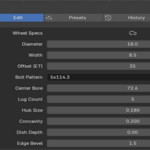
Size and fitment ▸ Wheel diameter and width ▸ Offset and bolt pattern ▸ Center bore and lug count ▸ Valve position |
|
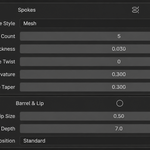
Face and spokes ▸ Hub size and depth ▸ Spoke style and spoke count ▸ Spoke thickness, twist, curvature and taper ▸ Wheel concavity ▸ Aero and monoblock window settings ▸ Edge bevels |
|
Lip and barrel ▸ Lip size and barrel depth |
|
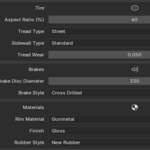
Brakes ▸ Brake disc size and brake style |
|
Tire ▸ Tire width and aspect ratio ▸ Tread type ▸ Sidewall style ▸ Tire bulge, pressure and wear |
|
Look and display ▸ Rim material and finish ▸ Rim color ▸ Rubber appearance ▸ Level of detail and display settings |
This gives you a complete workflow from AI-generated concept to manually refined wheel asset.
Multiple Wheel Design Styles
Create a wide range of automotive wheel designs with supported styles including:
Explore designs for sports cars, luxury vehicles, SUVs, trucks, track cars, JDM builds, rally vehicles, off-road projects and futuristic concept vehicles.
Procedural Materials and Finishes
Ultimate Wheel Kit includes a procedural material system built with Blender's shader nodes.
Automotive finishes
Additional finish controls
The procedural material workflow generates the visual character of the wheel directly in Blender without relying on bitmap texture images.
Detailed Tire and Tread Controls
Customize the tire as part of the complete wheel assembly.
Supported tread directions
Adjustable tire characteristics
Create anything from clean street tires and performance setups to worn, dirty, muddy and off-road configurations.
Built-In Presets and Design Exploration
Start from ready-made wheel concepts or create your own custom presets.
Explore different wheel directions quickly without rebuilding each design from the beginning.
Generation History
Keep your design exploration organized with built-in generation history.
|
Save and revisit previous designs ▸ Search your history ▸ Mark favorites ▸ Duplicate previous entries ▸ Restore earlier wheel configurations for further editing |
This makes it easier to iterate through multiple AI-generated concepts and continue developing the designs you like best.
Export Your Wheel Assembly
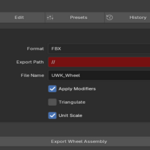
Export your generated wheel assembly using supported formats including:
Export controls include options for modifier application, triangulation where supported and unit scaling.
This makes the tool suitable for workflows ranging from Blender rendering and automotive visualization to game development, realtime projects, 3D presentations and downstream asset pipelines.
Cloud-Powered AI Backend
Ultimate Wheel Kit uses a dedicated cloud backend to power AI-assisted wheel generation.
The backend processes your design requests and communicates with the Blender addon to generate structured wheel parameters that are used to build the procedural wheel assembly inside Blender.
|
The backend ▸ Processes natural-language wheel design prompts ▸ Generates structured wheel-and-tire parameters ▸ Supports Generate, Variation, Improve and Random workflows ▸ Uses the current wheel design as context for variation and improvement requests ▸ Validates generated parameters against the supported wheel specification ▸ Applies parameter normalization and fitment-oriented guardrails ▸ Enforces AI usage quotas ▸ Enforces request rate limits ▸ Returns validated parameters to the Blender addon for procedural wheel generation The backend uses an AI model to generate the structured wheel specifications. |
AI Usage Limits
AI generation is subject to the limits configured by the Ultimate Wheel Kit backend. The current default configuration provides:
The system also applies additional per-license request rate limits to help maintain service stability and prevent excessive burst usage.
Your remaining monthly allowance resets at the beginning of the next monthly usage period. AI generation availability is dependent on the Ultimate Wheel Kit backend service being available and operational.
License Activation and Installation
When Ultimate Wheel Kit requires a license key, the backend can automatically activate the installation and issue a unique license key. The license system associates installations with license keys and supports multiple installations per license.
The current default configuration supports:
This allows you to use your license across two machines, such as:
|
Machines ▸ Primary desktop workstation ▸ Secondary workstation or laptop |
When a second machine uses the same license key and an available installation seat remains, that installation can be associated with the existing license. Once all available installation seats are occupied, additional installations require support assistance to move or manage the license.
License usage is also protected by request rate limits and AI generation quotas.
Designed for Automotive Artists and 3D Creators
What You Get
Ultimate Wheel Kit gives you a complete workflow for exploring, generating, customizing and exporting procedural automotive wheel assemblies.
Use AI to move quickly from an idea to a structured wheel design, then use Blender's procedural controls to refine:
Save your best designs, revisit previous concepts, build your own asset library and export your finished wheel assembly for use across your 3D pipeline.
Whether you're creating a realistic production-style wheel, an aggressive motorsport design, a custom JDM build, an off-road setup or a futuristic concept, Ultimate Wheel Kit gives you the tools to explore and develop the design inside Blender.
Requirements
|
Before you buy ▸ Blender 5.0 ▸ Internet connection required for AI-assisted generation ▸ Active Ultimate Wheel Kit backend access for AI generation ▸ AI generation subject to current monthly usage quotas and rate limits ▸ License activation subject to the current Ultimate Wheel Kit licensing system and installation limits |
Imagine the wheel. Generate the design. Refine every detail. Build your next automotive asset with Ultimate Wheel Kit.