 AL3K
AL3K


Tired of digging through folders, losing track of your portable builds, or manually managing startup flags?
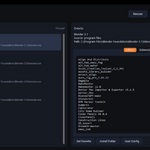
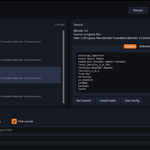
Universal Blender Launcher is a lightweight, standalone app designed to clean up your workspace. It scans your system, organizes every local Blender installation into one clean UI, and lets you manage your add-ons, extensions, and advanced launch configurations with a single click.
Whether you are a developer testing multiple versions, an artist switching between stable LTS and experimental builds, or simply looking for a faster way to launch projects, this launcher puts complete control back in your hands.
🚀 Key Features
Deep System Scan: Instantly locates Blender installations across standard Windows paths (
Program Files,Local AppData), Steam, your systemPATH, and any custom folder directories you choose to add.Intuitive UI & Version Picker: A beautifully minimal dark interface that lets you select your desired version and launch with one click.
Add-on & Extension Manager: Check exactly which bundled core add-ons, user add-ons, and new Blender 4.2+ extensions are installed on your chosen version before you launch.
Smart Favorites: Set a favorite version so it’s ready to launch the moment you open the app.
Advanced CLI Launch Flags: Seamlessly toggle factory startup, background mode, debug mode, suppress the Windows console, or add custom CLI arguments.
Direct Path Shortcuts: Quickly jump right to the installation folder or the specific version’s user configuration folder to manage preferences manually.
Standalone Utility: Built with Python and CustomTkinter—runs seamlessly with a clean startup splash screen and zero background clutter.
📦 What’s Included in the Download?
Easy Setup Wizard: Simple Windows installer (
Universal_Blender_Launcher_Setup.exe) to get you up and running with shortcuts in seconds.Portable Executable: A standalone
UBLauncher.exefor users who prefer no-installation utilities.Customization Pack: Built-in wizard tools (
pack.bat) to quickly change the launcher icon to any of our preset variations or your own custom image.