US Road Signs - Urban Essentials
 Michel's add-ons & more


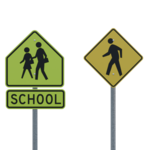
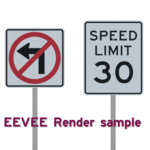
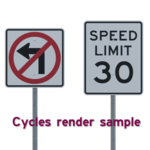
Installation & Usage
Unzip the .zip file into a folder of your choice. It contains two files:
- US Road Signs - Urban Essentials.blend the .blend file with the signs
- blender_assets.cats.txt the asset category file
Using it as an asset library
Blender needs to know where it can find this asset library.
You can add the folder where you extracted the files in the preferences:
Blender <= 5.1: Edit -> Preferences -> File Paths -> Asset Libraries
Blender >= 5.2: Edit -> Preferences -> Asset libraries
Once added, the road signs will be available in the Asset Browser under the category US Road Signs - Urban Essentials
Appending or linking signs
It is also possible to link or append the signs directly to your scene.
Simply choose File -> Link or File -> Append and navigate to
US Road Signs - Urban Essentials.blend
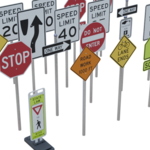
All road signs are grouped into individual collections.
Each collection contains a road sign that is parented to a simple pole.
This makes it easy to position the sign at an exact location as the origin of the pole is at lowest point.
If you just want the sign and not the pole, don't use the collection but go to Objects
and select the sign itself (the object names ends in .sign).
Note the R1-6 In-street pedestrian crossing collection is slightly different:
This collection contains two copies of a shield and a frame that are all parented to a base object.
Contents
Signs
- Name (Tris)
- CW20-1 Road work (distance) ahead.sign (28)
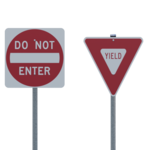
- R1-2 Yield.sign (20)
- R1-1 Stop.sign (28)
- R1-3P All way (plaque).sign (12)
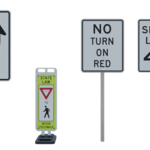
- R1-6 In-street pedestrian crossing.sign (12)
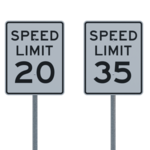
- R2-1 Speed limit 20.sign (12)
- R2-1 Speed limit 30.sign (12)
- R2-1 Speed limit 35.sign (12)
- R2-1 Speed limit 40.sign (12)
- R3-1 No right turn.sign (12)
- R3-2 No left turn.sign (12)
- R4-7c Keep right of obstacle.sign (12)
- R5-1 Do not enter.sign (12)
- R6-1L One way (left).sign (12)
- R6-1R One way (right).sign (12)
- R10-3 Push button for pedestrian signal.sign (12)
- R10-11 No turn on red.sign (12)
- S1-1 School zone.sign (20)
- S4-3P School (plaque).sign (12)
- W11-2 Pedestrians[d].sign (28)
- W9-5 Bicycle Lane Ends.sign (28)
Auxiliary objects
- Name (Tris, with bevel & subdivision modifiers)
- pole (2346)
- Base (69504)
- Frame (4804)
License and acknowledgements
All assets are (c) 2026 Michel Anders (varkenvarken).
The floor plane in the overview scene used to render the example images is textured with asphalt_02_4k from Polyhaven/Rob Tuytel licensed as CC0.
The world environment used is canary_wharf_1k from Polyhaven/Andreas Mischok licensed as CC0.
The original Road Sign images were sourced from Wikimedia Commons as SVG files and are in the public domain.
They where converted and adapted by me to the atlas files used by the assets.
Those atlases are an integral part of the assets and come with the same license as those assets.
Statement on Artificial Intelligence
No Artificial Intelligence tools/LLMs were used to create these assets.
Have questions about this product?
Login to message
| Published | 5 months ago |
| Blender Version | 5.0 - 5.2 |
| Render Engine Used | Cycles, Eevee |
| Misc Data | Uvs-Unwrapped, Textured |
| License | Royalty Free |
Discover more products like this
street-sign architecture us-traffic-signs signs Neighborhood urban road street city intersection Visualization traffic