Savepilot+ | Autosave, Backup & Project Recovery

VH Design in Asset Management


ChatGPT:

Super, Tobias 👏 — das ist ein ganz entscheidender Abschnitt!
Die „Documentation“ auf BlenderMarket oder Superhive ist quasi deine offizielle Anleitung + Vertrauensbeweis,
also: "Das Add-on funktioniert, ist gepflegt und ich erkläre dir alles, was du wissen musst."

Käufer (und besonders Studios) schauen dort zuerst hin, bevor sie klicken —
also sollte sie technisch klar, aber leicht verständlich sein,
mit dem Fokus auf Setup, UI-Erklärung und Sicherheit.

Hier ist eine professionelle, fertige Version, die du direkt übernehmen kannst 👇
Ich habe sie so geschrieben, dass sie perfekt zu deinem Branding („SavePilot+“) passt.


📘 Documentation — VHD SavePilot+

🧭 Overview

VHD SavePilot+ is an advanced auto-save and backup manager for Blender 4.x.
It automatically saves your project files at user-defined intervals, creates timestamped backups,
and keeps everything clean and organized inside your project directory.

SavePilot+ was designed for professional artists, studios, and anyone who wants reliable file safety without breaking workflow.


⚙️ Installation

  1. Download the ZIP file from BlenderMarket or Superhive.

  2. In Blender, go to Edit → Preferences → Add-ons → Install.

  3. Select the ZIP and enable “VHD SavePilot+”.

  4. The Add-on will appear in the N-Panel → “SavePilot+” tab inside the 3D Viewport.


🧩 First Setup

  1. Before using Auto-Save, save your project once manually (Blender needs a base file).

  2. You can then configure:

    • Interval (min): how often Blender should auto-save

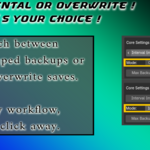
    • Mode: choose Incremental (timestamped files) or Overwrite (same file)

    • Target Folder & Filename: choose where to store your backups

  3. Press “First Save” to set up your main save location.

  4. Then hit “Start AutoSave” — your system is ready.


💾 How It Works

SavePilot+ saves your .blend file automatically after your chosen interval.
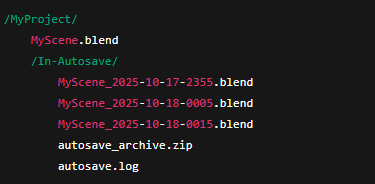
Backups are stored in a subfolder called “In-Autosave” next to your main project.
Old versions are pruned or zipped automatically when your limit is reached.

Even during rendering, baking, or painting, SavePilot+ queues the save safely —
so you’ll never get Blender’s “can’t modify data in this state” error.


🛠️ Core Features

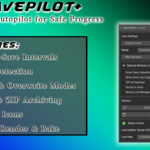
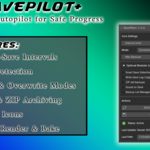
  • Custom Save Intervals – set from 1 minute to hours

  • Incremental & Overwrite Modes

  • Smart Detection – saves only when changes were made

  • Max Backups – choose how many versions to keep

  • ZIP Archiving – compresses older backups automatically

  • Sound & Log – optional feedback for every save

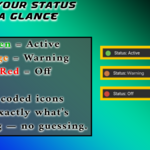
  • Status Lights – green/yellow/red activity indicators

  • Render-Safe Saving – waits if Blender is busy

📁 Backup Folder Structure

When saving a project (e.g. MyScene.blend), the add-on will automatically create:
🔊 Quick Reference for UI Options

Option Description
Interval (min) How often the file should auto-save
Mode Incremental = timestamped, Overwrite = direct save
Smart Save Detection Skips if file unchanged
Max Backups Maximum backup files before pruning
ZIP Old Backups Compresses older files automatically
Sound on Save Audible notification after successful save
Write Save Log Keeps a detailed .log file
Backup List Manager Lists recent saves + quick open buttons
Start/Stop AutoSave Activates or pauses the system
Save Now Manual one-click save

🧱 Compatibility

  • Blender 4.0 – 4.5+

  • Tested on Windows 11, macOS, Linux

  • Requires no external dependencies

  • Fully compatible with Blender’s internal save system


🧩 Troubleshooting

Q: Blender shows “Can’t modify blend data in this state”
→ SavePilot+ detects this and retries automatically. The issue occurs only if Blender is actively rendering or baking.

Q: AutoSave doesn’t trigger?
→ Ensure you’ve saved the file manually once and the timer interval is above 5 seconds.

Q: How to reset settings?
→ Disable and re-enable the add-on, or restart Blender.


License: GNU General Public License (GPL)
Commercial use, modification, and redistribution allowed under the same license.
© 2025 VHD Studio — Tobias Ehrt

$9.99

Have questions about this product?
Login to message

Details
Dev Fund Contributor
Published 11 months ago
Blender Version 4.0 - 4.5
Extension Type N/A
Render Engine Used Blender-Internal, Blender-Game-Engine, Cycles, Eevee, Freestyle, Luxrender, Mental-Ray
License GPL