◆ VOYDE PROCEDURAL / GEOMETRY NODES / BLENDER 4.3–5.1
Freezing Effect
Procedural Ice & Frost Modifier
Transform any mesh into a frozen, ice-covered surface in seconds.
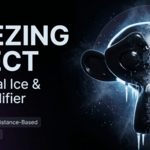
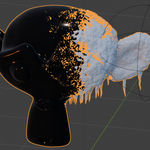
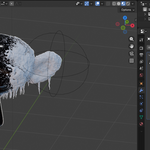
Freezing Effect is a procedural Geometry Nodes modifier for Blender that generates ice buildup, frost, surface crystals and hanging icicles directly on your mesh.
The effect is driven by a separate controller object, so you control where the freezing starts, how far it spreads and how the frozen area evolves over time.
GEOMETRY NODES MODIFIERCYCLES & EEVEENO TEXTURESNON-DESTRUCTIVE

01 — KEY FEATURES
Ice, frost and icicles from one modifier
◆Distance-based freezing
Control the effect with a separate controller object.
◆Procedural ice and frost
Generated with Geometry Nodes and Shader Nodes.
◆Animatable freeze spread
Move or keyframe the controller to animate the freezing.
◆Hanging icicles
Procedural icicles with adjustable density and length.
◆Surface ice crystals
Extra crystal detail directly on the frozen surface.
◆Clean modifier controls
Adjust the effect from the modifier panel without editing nodes.
◆Non-destructive
Your original mesh stays untouched.
◆No external textures
The effect is fully procedural.
02 — HOW IT WORKS
Freeze outward from a controller
Freezing Effect uses a controller object to calculate the freezing area across the mesh surface. Areas closer to the controller freeze first, while areas farther away stay less affected or unfrozen, depending on your settings.
Move or animate the controller to create spreading freeze effects, magical ice transformations, frozen props, winter environments and cinematic object reveals. No baking, no sculpting and no manual texture painting.
03 — MODIFIER CONTROLS
Every setting on the modifier panel
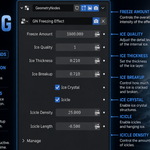
Freeze Amount
Overall amount of freezing visible on the mesh.
Ice Quality
Geometry detail, for performance or higher-quality results.
Ice Thickness
Thickness of the generated ice layer.
Ice Breakup
Cracks, breakup and surface variation.
Ice Crystal
Turns surface crystal scattering on or off.
Icicle
Turns hanging icicles on or off.
Icicle Density
How many icicles are generated.
Icicle Length
Length of the icicles.
04 — PERFECT FOR
Where it fits
◆Animated freezing effects◆Fantasy and magic ice powers◆Frozen props and objects◆Winter environment details◆Stylized cinematic shots◆Procedural VFX workflows
05 — DETAILS
What you get
Included
◆Freezing Effect Geometry Nodes setup
◆Controller-based freeze system
◆Procedural ice, frost, crystals and icicles
◆Example setup and demo scene
◆Documentation
Compatibility
◆Recommended for Blender 5.0 and newer
◆Tested up to Blender 5.1
◆Works with Cycles and EEVEE
 Voyde Procedural




 VOYDE.PROCEDURALVOYDEPROCEDURAL.COM / ALL PRODUCTS / X / INSTAGRAM