Freezing Effect — Procedural Ice & Frost Modifier
 Voyde Procedural


Freezing Effect — Procedural Ice & Frost Modifier Documentation
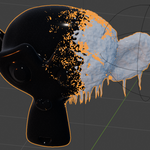
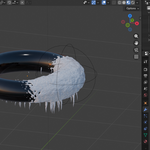
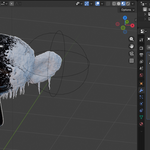
Freezing Effect is a procedural Geometry Nodes modifier for Blender that creates ice, frost, crystals, and hanging icicles on any mesh object.
The system is controlled by a separate controller object. Move the controller closer to or farther from the mesh to control where the freezing effect appears and how far it spreads across the surface.
INSTALLATION
- Download and unzip the product files.
- Open the included .blend file in Blender.
- Append or copy the Freezing Effect object/setup into your own scene.
- Apply the Freezing Effect modifier to your mesh object.
- Assign the controller object in the modifier panel if needed.
- Adjust the exposed parameters directly from the modifier panel.
HOW TO USE
- Select the mesh object you want to freeze.
- Add or keep the Freezing Effect Geometry Nodes modifier.
- Use the controller object to define the freezing area.
- Move or animate the controller to make the freeze effect spread across the mesh.
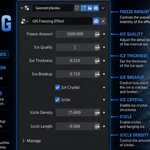
- Adjust Freeze Amount, Ice Thickness, Ice Breakup, Icicle Density, and Icicle Length to customize the result.
The effect is distance-based. Areas closer to the controller object will freeze first, while areas farther away remain less affected or unfrozen depending on your settings.
PARAMETERS
Freeze Amount
Controls the overall amount of freezing visible on the mesh.
Ice Quality
Adjusts the geometry detail level. Lower values are faster; higher values create more detailed results.
Ice Thickness
Controls the thickness of the ice layer generated over the surface.
Ice Breakup
Adds procedural variation, cracks, and irregularity to the frozen surface.
Ice Crystal
Enables or disables scattered surface ice crystals.
Icicle
Enables or disables hanging icicles.
Icicle Density
Controls how many icicles are generated.
Icicle Length
Controls the length of the hanging icicles.
ANIMATION
To animate the freezing effect, animate the controller object or keyframe the Freeze Amount parameter.
Example:
- Place the controller away from the object.
- Insert a keyframe.
- Move the controller closer to the object.
- Insert another keyframe.
- Play the animation to see the freezing effect spread across the mesh.
COMPATIBILITY
Recommended for Blender 5.0+.
Tested up to Blender 5.1.
Works with Cycles and Eevee.
NOTES
This product is fully procedural and non-destructive. The original mesh is not permanently changed.
No external textures are required.
Results may vary depending on the scale, topology, and surface direction of the mesh. For best results, apply object scale before using the modifier.
Have questions about this product?
Login to message
| Sales | 20+ |
| Published | 4 months ago |
| Blender Version | 4.3 - 5.1 |
| Render Engine Used | Cycles, Eevee |
| License | Royalty Free |