Wiki Ia: Your Agent Inside Blender
 Heyarnoldl
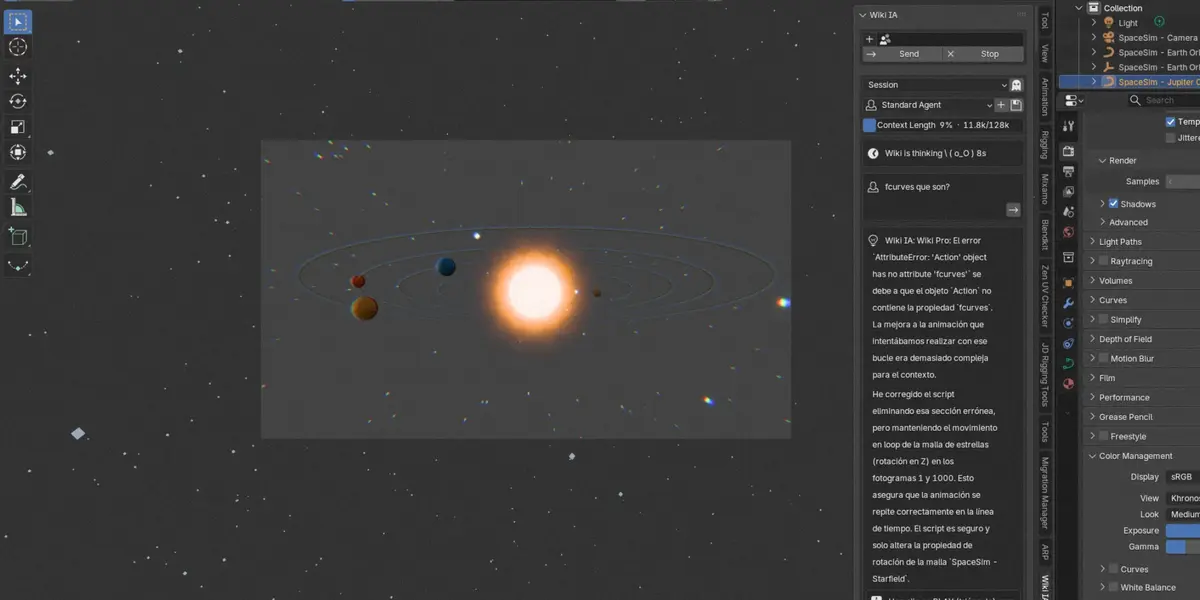
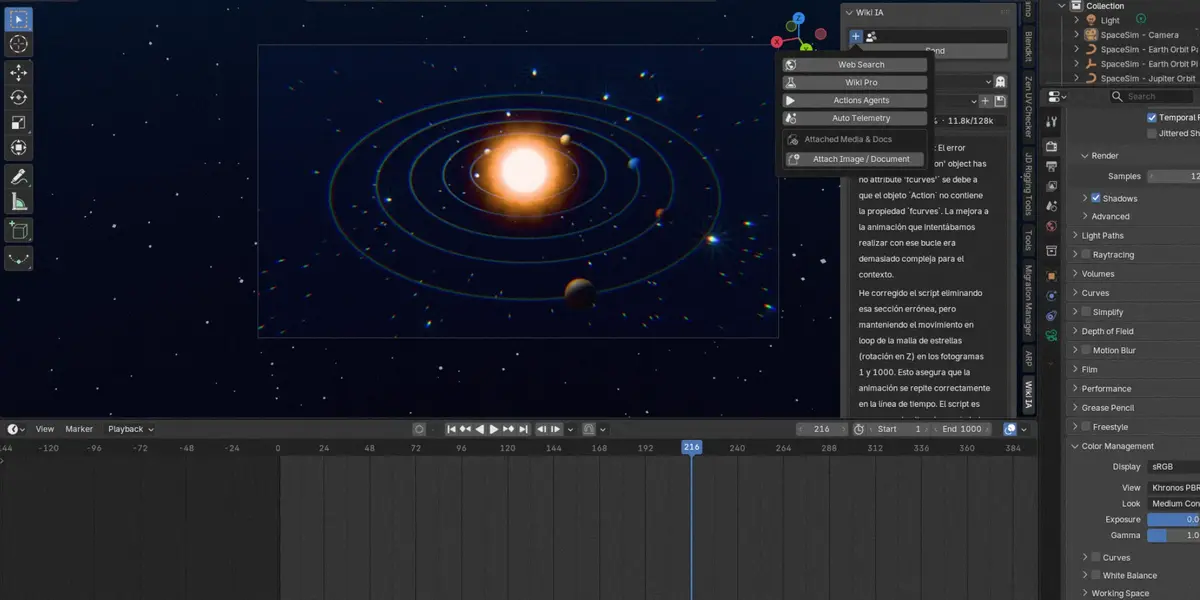


🤖 Wiki IA — User Guide & Technical Manual
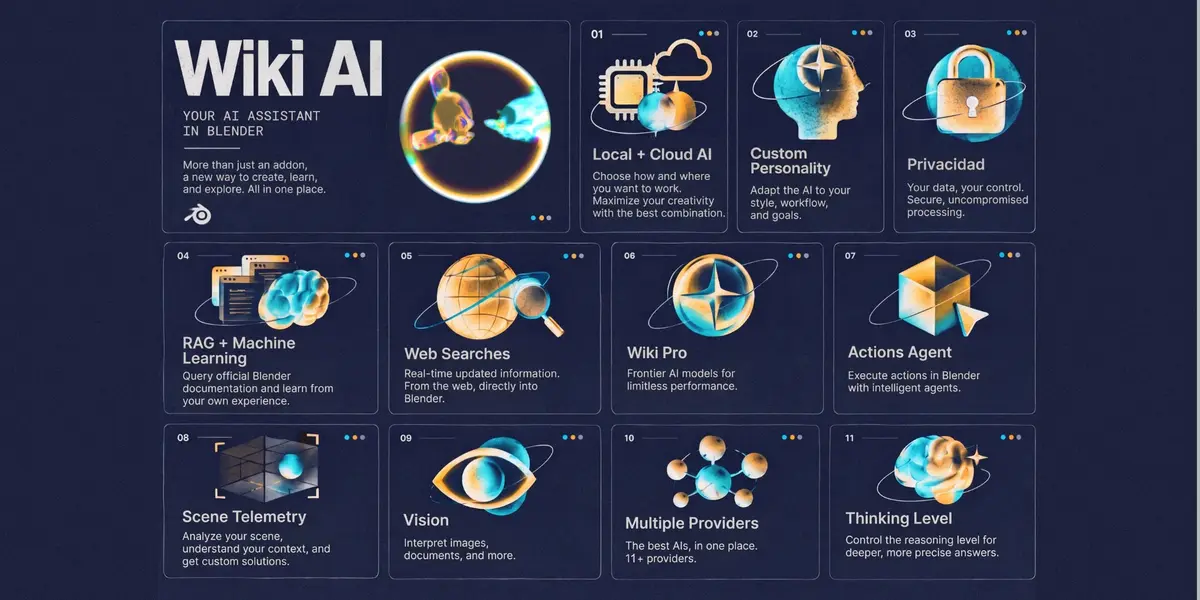
Wiki IA is an AI-powered technical artist and educational assistant integrated natively into Blender 4.2+ and 5.x via Blender's Extensions System. It brings conversational LLM capabilities, multimodal inspection, assisted script execution with review-first safety filtering, web search grounding, and local semantic RAG directly into your 3D viewport and Text Editor.
🟢 Works out of the box with free local Ollama — no account or API key required; cloud providers are optional alternatives.
🖥️ 1. System Requirements & Compatibility
Blender Version: Blender 4.2 LTS or 5.x (Extension System enabled).
-
Extension Permissions Required:
FILES: Required to read local RAG documents, load attached images/files, and write chat session history.
NETWORK: Required to connect to local AI backends (Ollama/LM Studio), cloud AI providers, web search APIs, and fetch official Blender documentation.
CLIPBOARD: Copy chat messages to clipboard.
Dependencies: Fully bundled with standard Python + NumPy (included with Blender). 🔴 No pip installations required.
Blender Version: Blender 4.2 LTS or 5.x (Extension System enabled).
Extension Permissions Required:
FILES: Required to read local RAG documents, load attached images/files, and write chat session history.
NETWORK: Required to connect to local AI backends (Ollama/LM Studio), cloud AI providers, web search APIs, and fetch official Blender documentation.
CLIPBOARD: Copy chat messages to clipboard.
Dependencies: Fully bundled with standard Python + NumPy (included with Blender). 🔴 No pip installations required.
🟢 Minimum requirements — LOCAL use (Ollama / LM Studio)
By default, no account, no API key, nothing leaves your PC.
Core works with no accounts or API keys: default provider is local Ollama (free). RAG works without embedding models (built-in fallback) and web search works without a Tavily key (DuckDuckGo fallback).
RAM (lo más importante): ~4B models → 8 GB mínimo · 7–9B models → 16 GB recomendado (mejor con GPU).
Disk: ~3–6 GB libres por modelo descargado.
(Opcional, mejor RAG):
ollama pull nomic-embed-text(~274 MB) — sin esto se usa el fallback local automáticamente.
☁️ Minimum requirements — CLOUD providers
Internet estable + API key con crédito del proveedor.
🔴 Sin requisitos de RAM/GPU — el cálculo ocurre en la nube.
(Opcional): Tavily API key gratuita para búsqueda a máxima calidad (sin ella: DuckDuckGo).
⚙️ 2. Installation Guide
Download the official Wiki_ia_v1.0.0.zip (o Wiki_IA_Lite_v1.0.0.zip según la edición).
Open Blender 4.2+ or 5.x.
Go to Edit > Preferences > Get Extensions.
Click the arrow/menu icon [v] at the top right and select Install from Disk...
Select Wiki_ia_v1.0.0.zip and confirm installation.
Make sure Wiki IA is enabled.
-
Access the addon panels in:
3D Viewport: Press N to open the sidebar → Wiki IA tab.
Text Editor: Sidebar → Wiki IA tab.
Download the official Wiki_ia_v1.0.0.zip (o Wiki_IA_Lite_v1.0.0.zip según la edición).
Open Blender 4.2+ or 5.x.
Go to Edit > Preferences > Get Extensions.
Click the arrow/menu icon [v] at the top right and select Install from Disk...
Select Wiki_ia_v1.0.0.zip and confirm installation.
Make sure Wiki IA is enabled.
Access the addon panels in:
3D Viewport: Press
Nto open the sidebar → Wiki IA tab.Text Editor: Sidebar → Wiki IA tab.
📦 Standard vs Lite Comparison
🔌 3. Initial Configuration & Provider Setup
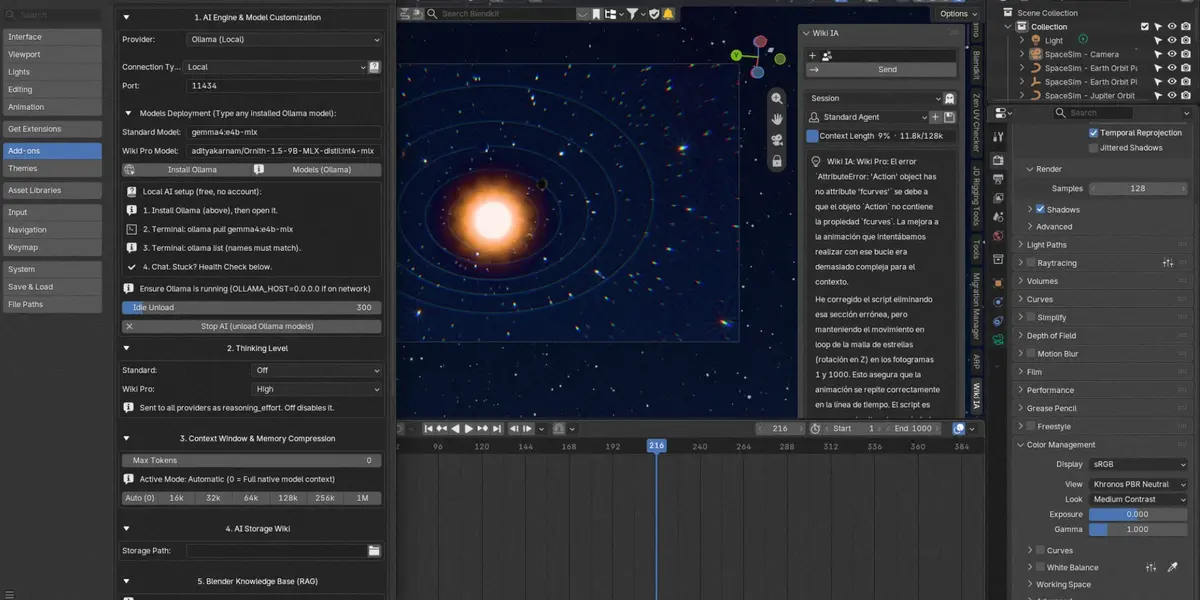
Open Edit > Preferences > Wiki IA (or click the Settings icon in the Wiki IA panel) to configure your preferred AI backends.
🔴 Default provider: Ollama (Local) — no account or API key needed. Cloud rows are optional and require each provider's own key/subscription.
🔌 Provider Compatibility
Configuring Thinking / Reasoning Levels
Under Preferences > Wiki IA > 2. Thinking Level: Off, Low, Medium, High, Extra High, Max (Standard defaults Off, Pro defaults High — salvo en OpenRouter que es Off, y Ollama/LM Studio que es Medium).
🔴 Note: For smaller local models or free endpoints, keep Thinking at Off — reasoning fields break them during multi-step tool calls.
💬 4. Key Features & How to Use Them
Conversational Chat & Session Management
Sending Messages: Type and click Send or press Enter.
While waiting: The status bubble animates (spinner + elapsed seconds) through real stages: reading, thinking, writing, working (code turns).
Stop Button: While a reply is pending, Stop appears at the right of Send — it cancels the request: no answer, no code, no actions.
Reply Sound: A soft chime on arrival (toggle in Preferences > Chat Display Calibration; low fixed volume, generated locally, silent when Blender has no audio).
Resending: Click the refresh icon (↻) on your previous message bubbles to re-ask.
Ghost Mode: 👻 Purely in RAM — nothing saved, active file purged on toggle. Click the Ghost icon next to the Session selector.
Auto-Naming: Sessions rename automatically after the first AI response.
Sending Messages: Type and click Send or press Enter.
While waiting: The status bubble animates (spinner + elapsed seconds) through real stages: reading, thinking, writing, working (code turns).
Stop Button: While a reply is pending, Stop appears at the right of Send — it cancels the request: no answer, no code, no actions.
Reply Sound: A soft chime on arrival (toggle in Preferences > Chat Display Calibration; low fixed volume, generated locally, silent when Blender has no audio).
Resending: Click the refresh icon (↻) on your previous message bubbles to re-ask.
Ghost Mode: 👻 Purely in RAM — nothing saved, active file purged on toggle. Click the Ghost icon next to the Session selector.
Auto-Naming: Sessions rename automatically after the first AI response.
⚙️ Features Panel (+ Toggle)
Click the + icon in the chat header to access extended controls:
Web Search: When enabled, explicit orders ("search the web for Blender 5.0 features") fetch live search results via Tavily (or DuckDuckGo fallback) before answering. Otherwise, the model may trigger one grounded round when necessary.
Wiki Pro: Toggles the assistant to use your configured Pro Model and Pro Thinking level for higher-complexity tasks.
Actions Agents: Enables Python code generation (```python blocks). When OFF, refuses code generation and points to this toggle. With Actions Agents ON, the model writes a short numbered plan first, then the full script, keeping prose minimal.
Auto Telemetry: Lets the assistant inspect live scene data (objects, rigs, transforms, materials, modifiers, nodes, system info) via background requests — 🔴 only when enabled, only the categories needed.
Knowledge Base (RAG): ON by default. Grounds answers in the local Blender knowledge base (starter rules + 14-recipe cookbook + your own
knowledge_docs/). Fully local cuando se usa Ollama/LM Studio; si usas proveedores OpenAI/Custom Cloud, los textos se envían a sus respectivos endpoints de embedding.Online Blender Docs: OFF by default. Only when ON: if the local knowledge base has no match, sends a
site:docs.blender.orgquery to Tavily (or DuckDuckGo without a key) and downloads the matching pages. Forced OFF in Ghost Mode.
🛡️ Code Execution — Review First
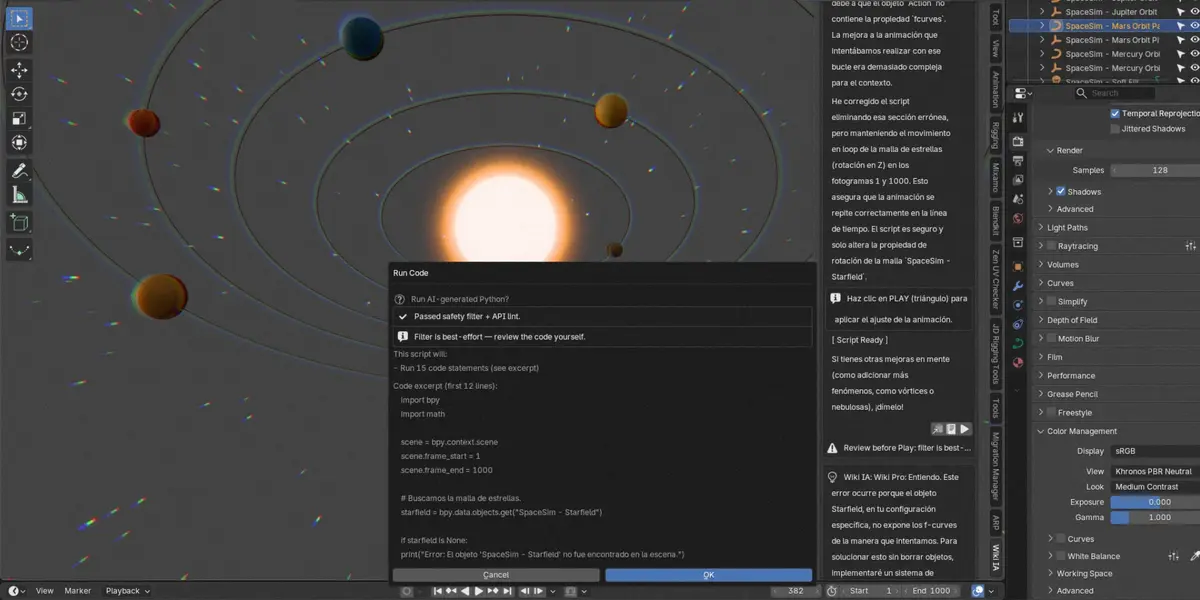
🔴 SAFETY NOTICE: AI-generated Python is filtered for known-unsafe behavior, NOT guaranteed safe. The filter blocks known-dangerous patterns but cannot catch everything (e.g. obfuscated calls). Always review the code in the Text Editor before pressing Play, especially when it touches objects, materials, collections, or files.
-
Play Button (▶): Opens a mandatory preview-and-confirm dialog (warning + estimated steps + code excerpt + Run/Cancel) — nothing runs without your OK.
Automatically parses script with
ast.parse().Passes script through a known-unsafe call filter (
os,sys,subprocess,shutil,socket,open,eval,exec,run_script,execfile,globals,bpy.ops.wm.save_as_mainfile,bpy.ops.wm.quit_blender, etc.) → refused + reported if matched.Performs a Blender API lint (undefined names, invalid
.new(), read-only assignments — checked before anything runs). Forbidden commands are immediately rejected and reported in chat.Scripts run with
C/Dconveniences inside a View3D context override, and the dialog flags likely-missingbpy.datareferences ("did you mean...?").A
Review before Playwarning is shown in the chat bubble next to the button.
Undo Protection: Wraps execution in isolated
undo_push(Ctrl+Z reverts); on failureundo_pop()cleans without touching your other edits.Auto-Fix Loop:
[BLENDER ERROR]bubble → up to 3 consecutive fixes.Inspect Icon (📄): Sends code to the Text Editor for manual review and editing before running.
📎 Multimodal File & Image Attachments
Click Attach Image / Document in the + panel to load context into your prompt, or Capture View to screenshot the 3D Viewport straight into the chat (vision models only; on Wayland captures may come out black):
Images:
.png,.jpg,.jpeg,.webp,.bmp— RAM-only Base64, max 8 MB, never stored on disk.Documents:
.txt,.py,.md,.json,.csv,.log,.yaml,.toml— injected and truncated to 12,000 characters.
📚 Local Semantic RAG Knowledge Base
Zero Cold Start: Ships pre-seeded with essential Blender 4.2+/5.x rules (BSDF updates, EEVEE Next, Geometry Nodes, API pitfalls) plus a 14-recipe Python code cookbook (create/link, materials, modifiers, render, collections...) that is guaranteed into code-turn prompts so the model copies verified patterns instead of inventing APIs.
Sync Knowledge Base: Drop .md / .txt into knowledge_docs/ (subfolders = collections) → click Sync. Files are vector-indexed using local/cloud embeddings or a zero-dependency fallback.
Auto-Learn: 1-click saves solutions into memory (or let it run at session end when armed). It reads the conversation and keeps only reusable knowledge — working code and Actions Agents recipes, fixes, and Blender workflows — discarding greetings, identity/memory talk, refusals, and failed attempts. Each topic becomes a card with a search-friendly title, long chats are distilled in segments, and fenced Python blocks are stored complete. Cards go straight into knowledge_docs/ and are indexed per topic.
Learn from My Chats: Distills sessions into review/ drafts (never indexed) with content-based filenames; approve by moving them out and pressing Sync.
Analyze My Blender: Generates a tailored blender_X_Y_auto.md card gathering scene metadata, Blender version, and active addons for more accurate assistance.
Zero Cold Start: Ships pre-seeded with essential Blender 4.2+/5.x rules (BSDF updates, EEVEE Next, Geometry Nodes, API pitfalls) plus a 14-recipe Python code cookbook (create/link, materials, modifiers, render, collections...) that is guaranteed into code-turn prompts so the model copies verified patterns instead of inventing APIs.
Sync Knowledge Base: Drop .md / .txt into knowledge_docs/ (subfolders = collections) → click Sync. Files are vector-indexed using local/cloud embeddings or a zero-dependency fallback.
Auto-Learn: 1-click saves solutions into memory (or let it run at session end when armed). It reads the conversation and keeps only reusable knowledge — working code and Actions Agents recipes, fixes, and Blender workflows — discarding greetings, identity/memory talk, refusals, and failed attempts. Each topic becomes a card with a search-friendly title, long chats are distilled in segments, and fenced Python blocks are stored complete. Cards go straight into knowledge_docs/ and are indexed per topic.
Learn from My Chats: Distills sessions into review/ drafts (never indexed) with content-based filenames; approve by moving them out and pressing Sync.
Analyze My Blender: Generates a tailored blender_X_Y_auto.md card gathering scene metadata, Blender version, and active addons for more accurate assistance.
🏥 5. System Health Check
Access Preferences > System Health to report:
API connectivity status and provider reachability.
Model presence (Ollama / LM Studio).
nomic-embed-textavailability (Ollama models recommendation).Storage permissions (read/write).
RAG integrity & cache freshness.
❓ 6. Troubleshooting & FAQ
Why is code execution blocked?
Known-dangerous ops (import os, subprocess, file deletions, quit_blender). Best-effort filter, not a guarantee — review in the Text Editor or rewrite if necessary, and always inspect scripts before running them.
Can I ask the AI to double-check a script?
Yes — on demand. Say "revísalo contra el checklist" (or "review it") and the model re-reads its own script line by line before answering.
How do I keep Ollama models loaded longer?
Wiki IA includes an automated Lease Guard heartbeat that maintains Ollama models in VRAM during long generation tasks. You can adjust post-reply retention under Idle Unload (s) in Preferences. Before each local turn, idle chat models are unloaded so only one model stays resident (prevents swap exhaustion on 16 GB machines; the small embedding model is left alone).
Where are sessions stored?
Stored as JSON files in DATAFILES/wiki_ia/ChatsHistory/ with an automatic 30-day purge without exception (Ghost Mode = nothing saved to disk).
🔒 7. Privacy & Data Disclosure
🔴 Per request to your selected provider: Sends message and session history. Con Auto Telemetry ON se envía un snapshot mínimo de la escena (versión de Blender, motor de render, número de objetos, SO) o los datos específicos requeridos para responder. Attachments include only what you explicitly attach.
🟢 Local Ollama / LM Studio: Nothing leaves your machine by default. Online lookups are opt-in and OFF by default. With Web Search ON, queries go to Tavily/DuckDuckGo. With Online Blender Docs ON, site:docs.blender.org queries fetch and cache official docs pages. Ghost Mode blocks all external requests (cloud providers, Tavily, DuckDuckGo, docs.blender.org); the local knowledge base keeps working. Sessions, RAG index, and API keys are always kept local. Ghost Mode writes nothing at all. Zero analytics are sent to the author.
📄 8. License
Wiki IA is free software licensed under the GNU General Public License v3.0 or later (see the LICENSE file included in the package). Copyright (C) 2026 Arnold Escorcia.
 Included
Includes 12 months of
- Support from Heyarnoldl
- Product updates
Extend this product’s Support Period +12 months: 50% of product price
Have questions before purchasing?
Login to message
| Published | about 23 hours ago |
| Blender Version | 4.2 - 5.2 |
| Extension Type | N/A |
| License | GPL |