WireShot
 Chthonian Gods Studio




WireShot 1.2.0
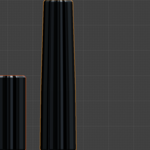
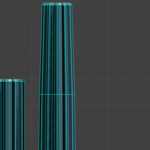
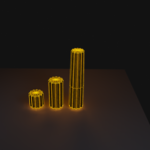
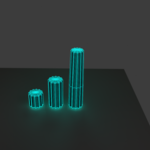
WireShot creates polished topology-wire presentation renders from selected Blender mesh objects.
INSTALLATION
1. In Blender, open Edit > Preferences > Get Extensions.
2. Use the menu and choose Install from Disk.
3. Select the WireShot ZIP file.
4. Enable WireShot if Blender does not enable it automatically.
5. Open the 3D Viewport Sidebar (N) > WireShot.
QUICK START
1. Select one or more mesh objects.
2. Choose a style preset.
3. Choose Clay + Wire, Original + Wire, or Wire Only.
4. Leave Create WireShot Camera enabled for automatic framing, or disable it to keep your existing camera workflow.
5. Click Generate WireShot.
6. Click Render when an active scene camera exists.
7. Click Clear to remove the generated WireShot setup and restore the previous scene state.
FEATURES
- Ember Red, Signal Yellow and Cyber Teal presentation presets
- Dark blue-grey clay presentation
- Wire generated from actual mesh edges
- Quad topology stays quad; no tessellation diagonals are added
- Adaptive wire thickness
- Clay + Wire / Original + Wire / Wire Only
- Optional automatic WireShot camera
- Automatic three-light studio
- Ground and shadow presentation
- Compositor glow where supported
- High-poly confirmation before heavy wire generation
- Non-destructive generated setup with Clear/restore
- 1024 / 2048 / 4096 square PNG output presets
TOPOLOGY
By default, WireShot uses the object's original mesh topology. Enable Use Evaluated Topology only when you explicitly want the evaluated modifier result. If a modifier creates triangles, those evaluated edges will be displayed.
COMPATIBILITY
Tested for Blender 5.2 LTS.
Have questions about this product?
Login to message
| Blender Extension Compatible | Yes |
| Published | about 2 months ago |
| Blender Version | 5.0 - 5.2 |
| Extension Type | Add-on |
| Render Engine Used | Cycles, Eevee |
| License | Mit |