 auphinity.tools


⏱ Work Time Tracker
Automatic work time tracking for Blender, broken down by project stages
Work Time Tracker
Know exactly how long every project takes — without thinking about it
The problem
A client asks: "How many hours did you spend on this?"
You try to remember. Was it six hours? Maybe eight? Did you count that time you spent staring at the reference board? What about the lunch break — did you pause the external timer? Did you even start it?
Blender doesn't track your work time. External timers require discipline and the constant habit of starting and stopping them. You forget, you get inaccurate numbers, you underbill or overbill.
Work Time Tracker solves this by living inside Blender. It detects when you're actually working — moving objects, editing meshes, tweaking materials — and automatically tracks the time. When you stop working, it pauses. No buttons to press, no tabs to switch, no apps to remember.
How it works
| Step | What happens |
|---|---|
| You work | The tracker detects activity (any scene change) and starts counting |
| You stop | After a configurable idle timeout (default: 30 sec), tracking pauses automatically |
| You resume | As soon as you touch anything in Blender, tracking resumes |
| You save | Time data is flushed and saved inside the .blend file |
| You reopen | All tracked time is still there — it persists between sessions |
No external files. No cloud. No account. Everything is stored as custom properties directly in your .blend file.
Features
| Feature | Description |
|---|---|
| Automatic activity detection | Tracks when you're actually working. Pauses when you're idle. No manual start/stop needed. |
| Project stages | Break your time into stages: Modeling, Texturing, Rigging, Animation — whatever your workflow needs. Each stage tracks time independently. |
| Pause / Resume | Need to step away but keep Blender open? Hit Pause. The tracker won't count idle time even if Blender detects minor events. |
| Stage management | Create, rename, delete, and switch between stages at any time. Time for each stage is shown in HH:MM:SS format. |
| Configurable idle timeout | Set from 5 to 600 seconds. Default is 30 seconds — long enough that quick thinking pauses don't break the count. |
| Bilingual interface | Full English and Russian interface. Switch in one click from the settings panel. |
| Data saved in .blend | No external files, no cloud sync, no account. Time data lives in the .blend file as custom properties. Send the file to a colleague and they see the same time log. |
| Persistent across sessions | Close Blender, reopen tomorrow — your tracked time is exactly where you left it. |
Who is this for?
- Freelancers who bill by the hour and need accurate time logs for each project or client.
- Studio artists who need to report how long tasks take for project planning and estimation.
- Solo creators who want to understand where their time goes — are you spending 60% on modeling or 60% on UV unwrapping?
- Anyone who has ever been asked "how long did this take?" and had no good answer.
Workflow example
You're working on a character model for a client who pays hourly.
- Open the .blend file. The tracker starts automatically.
- You model the base mesh for 2 hours. The Stage 1 timer shows
02:00:00. - You take a coffee break. After 30 seconds of no activity, the tracker pauses on its own.
- You come back and click + New Stage, name it "Texturing".
- You texture for 3 hours. Stage 2 shows
03:00:00. - You save and send the file. Total:
05:00:00. Your invoice is accurate.
Next week, you reopen the file to make revisions. The tracker picks up right where you left off — previous time is preserved, and new work adds to the existing total.
The panel
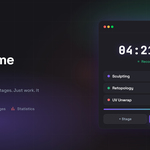
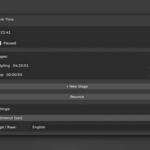
The entire tool lives in a single sidebar tab. Press N in the 3D Viewport and click the ⏱ Time tab.
| Section | What it shows |
|---|---|
| Total time | Combined time across all stages, displayed in large HH:MM:SS format |
| Status indicator | ● Active (counting), ○ Idle (waiting), ⏸ Paused (manual pause) |
| Stages list | Each stage with its name, time, radio button to switch, pencil to rename, X to delete |
| + New Stage | Create a new stage — the old one keeps its time, new time goes to the new stage |
| Pause / Resume | Manual override when you need full control |
| Settings | Idle timeout (seconds) and language selector (English / Русский) |
What you get
| Detail | Value |
|---|---|
| Version | 2.1.0 |
| Compatibility | Blender 3.0 and newer |
| License | GPL-2.0-or-later |
| File |
work_time_tracker.zip — install directly in Blender |
| Render engine | No dependency — works with any renderer |
| Languages | English, Russian |
| Data storage | Inside the .blend file (custom properties) |
| Documentation | Full user guide included (see Documentation tab) |
Tip: After installing, press N in the 3D Viewport, click the ⏱ Time tab, and start working. The tracker does the rest.