 Yuzurin


Link
https://twitter.com/yuzurin0620
Installation
1. Install the Add-on
- Install it from
Preferences > Add-ons > Install from Disk.
2. Enable the Add-on
-
Enable
yuzuWeightEditorinEdit > Preferences > Add-ons.
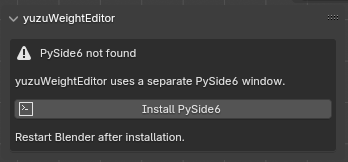
3. Install PySide6
If Blender shows PySide6 not found, follow these steps from the 3D View sidebar:
- Open View3D > Sidebar (N) > yuzuWeight
- Restart Blender after the installation finishes
- Click Install PySide6
How to Launch
- Open
View3D > Sidebar (N) > yuzuWeight - Click
Open Editor - Work with the relevant mesh, and select vertices when needed
$25
Have questions about this product?
Login to message
| Blender Extension Compatible | Yes |
| Sales | 20+ |
| Published | 5 months ago |
| Blender Version | 4.2 - 5.1 |
| Extension Type | Add-on |
| Render Engine Used | Cycles, Eevee |
| License | Mit |
Discover more products like this
armature skinning weight painting weight editor blender weights blender addon SIWeightEditor mirror weights Spreadsheet rigging vertex groups