 netkingZ


REFERENCE MANAGER ADD-ON · BLENDER 4.0+
Your references.
Right on top of your model.
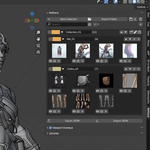
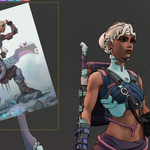
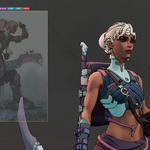
Organise every reference image in one library, drop as many as you need into the 3D Viewport, and move, rotate, scale or fade them with a floating HUD — without ever leaving the view you're working in.
MULTI-OVERLAY HUD IN THE VIEWPORT NAMED LIBRARIES NO DEPENDENCIES
◆ EVERY REFERENCE. ONE PLACE.
Build a library once, find any image in seconds.
ORGANISE
Library & Organization
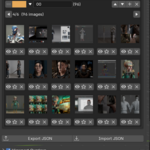
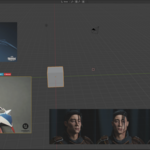
Collections → Sub-categories → Images, with colour coding for every group. Full-text search, one-click folder import, and a favorites system that automatically promotes starred images to the top of every grid.
ORGANISE
Grid Zoom
Zoom from 1 to 12: from a compact 6-column grid down to a single large preview. Large collections are paginated automatically.
◆ IN THE VIEWPORT. WHERE YOU NEED THEM.
Pose, sculpt and model with your references always in sight.
VIEWPORT
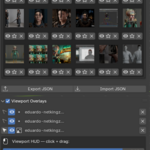
Multi-Overlay Viewport
Add as many references as you like at the same time. Each overlay is fully independent: click any image in the viewport to select it, then transform it in real time with the floating HUD toolbar.
VIEWPORT
HUD Controls
✥ Move — click and drag to reposition
↺ Rotate — drag left/right, 0.5° per pixel
↺ Reset — one click back to exactly 0°
⊞ Scale — drag left/right, no arbitrary limits
◐ Opacity — from 0% to 100%
⇔ Mirror H — flip left ↔ right
⇕ Mirror V — flip top ↕ bottom
✕ Remove — instant removal
Esc or Right-click cancels and reverts any transformation.
◆ PICK UP EXACTLY WHERE YOU LEFT OFF.
Your whole setup, saved by name.
SESSIONS
Named Libraries
Save your entire setup — overlay positions, transforms and opacity included — and reload any session in one click. Export and import libraries as files to move them between computers.
◆ FROM FOLDER TO VIEWPORT
1Press N in the 3D Viewport and open the RefDeck tab.
2Import a folder or add single images to a collection.
3Send any image to the viewport and shape it with the HUD.
What you get
▸ NKZ RefDeck 1.6.3 as a Blender extension (.zip)
▸ Free updates
▸ Use it in personal and commercial work
Requirements
Blender 4.0+ · No external dependencies · Windows / macOS / Linux · GPL-3.0-or-later
reference · overlay · viewport · posing · sculpting · modeling · workflow · character art
STOP ALT-TABBING TO YOUR REFERENCES
Keep your eyes on the model.
NKZ RefDeck · by Eduardo Bartali · NETKINGZ — netkingz.com