149 Stylized Crack & Damages Brush Pack - Vol01
 Mona-Ghafourian


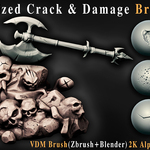
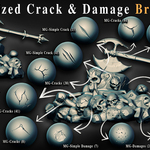
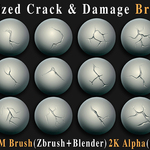
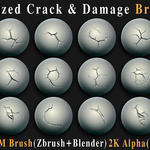
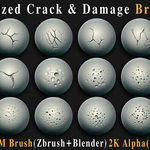
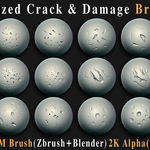
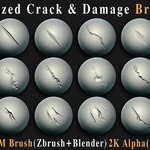
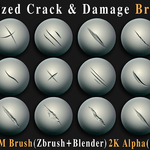
DOCUMENTATION
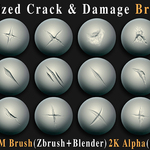
149 STYLIZED CRACK & DAMAGES BRUSH PACK — VOL01
A collection of 149 stylized crack, damage and surface-imperfection brushes designed for sculpting, texturing and adding fast surface detail to 3D assets.
The pack includes ZBrush VDM brushes, Blender VDM brushes and 2K alpha maps in PSD, TIFF and PNG formats.
01 — WHAT'S INCLUDED
149 × 2K ALPHAS
All 149 designs are provided as clean black & white alpha images in:
PSD
TIFF
PNG
These alphas can be used as masks, stencils, height information or other texture inputs depending on your workflow.
149 × ZBRUSH VDM BRUSHES
ZBrush VDM brushes are included in ZBP format.
The VDM brushes are ready for drag-and-drop installation and use inside ZBrush.
149 × BLENDER VDM BRUSHES
The Blender version includes 149 VDM brushes provided in .asset.blend format.
These files are designed for use with Blender's VDM sculpting workflow.
PREVIEW IMAGES
Preview images are included to make it easier to browse the available designs and select the appropriate brush or alpha.
02 — INCLUDED STYLES
The collection contains four main styles:
CRACKS
Bold, stylized fissures designed for rocks, stone, old walls and other hard surfaces.
DAMAGES
Artistic chips, breaks, worn edges and stronger surface damage.
SIMPLE CRACKS
Clean and subtle crack patterns for minimalist, controlled or stylized surfaces.
SIMPLE DAMAGES
Light imperfections and subtle wear for situations where a softer damage effect is required.
03 — ZBRUSH INSTALLATION
Installing the ZBP Brushes
Extract the downloaded product files.
Locate the ZBrush
.ZBPbrush files.Copy the brushes to your ZBrush Brushes folder.
Restart ZBrush if it was already running.
The brushes can then be accessed from the Brush palette.
The ZBrush VDM brushes are also suitable for drag-and-drop use.
ZBrush Compatibility
This product requires:
ZBrush 2022.0.5 or newer
04 — BLENDER INSTALLATION
Using the Blender VDM Brushes
Extract the downloaded product files.
Locate the Blender VDM
.asset.blendfile.Open Blender.
Open the Asset Browser.
Locate the provided VDM assets.
Drag the required VDM brush into your sculpting workflow.
Blender Compatibility
The Blender files are optimized for:
Blender 4.3 and above
05 — USING THE 2K ALPHAS
The included black & white alpha maps are designed to provide flexible use across different 3D applications.
Depending on your software, they can be used as:
Sculpting alphas
Masks
Stencils
Height information
Texture inputs
For the best result, adjust the strength, scale and contrast of the alpha according to the surface and level of detail you need.
06 — WORKFLOW TIPS
For Stylized Sculpting
Start with a larger crack or damage brush to establish the main forms, then use smaller details to break up the surface.
For Controlled Damage
Use the Simple Cracks and Simple Damages categories when you need more subtle surface variation.
For Texturing
The black & white alpha images can be used to generate or control surface information in applications that support alpha, mask or height-based workflows.
For Asset Production
The brushes can be used on rocks, stone, walls, props, environment assets and other hard-surface or stylized objects.
07 — CHOOSING THE RIGHT CATEGORY
Cracks
Use for strong, visible fissures and larger surface breaks.
Damages
Use for chips, breaks, worn edges and stronger surface imperfections.
Simple Cracks
Use for clean and relatively subtle crack patterns.
Simple Damages
Use for lighter wear and controlled imperfections.
08 — IMPORTANT NOTES
ZBrush files require ZBrush 2022.0.5 or newer.
Blender files are optimized for Blender 4.3 and above.
ZBrush VDM brushes are provided in ZBP format.
Blender VDM brushes are provided in
.asset.blendformat.The alpha collection is provided in PSD, TIFF and PNG formats.
All alpha designs are 2K resolution.
Preview images are included for easier browsing and selection.
09 — SUPPORT
If you experience a technical problem with the included files, please check the FAQ section first.
If your question is not covered there, contact the creator through the Superhive product page and include:
Your software and version
The specific brush or file you are using
A short description of the issue
A screenshot if applicable
This will make it easier to identify and resolve the problem quickly.
Have questions about this product?
Login to message
Includes an Asset Library
149 drag-and-drop assets for Blender’s Asset Browser.
Browse included assets| Sales | 10+ |
| Published | over 1 year ago |
| Blender Version | |
| License | Royalty Free |