170+ Shoes Mega Pack - Footwear Models Collection For Game Development & Animation
 blenderustad


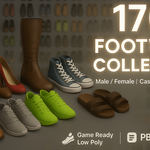
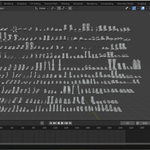
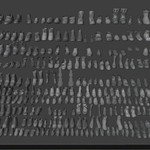
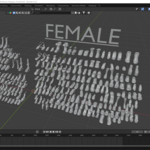
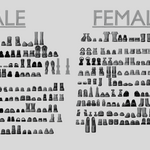
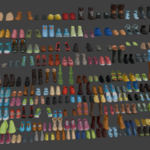
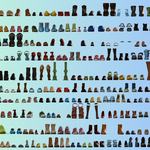
Mega Shoes Pack — 170+ Stylized 3D Footwear Collection
Marketing thumbnails in this folder use the spelling "maga shoes pack" / "Mega Pack" — they all refer to this same collection.
A library of 170+ stylized, game-ready footwear models for male and female characters and avatars. Styles run from casual and formal shoes to sneakers, boots, heels, sandals and slides. Built and organized in Blender, with exports for every common engine and DCC pipeline.
What's in the folder
| File | Format | Notes |
|---|---|---|
Shoes 2.blend |
Blender scene | Main source file — all 170+ models in one scene. |
Shoes 2.blend1 |
Blender backup | Auto-saved previous version; open only if .blend is damaged. |
Shoes 2.fbx |
FBX | For Unreal, Unity, Maya, 3ds Max, Cinema 4D. |
Shoes 2.glb |
glTF 2.0 (binary) | For web / real-time viewers, Godot, Blender re-import, USD pipelines. |
Shoes 2.obj + Shoes 2.mtl
|
Wavefront OBJ | Universal static-mesh exchange; material definitions in the .mtl. |
Shoes Category Vise.blend (+ .blend1) |
Blender scene | Same models, organized by category ("Category Wise") into collections — boots, sneakers, heels, sandals, formal, etc. |
Shoes Category Vise.fbx / .obj / .mtl
|
Exports | Category-organized versions of the above. |
*.png |
Images | Promo renders, viewport screenshots and the full contact sheet (All Shose.png). |
Two organizations of the same content:
-
Shoes 2— flat scene, fastest to browse everything at once. -
Shoes Category Vise— grouped into named collections so you can pull one style family at a time.
Technical specifications
- Model count: 170+ individual footwear models (left/right pairs).
- Gender coverage: male and female; adult sizing, adaptable to younger characters by scale.
- Style topology: clean, low-poly / game-ready stylized meshes suitable for real-time use.
- Pipeline stage: ready for sculpting, retopology detailing, rigging and animation.
-
Materials: PBR (metallic-roughness) setup in the
.blend; baked into FBX/GLB where the format supports it, and referenced via.mtlfor OBJ. - Scale & orientation: modeled to real-world scale, Z-up in Blender. FBX exports use each target engine's conversion on import.
- UVs: unwrapped; non-overlapping islands for texture/detail baking.
Getting started (Blender)
- Open
Shoes 2.blendfor the full library, orShoes Category Vise.blendto work by category. - In the Outliner, expand the collections to find the model you need.
- Select the shoe pair and its material, then File ▸ Append it into your character scene (or
Ctrl+C/Ctrl+Vbetween open Blender sessions). - Snap the shoes to your character's feet, match scale, then parent to the foot/toe bones or bind with the rig.
- Adjust foot pose / ankle rotation to seat the shoe correctly.
Importing into a game engine
-
Unreal Engine / Unity: import
Shoes 2.fbx(or the category FBX). Set import scale as needed, enable "Combine Meshes" off if you want each shoe separate, and reassign PBR textures to the engine's material. -
Godot / web / glTF tools: use
Shoes 2.glb— materials and mesh come through in one file. -
Other DCC apps: use
.obj+.mtlfor a neutral, no-rig transfer.
Recommended workflow
- Use the Category Wise file to audit styles and decide which shoes fit your project, then append only those into a trimmed working file to keep scenes light.
- Keep the
.blend1backups untouched as a safety copy. - Bake stylized detail (stitching, sole tread, creases) from a sculpt if you need higher-fidelity normal maps than the base mesh provides.
- For a full character wardrobe, combine with matching outfit/character packs and share one texture atlas per style family.
Typical uses
- Stylized game characters and NPCs
- VR / metaverse avatars
- Animated shorts and cartoons
- Character design turntables and portfolio renders
- Crowd / background character variation
$69
Have questions about this product?
Login to message
| Sales | 10+ |
| Published | over 1 year ago |
| Blender Version | 2.6x - 4.5 |
| Render Engine Used | Arnold, Blender-Internal, Blender-Game-Engine, Cycles, Eevee, Freestyle, Luxrender, Mental-Ray, Octane, Vray, Yafaray |
| Misc Data | Textured |
| License | Royalty Free |
