What does the 3ds Max bridge do?
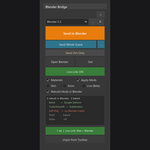
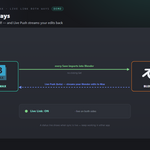
Send your meshes to 3ds Max and get them back — mesh, UVs, or everything — in one click, without manual exporting or importing. It reuses a running 3ds Max (or launches the version you pick), applies your clean-up steps inside Max on import, and can sync both ways hands-free.
Which 3ds Max versions does it work with?
3ds Max 2020 or newer. It auto-scans your installs under `Program Files\Autodesk` and lets you pick which one to use — so with several versions installed it still launches exactly the one you chose. You can also set the `3dsmax.exe` path by hand.
Do I need to install anything in 3ds Max?
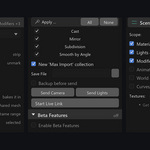
For two-way sync, yes — install the companion MAXScript once, then restart Max. Click Install / Reinstall in the add-on preferences, or use the Drag-in Installer and drag `DRAG_INTO_3DSMAX.ms` into Max. Sending from Blender into Max works without it; the script is what lets Max import automatically and send back.
What are the Get modes?
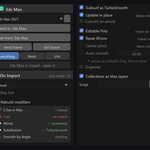
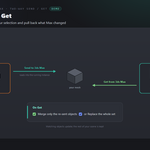
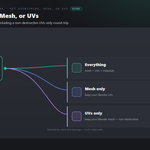
On Get you choose Everything (mesh + UVs + materials), Mesh only (keep your Blender UVs), or UVs only (keep your Blender mesh) — like a RizomUV round-trip. A Send UVs Only / Send Mesh Only action in Max can also override the mode for a single pull. Objects are matched by name and topology, so it's multi-object safe.
What is Live Link?
Turn it on and every save from 3ds Max imports into Blender automatically — no clicking Get — using your current Get mode. A status line shows when sync is live on both sides. Live Push (Blender to Max on edit) is a Beta option, off by default, with a scope and debounce delay you control.
Can I control what 3ds Max does with the mesh on import?
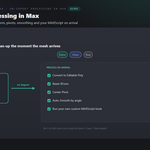
Yes. Have Max convert each mesh to Editable Poly, Reset XForm, Center Pivot, or Auto-Smooth by angle on arrival, and run your own custom MAXScript hook. One-click Game / Clean / Raw presets set the whole recipe at once.
Does it keep my scene structure and instances?
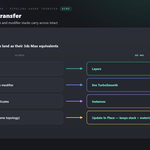
It can recreate Blender collections as Max layers, send an unbaked Subdivision modifier as a live TurboSmooth, keep linked duplicates as instances, and Update In Place so a re-sent mesh keeps its modifier stack and material IDs when the topology is unchanged.
Can it send cameras, lights and animation?
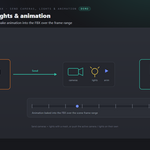
Yes. Include selected cameras and lights with a send, push the active camera or the scene lights on their own to match layout between apps, and bake object/armature animation into the FBX over the scene frame range.
Which Blender versions are supported?
Blender 3.3 through 5.2. On 4.2+ it installs as a modern Extension; on 3.3–4.1 as a classic add-on. Windows.
Does it change my Blender scene?
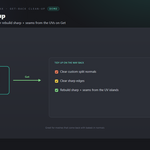
Only where you ask it to. Get in UVs or Mesh mode is non-destructive — it transfers just that channel onto your existing mesh. There's an optional Backup Before Send, and optional on-Get clean-up (clear custom normals / sharp edges, rebuild sharp + seams from UV) that you switch on yourself.
What tools do I share with the other Universal Bridge products?
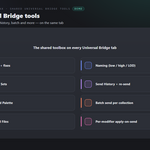
Preflight (scale/rotation, UVs, materials, n-gons, non-manifold, with one-click fixes), a Naming helper (low / high / LOD / UCX / socket), Selection Sets, Send History with re-send, a Command Palette, Batch send per collection, Versioned Files, and per-modifier apply-on-send control — all on the same tab.
Can I use it for commercial work?
Yes. Like all Blender add-ons it's licensed under the GPL, so you can use it in any commercial project. 3ds Max is Autodesk 3ds Max is required and sold separately. You need your own licensed copy from Autodesk. No Autodesk 3ds Max licence is included with this product - it is the Blender-side bridge only, and is not affiliated with, endorsed by, or a reseller of Autodesk.
Does it work on macOS or Linux?
Currently Windows only.
Do I need Autodesk 3ds Max, and is a licence included?
You need your own Autodesk 3ds Max - it is sold separately by Autodesk and is not included with this product. This add-on is the Blender side of the bridge only, and is not affiliated with, endorsed by, or a reseller of the vendor. It is also Windows only: macOS and Linux are not supported.
Can I change the icons, or turn them off?
Yes. Preferences ▸ Button Icons offers Brand Colours (the default, each bridge in its own colour), Mono with a colour swatch you pick, and Blender Built-ins if you would rather have no custom icons at all. Colour-code Status decides whether link and modifier icons keep their green / amber / red. The icons are drawn from masks and tinted as they load, so any colour stays crisp.
Can it move a whole scene, not just selected objects?
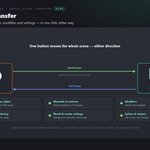
Yes. Send Scene / Get Scene move the entire scene in one click - meshes, cameras, lights, materials and textures, modifiers, animation, world and render settings, and splines - with a menu of options controlling exactly what travels. Materials are rebuilt as real Physical Materials in 3ds Max and Principled shaders in Blender, and lights are converted between watts and photometric units. Anything that cannot cross is named in a report.
 Tachyon Studio