 Pardesco LLC


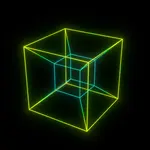
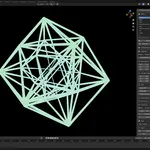
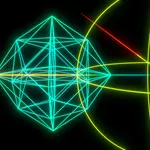
Blender models three dimensions. This add-on gives it a fourth.
Spawn a genuine four-dimensional polytope in your scene, rotate it through the planes that don't exist in our space, and watch its 3D shadow evert — turn itself inside out — live in the viewport. Every frame is recomputed from 4D coordinates. Nothing is baked, morphed, or faked with shape keys.
True 4D rotation, not a 3D imitation
Six rotation planes — XY, XZ, XW, YZ, YW, ZW — each with its own base angle and speed in degrees per frame. The XW, YW and ZW planes are the ones that couple our three dimensions to the fourth; that's where the eversion comes from.
Project down with perspective (w-divide, straight edges, corner spheres closing the tube joints automatically) or stereographic (conformal, curved edges, shapes everting through the projection pole). Edges are subdivided 32× in 4D, so stereographic curvature stays smooth in the viewport and in every export — not just at render time.
70 curated polytopes, searchable
All six convex regular 4-polytopes and the regular stars, classic truncates and rectifieds, the grand antiprism, the snub 24-cell, big-regiment representatives, and compounds.
Seventy is the number after deduplication, and that's the point. We keep a working catalogue of several thousand 4D shapes, but once you project them most turn out to share a wireframe with something else already on the list. These 70 are what survives deduplication by exact edge geometry — the genuinely distinct ones, with the aliases recorded in the index rather than sold back to you as separate entries.
Vertex and edge counts plus a live-point estimate sit next to each name, and heavy shapes warn you before you spawn them. Point the add-on at a folder of your own 4OFF or JSON files in preferences and they appear in the browser under “Custom”, or load a one-off file directly.
Animated cross-sections
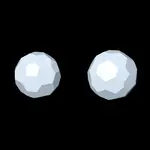
The true 3D intersection of the polytope with the hyperplane w = W, computed per frame from the shape's cell data — the “passing through our space” visualization. A tesseract resolves into an exact cube; a 600-cell blooms into two hundred faces.
Sweep the hyperplane over time, combine it with rotation for a slice that turns as it cuts, and keep the projected tubes visible for a ghost overlay or hide them for the pure solid. Every bundled shape carries cell data — convex shapes section exactly, stars best-effort.
Loop Studio — seamless by construction
Set frame count, turn count and a motion preset (Isoclinic, Isoclinic Right, Simple XW, Double, Spin Tumble) and every rotating plane completes a whole number of turns, so the last frame reproduces the first exactly. No hand-tuned keyframes, no crossfade.
Bake the result to USD BasisCurves with per-point widths taken from the tube radius gradient, so thickness survives into Houdini or back into Blender. USD rather than Alembic on purpose: Alembic cannot carry per-point curve radius.
Many polytopes in one scene
Each spawned polytope holds its own rotation, projection, tube radii and section settings, and they all animate simultaneously. The panel edits whichever one is selected. Build side-by-side comparisons, arrays, whole compositions.
Two render-ready styles
Neon Gradient — distance-graded neon tubes, black world, bloom.
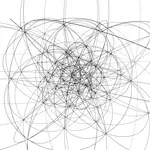
Wireframe Ink — uniform black strokes on white, matched to the vector export.
One dropdown, and both work on Blender 4.5 and the new 5.x compositor.
Exports that leave Blender
- Snapshot to Mesh — freeze the current frame, tube geometry and corner spheres realized, into a standalone mesh you can sculpt, print, or hand off.
- STL / GLB — snapshot, export and clean up in one click.
- SVG / DXF (R12) — the projected edge centerlines through the scene camera: one smooth 33-point stroke per edge, millimetre-true document sizing, up to 8 layers binned by tube thickness with proportional stroke widths, and frame-range batch export for plotter animation series. DXF is written as plain R12 POLYLINEs for maximum laser-software compatibility.
Centerlines, not silhouettes — a pen plotter or a laser wants one clean stroke per edge, not the doubled outline that a silhouette pass produces.
What's in the download
The add-on as a Blender extension zip, a quick-start guide, a feature reference, and four demo .blend files — a neon loop, a 120-cell cross-section sweep, a plotter-ink vector export stage, and a multi-polytope scene — each framed and ready to render.
Try the math in your browser first
We run a free 4D polytope viewer at 4d.pardesco.com — no account, nothing to install. Spin a tesseract, switch between perspective and stereographic, and watch the eversion happen. It's the honest way to find out whether four-dimensional rotation is something you want in your work.
The viewer is for looking. This add-on is for making: the same geometry inside your Blender scene, lit and rendered with Cycles or EEVEE, with cross-sections, seamless loops, several polytopes at once, and mesh, USD and vector export.
Requirements
Blender 4.5 LTS or newer, on Windows, macOS or Linux. Tested against 4.5.3 LTS, 5.1.2 and 5.2. Pure Python and Geometry Nodes — no external dependencies, no account, no subscription, nothing phones home. Scenes saved with older add-on versions migrate automatically on open.
Built by Pardesco over several years of making four-dimensional work — the same engine behind our own polytope films and sculpture. The browser viewer that started it is open source under MIT at github.com/Pardesco/4d-polytope-viewer, if you'd rather read the projection math than take our word for it.